
Secure OpenShift by Configuring Identity Providers and Permissions
Last updated on Aug 11, 2026

To ensure effective control of the access of an enterprise container platform, the security management strategy employed must be adaptable, reliable, and comprehensive. Red Hat OpenShift fulfills this obligation because it possesses a built-in architecture that allows one to separate identity verification from other permissions. OpenShift security is understood through two main concepts: Authentication, which is responsible for verifying who wants access, whether a human or a machine, and Authorization, which implies that Role-Based Access Control indicates what the system allows an authenticated user to do.
Hence, OpenShift developers must know how the systems operate and interact with each other. OpenShift builds on the functionality of Kubernetes and offers an enterprise authentication server, user object management, and a bunch of roles. Thus, this guide analyzes how OpenShift authentication is structured, the functioning of external identity providers, how users and groups are organized, and the principles of RBA implementation.
The design of OpenShift Authentication Architecture
At OpenShift, the authentication process is built on a single, token-driven mechanism of authentication. Once this step is accomplished, any subsequent act on the OpenShift platform—regardless of whether it is carried out through the web interface, the CLI, or a monitoring program—reduces to a call to the Kubernetes API server. After this has been done, the system can evaluate the request.
OAuth Server Integrated in OpenShift
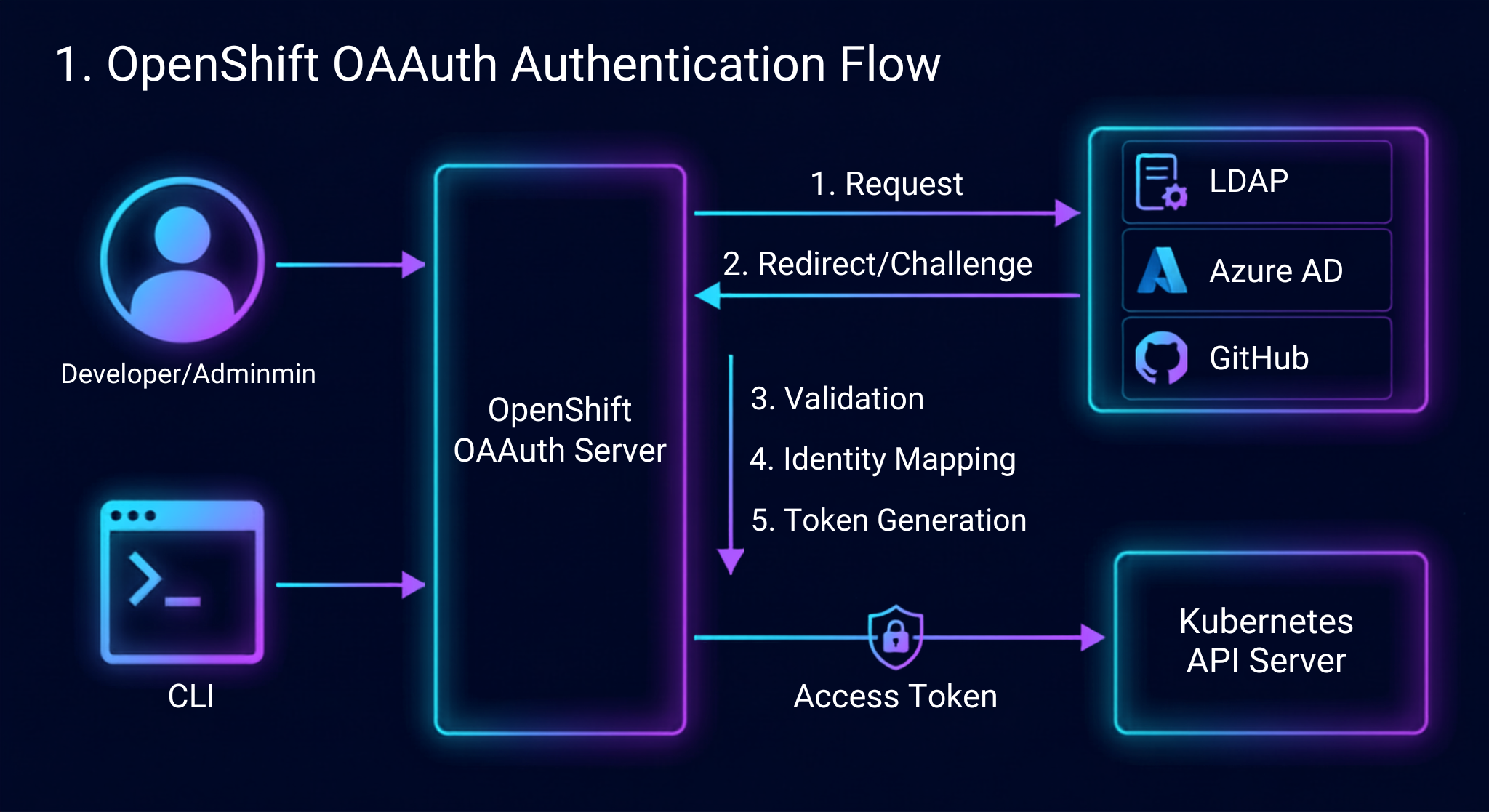
The integration of the OAuth server into OpenShift is aimed at fulfilling user authentication needs. In the role of the central authority for access control, the OAuth server receives the log-in requests from users, authenticates them by validating their identities against one or more backend identity management systems and provides them with the appropriate access tokens.
When a user starts a new session, the OAuth server endpoint is triggered. At this point, the server requests the user to enter credentials or directs them to the service providing single sign-on. When the user logs in, the provider confirms their identity allowing the OAuth server to provide them with an encrypted access token that is later used in headers for every request within the API.
Steps Involved in Authentication Solicitation
The various phases of an authentication solicitation process involves the following stages:
Beginning The client, regardless of whether they are a user using the command-line tool, or an administrator accessing the web dashboard, makes an authentication request.
Identity Provider delegation The internal OAuth server sends the authentication challenge to the identity provider that has been configured.
Validation The external or internal identity provider checks that the entered data is correct. It can verify the credentials entered through username, password, token, and cryptographic assertion.
Identicy Mapping. After validation, OpenShift executes identity mapping rules to relate the external user account to the OpenShift user object.
Token Generation The OAuth server now sends an access token that is tied to the exact OpenShift user identity.
API Evaluation The user sends API requests containing bearer tokens. The API server first authenticates the signature and the validity of the token, which has been used for authentication, so that the request can be processed.
Moving Past Bootstrap IDs
When an OpenShift cluster is installed, various types of accounts are created to facilitate administration and management of the OpenShift cluster platform. However, continuing to use bootstrap accounts as administrative accounts is not considered safe. As a policy requirement, identity providers must be implemented immediately after the installation of the OpenShift cluster. Once the identity providers are configured and the control of the OpenShift installation is transferred to the legitimate user or users, the bootstrap account will have to be disabled. Taking a red hat openshift course allows students to transition to enterprise-level identity providers smoothly and avoid root access issues.
What are Identity Providers in OpenShift?
Instead of creating its own user database, OpenShift depends on external identity services to verify users. In order to achieve this, the systems administrator configures one or more of these identity providers as a custom OAuth configuration component. Learning how to do this is part of the fundamental module of the openshift course online, allowing cloud administrators to manage complex authentication systems.
The Various Types of Identity Providers Available
OpenShift supports a wide range of identity providers for almost all infrastructures in the market, making it very flexible in terms of different security models and identity management.
HTPasswd
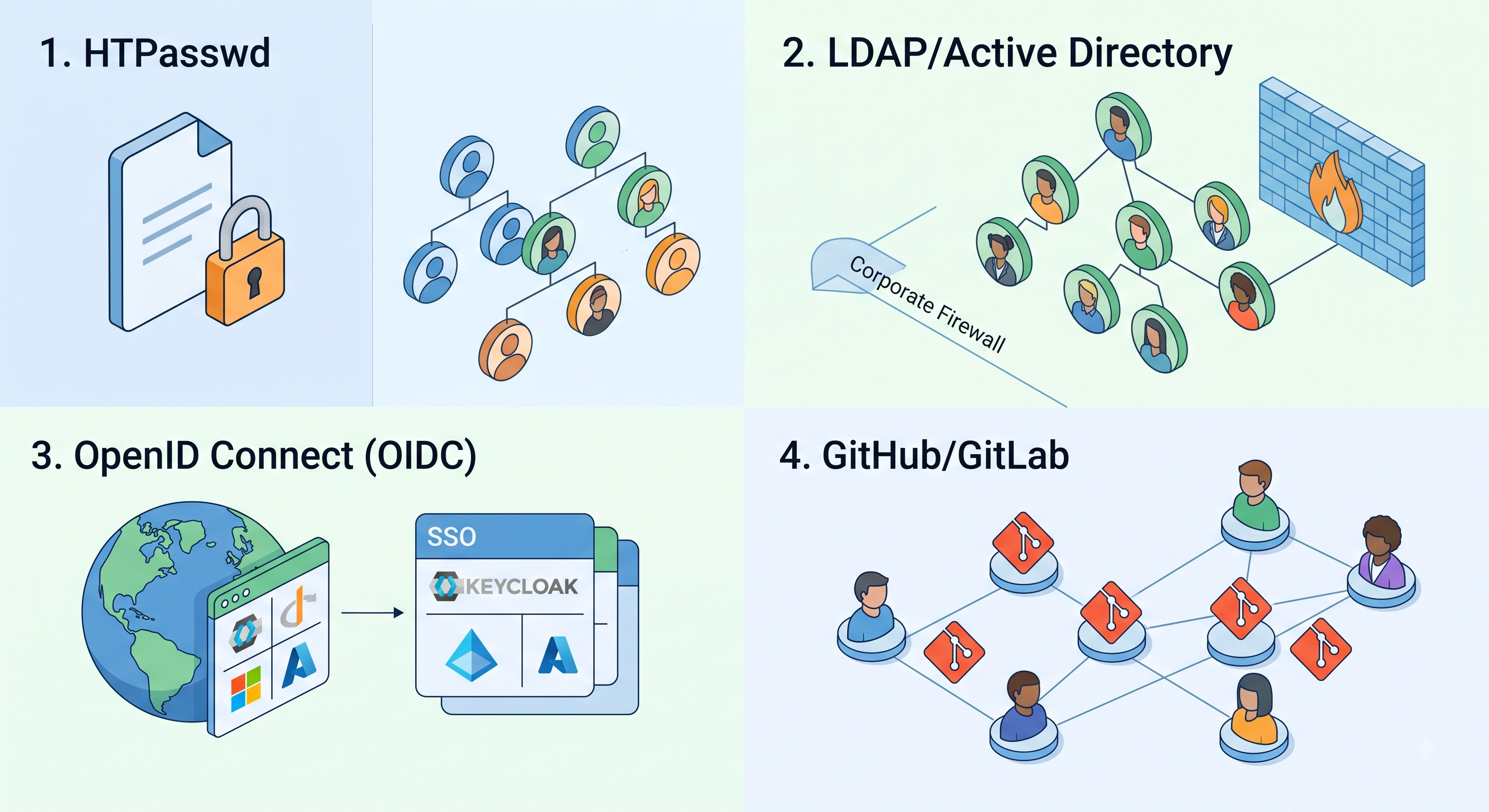
With HTPasswd, the identity provider checks user credentials by matching them against a plain text file that has usernames and passwords. The contents of the file reside within Kubernetes in the form of a secret. This method works well for small environments or if the administrator has no other options since the method does not provide features such as user provisioning and authentication, or a centralized storage for directories.
LDAP and Active Directory
LDAP, which stands for Lightweight Directory Access Protocol, is one of the most commonly used corporate frameworks in OpenShift. This framework verifies credentials when interfacing with external LDAP v3 servers or Microsoft Active Directory systems, which means that organizations can utilize existing employee information, implement rules regarding passwords, and establish group assignments through the OpenShift RBAC system.
With OpenID Connect
While OpenID Connect is a security technology that is based on OAuth 2.0, it is also regarded as the best practice for cloud SSO implementations today. When OpenShift is connected to an OIDC provider, such as Red Hat Single Sign-On (Keycloak) or Azure Active Directory, businesses benefit from easy access to the federated authentication service, authentication mechanisms, and a unified session management feature.
GitHub and GitLab
OpenShift can pass the authentication responsibilities to publicly available GitHub, GitHub Enterprise, or self-hosted GitLab servers in developer-centric environments and GitOps workflows throughout the organization. The users are authenticated based on their versioning account, but the access can be filtered based on the membership in GitHub companies or GitLab groups.
Request Header and Basic Authentication
With the help of the Request Header, OpenShift can trust the proxy server responsible for the authentication placed in front of the cluster. The proxy performs the user validation using the necessary corporate methods and transmits the user’s identity to the HTTP header fields sent to OpenShift. The Basic Authentication allows the user validation through standard basic authentication techniques against the generic remote backend.
Identity Mapping Strategies
Once the user authenticates with the identity provider, OpenShift needs to establish a relationship between the given external identity and an internal OpenShift user object. This relationship is established by defining a certain mapping method in the configuration of the provider:
Claim: It is the default mapping method. It creates a new OpenShift user object automatically provided that the user in question has not been registered yet in the system and that his/her username does not belong to a different provider.
Lookup: Hereby, the administrator has to provision the internal user objects manually and associate them with the external identities before they are able to log in. If external user tries to log in, the system denies authentication.
Generate: A unique internal user name is created by adding the name of identity provider to the name of the user, which prevents username collisions.
Add: This technique allows associating new external identities with already existing internal user objects automatically if they have the same usernames.
Managing Users, Groups, and Service Accounts
When authentication has been completed successfully, OpenShift is able to track the active user through the native application programming interface (API) objects. It is vital to have a good understanding of how the users, groups, and service accounts functionality can be understood for the purposes of effective policy development within a given organization.
The User and Identity Objects
OpenShift has separate API resources for tracking information regarding the identity:
User Resource: This refers to the individual who can act in the cluster. The user object indicates certain information such as username, full name, email, and the related identities and groups.
Identity Resource: This refers to the unique login account on the external identity provider. The same user may have a number of identities as long as the user has the possibility of using various identity providers at different times.
For the first time a user logs in using the default mapping configuration, OpenShift generates the Identity object and User object automatically.
Group Management
A Group is a group of individual user accounts. Instead of giving each and every developer or administrator permission one by one, it is better to grant permission to Groups as per security best practices. All users who become a member of any group automatically get access to all the permissions given to that group.
There are two types of group management present in OpenShift:
Manual Group Management: Cluster administrators create the group resource and carry out the related tasks using the management interface or the administrative suite.
Automated LDAP/Directory Synchronization: The administrators can set up processes that will do automatic background synchronization of users with enterprise directories by searching them. The cluster will then extract the information about group members from the directories and update the OpenShift level Group objects. Thus, if an employee joins, changes teams or leaves the company, the OpenShift permissions will be synchronized with this state automatically.
Service Accounts for Non-Human Entities
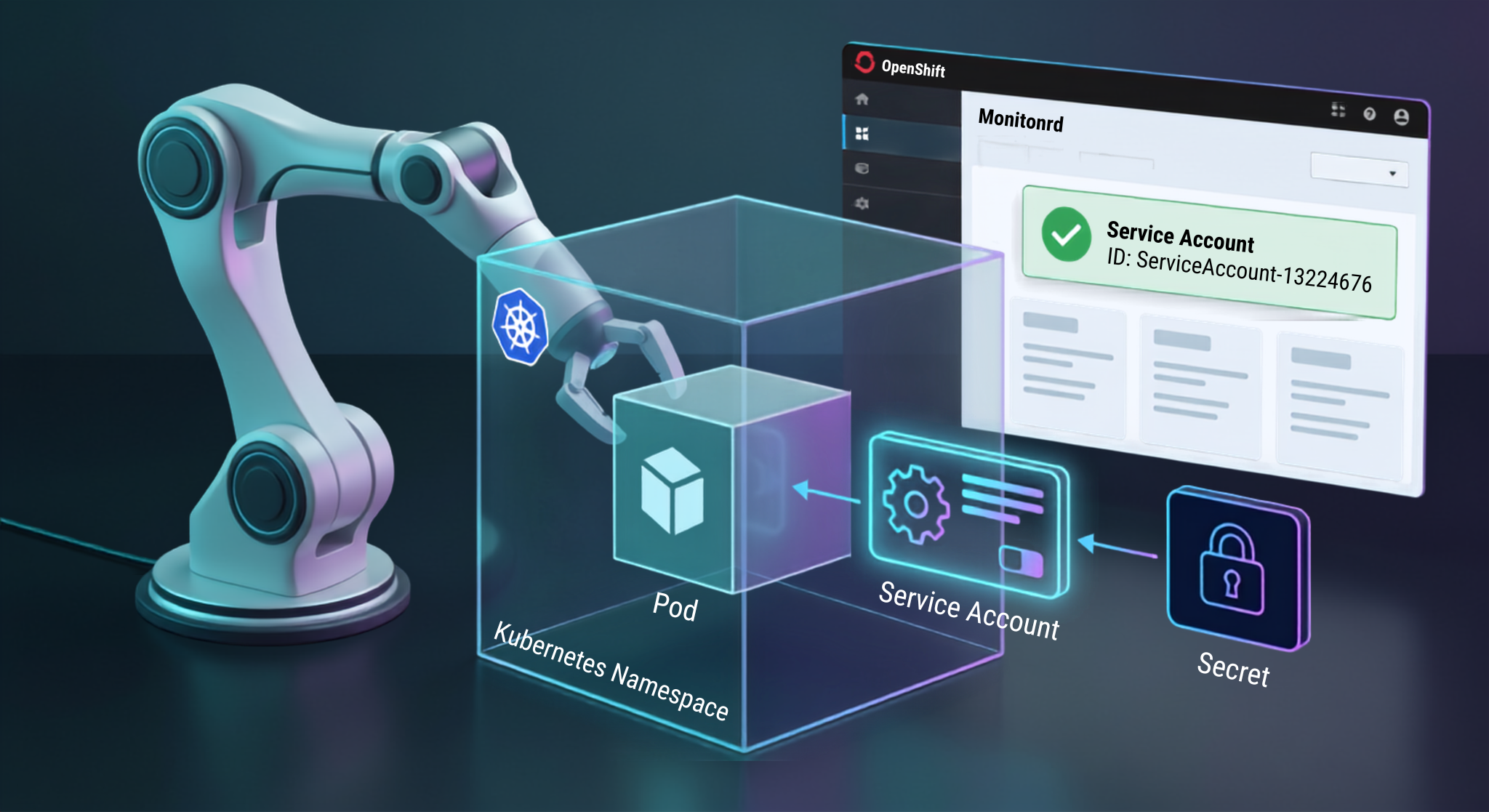
User objects denote human users, while automation needs a different identity system. The Service Accounts of OpenShift are used to create unique identities for system components, integration pipelines, monitoring agents, and other workload pods.
The scope of Service Accounts is limited to specific projects (namespaces). Whenever a new project is created, OpenShift automatically creates the default service accounts that are used during application processing, deployment handling, and image creation. A service account is associated with a persistent authentication token that is contained in the project secrets. Pods can mount those credentials, thus making it possible to communicate with the OpenShift API without revealing the credentials of human users and avoiding the creation of hardcoded secrets.
The Architecture of Role-Based Access Control (RBAC)
After the authentication identifies the entity, OpenShift determines whether this identity is permitted to execute the requested task. The authorization takes place only via RBAC.
The Basic Components of RBAC
The OpenShift RBAC functions based on three main principles:
Subjects: The Who in the request. Subjects consist of Users, Groups, and Service Accounts.
Roles: What that can be done. Roles are a set of rules for actions on specific API resources.
Bindings: The Link that connects the subjects to the roles.
RBAC Rules Structure
Each role can be made up of multiple permission rules. A rule is assessed according to three fundamental features of an incoming API request:
API Group: It refers to the logical grouping of the API endpoints being accessed (like the core Kubernetes resources, OpenShift application resources, etc.).
Resource: It refers to the targeted objects in the API group (like pods, deployment configurations, services, persistent volume claims, etc.).
Verbs: It refers to the actions allowed on those resources. Some of the example verbs are get, list, watch, create, update, patch, delete etc.
When an API request comes in, an authorization engine examines all role bindings relevant to the subject. If the rule allows the requested verb for the resource and the scope, the API request will be approved. If there are no matching rules, the API request will be denied according to the explicit allow principle. After completion of openshift online training at OnlineITGuru, one should have real time working knowledge on API groups and verb controls.
Roles and Cluster Roles
In OpenShift, permissions are differentiated into two classes: local project permissions and global cluster permissions, and make use of Roles and Cluster Roles to reflect their difference.
Local Roles
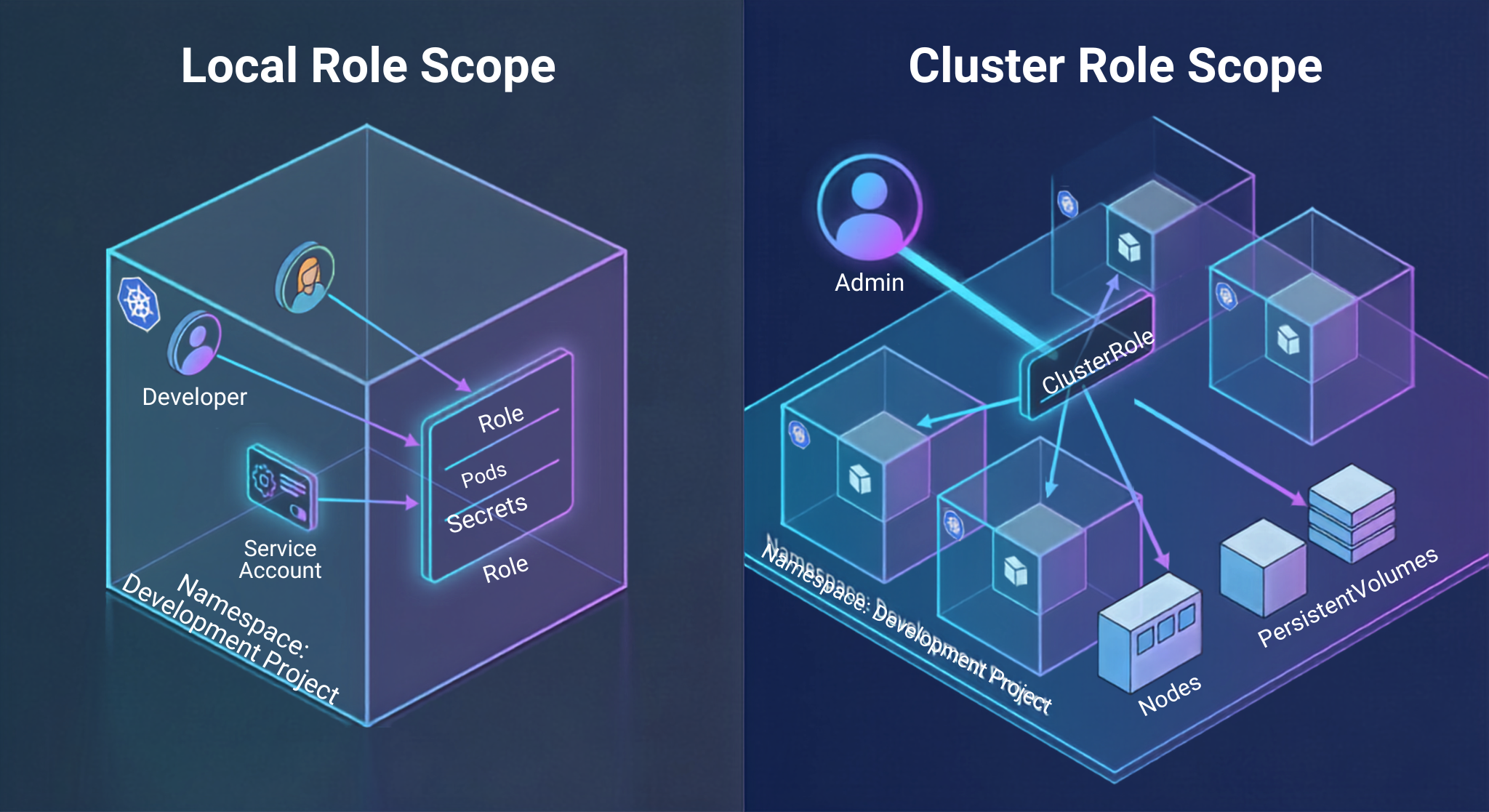
A Role object sets the permission limit within one project or namespace. The rules defined under a local Role will only apply to the resources of that project. Local roles make sense when defining custom duties of a developer by giving him authority to access certain pod logs and restart deployments in a test environment without revealing project configurations.
Cluster Role
The Cluster Role object is the one that grants the permissions across the platform. Unlike the local Role, the Cluster Roles are not restricted to one namespace. The Cluster Roles serve two main purposes:
Establishing Global Infrastructure Privileges: This means allowing actions on the cluster-wide entities that are not pertaining to a specific project like node management, e.g. storage classes, cluster operator configuration, and physical volume provisioning etc.
Acting as a Permission Template: Providing an already existing set of rules that can be applied within any project on the platform without the need to repeat local rules in any desired namespace.
Standard Out-of-the-Box Cluster Roles
OpenShift comes with standardized Cluster Roles that cover common administrative and development-oriented use cases:
cluster-admin
The cluster-admin role provides full superuser capabilities throughout the platform. Users who have cluster-admin access can perform any action over all resources in the platform, such as changing infrastructure settings, implementing clustering operators, and changing system security policies. The access to this role should be limited to the reliable platform administrators only.
admin
The admin role is associated with the project manager persona. Access to resources in a project is provided to someone with admin privileges when the admin role is granted to this person inside a specific project namespace. The person has full control over resources in the project, including the ability to manage deployment workloads and modify secrets. However, the person cannot change project quotas or cluster resources.
Edit Role
Designed for use by active application developers, the edit role enables users to create, change, and remove various types of standard application resources, such as pods, services, routers, deployments, and persistent volume claims. The most significant aspect of the edit role is that it prevents users from seeing or changing access policies, roles, and role bindings associated with the project—this effectively stops developers from increasing the capabilities of their user account and tampering with security settings.
View Role
The view role gives users read-only access to most objects in a project namespace. It is granted to subjects who need to monitor application status and check pod and deployment history information. These security roles are perfect for auditors and various parties interested in business processes and results.
users with basic rights
The basic-user role allows users to get minimal rights required for authentic users to use the system. It allows users to see minimal information about their personal profile and to view the list of projects they can access.
users with self-service rights
The self-provisioner role determines whether authentic users can create new projects automatically. By default, the feature is granted to all authentic users that let them create new projects without any permission needed. However, in some enterprise environments the system administrators can revoke the global role to implement more controlled allocation of licenses.
Role and Cluster Role Binding Configuration
Although creating a role creates permission sets, those rules will not work unless connected via bindings to subjects. OpenShift offers two types of binding which determine the extent of the permissions granted by those roles.
Role Binding
A Role Binding indicates binding between subjects (users, groups, and/or service accounts) and the role in the particular project’s namespace.
The local Role Binding may refer to either a local Role in that namespace, or a Cluster Role on the level of the entire cluster. In the case when Role Binding binds to a Cluster Role, the subject will receive the permissions provided for that role, however, in the context of that project only. For instance, if a user is bound to a view Cluster Role using a local Role Binding in a development project, he will be able to see only development project resources, while having no access to any other resources in the cluster.
This architecture delivers notable operational efficiency. Platform engineers do not need to create custom roles for every project but can utilize a common Cluster role with local bindings to provide specific, isolated access.
Cluster role bindings
The Cluster Role Binding works for connecting subjects to the Cluster Role throughout the entire cluster platform. Unlike local bindings, permissions obtained through the Cluster Role Binding are applied globally for all the projects’ namespaces and also the resources that are not tied to any specific namespace. When a user is assigned to the edit Cluster Role using Cloud Role Binding, such a user would have the ability to erase whatever is necessary in all the projects, even in the system namespaces. Therefore, Cluster Role Bindings have to be used very carefully and only entrusted to specific platform infrastructure operators, central security monitoring tools, and cluster-wide management accounts.
Binding Service Accounts
Management is done the same way for non-human identities as human identities. Hence, while automating continuous integration and deploying infrastructure operators, administrators bind service accounts to the relevant roles.
For instance, the delivery pipeline that works in the build namespace may need deployment rights in another namespace of production. The workflow is accomplished without overshooting the privileges of the pipeline through the use of local Role Binding at production namespace that refers to edit Cluster Role and specifies the service account of build project as the subject. As a result, the project service account has access to update workloads in production but cannot affect security settings or gain access to the unauthorized project namespaces.
Corporate Best Practices for Authentication and RBAC
Creating and sustaining a secure identity and access policy for OpenShift means you have to follow particular governance practices, apply proper auditing methods, and abide by certain enterprise rules.
1. Effect Group-Based Permission Management
When you assign authorization permissions to users individually, it increases the burden on administrative work and enhances the possibility of making mistakes. Roles should always be assigned through OpenShift Groups connected to directory teams. If one links OpenShift groups with enterprise directory teams, it guarantees that enrollments and cancellations will be synced automatically through LDAP and OIDC. To master the process of mapping LDAP and OIDC groups with OpenShift RBAC is necessary to work on a real-life lab project that is part of a specialized redhat openshift course.
2. Follow the Principle of Least Privilege
People should be given only the least required permissions for their job. There shouldn’t be any cases when we grant too many rights. Only users who are responsible for managing the system must be given permissions that allow them to complete their tasks.
3. Deactivate the Default Administrative Account
Once organizational identity providers are configured and administrators and groups are set up, the temporary initial cluster administration credentials must be disabled or removed. The use of named administrative accounts ensures proper traceability through the ability to know who was responsible for changes to the platform configurations.
4. Limit Project Self-Provisioning
In environments where compliance, chargeback or governance is critical, it is a good idea to strip out all authenticated users from being assigned with the default self-provisioner's role binding. This will prevent users from creating project namespaces randomly, making it easier for organizations to create projects via automated ticketing systems, GitOps flow or special forms.
5. Carry Out Continuous Audits of RBAC Configurations and Access Logs
The need for compliance audits of RBAC role bindings is imperative to identify the issues of permission scopes, inactive accounts, and over-privileged services. Additionally, the OpenShift API audit logs must be streamed to a centralized Security Information and Event Management (SIEM) environment. Audit records contain all information regarding the API requests performed, such as the user identity, the action requested, the impacted resource, and the outcome of authentication.
Final Thoughts
Implementing authentications and RBAC implementations within the Red Hat OpenShift platform is an essential element in securing the multitenant platform. Through the use of centralized OAuth, different integration of identity providers, users, and groups, as well as RBAC implementations, OpenShift provides a strong basis for security to be implemented through the use of the platform.
Through this platform, system administrators and architects who understand how to implement the above approach will provide self-service capability to the development team without compromising the governance process and legal requirements.