
The Architectural & Strategic Evolution of Workday HCM: Transforming Global Workforce Operations
Last updated on Jul 23, 2026
The current business environment is witnessing a structural transformation. It has become clear that HR is more than just a back-office function; it has transformed into an important factor of success. At the heart of this shift is Workday's Human Capital Management (HCM) software which represents a cloud-based solution that allows organizations to manage their human resources in terms of hiring, workforce planning, payroll, compensation, and ongoing training entirely from one system with real-time data.
As companies are moving to the cloud environment at a fast pace, the need for Workday certified application administrators, integration specialists and functional consultants has increased greatly. By taking practical workday hcm training course offered by OnlineITGuru, people in IT and HR field would gain some hands-on experience in setting up this environment. The various online workday courses will help people learn about Core HCM configurations and advanced reporting systems.
This technical paper is going to highlight the system architecture, its basic functional modules, business processes, and security issues, as well as aspects related to data integration and usage of analytics.
Structural Paradigm: What Makes Workday Unique in Its Architecture?
In order to comprehend the fundamental engineering distinction of Workday HCM from conventional relational systems, it is necessary to study its basic technological platform. Traditional HR technologies are built on the Relational Database Management System (RDBMS) which is based on tables with strict RDBMS arrangement, normalized data sets, foreign keys, complicated SQL joins, and so on.
Such systems require a slow night-time batch update as well as offline data warehousing ETL (Extract, Transform and Load) for executive reporting.
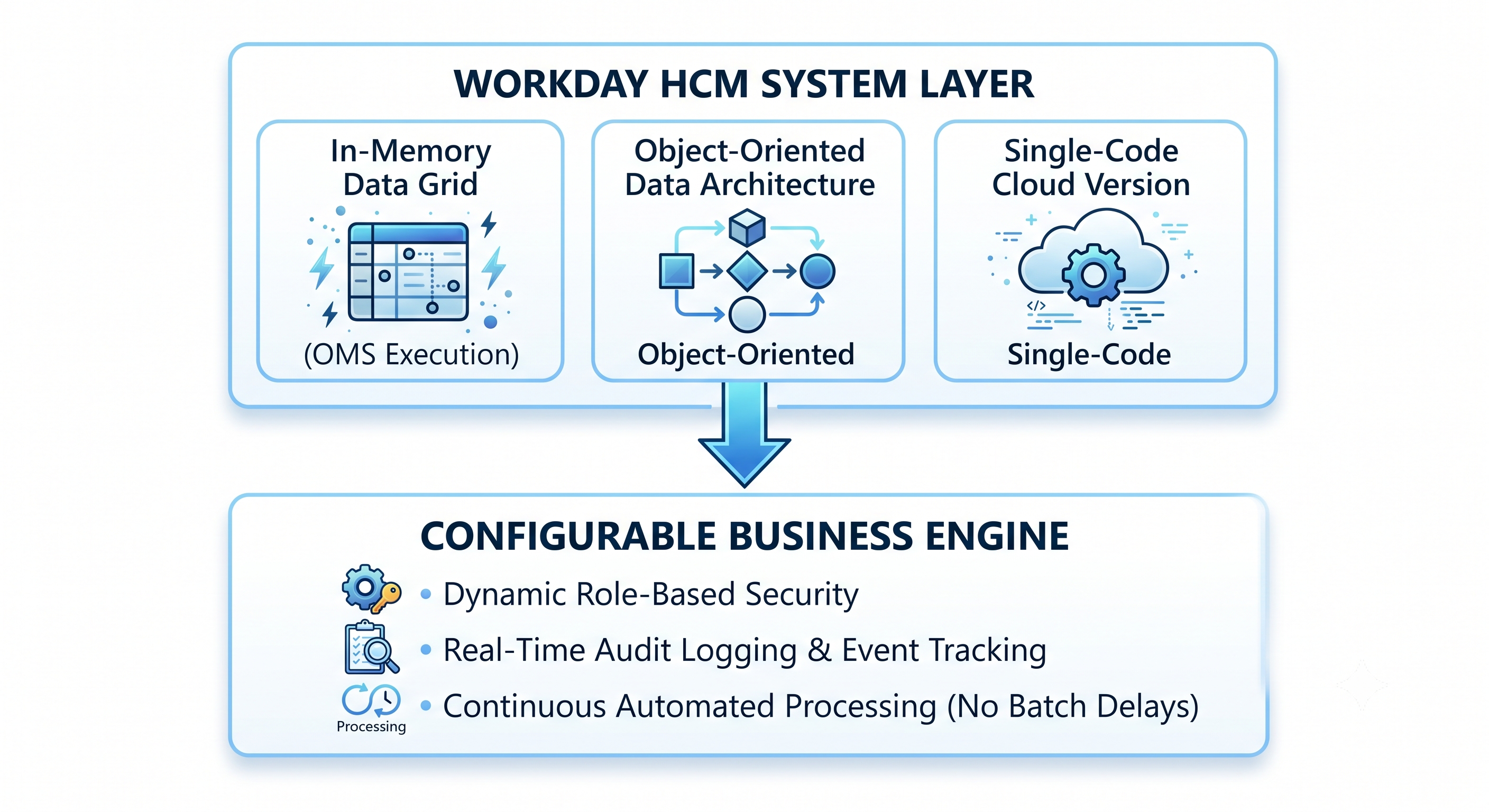
Database Engine within Memory (Object Management System - OMS)
The Object Management System (OMS) serves as the core application server for Workday. All data pertaining to operations, metadata of the system, logic of processes, and specifications regarding security are now present in RAM. Since the OMS is not required to fetch the complex associative links of employees via searching the information on the stored disk repeatedly, the analytical processes can be performed simultaneously with transactions without the impact of any delays on queries outgoing from the database.
The database itself is initially being read without any delays from RAM. The storage technology applied is needed only for recording transactions and restoring the application.
Object-Oriented Structure
In Workday, the Objects work as the representation of all business phenomena. An Object possesses data as well as properties that enable it to connect various Objects.
For example, a Worker Object points to a position Object, which directs to a Supervisory Organization Object and finally to the Cost-Center Object. When an employee moves to another department, the system updates the pointers in memory. Hence, any report, security breach, or approval process linked to this worker is updated automatically.
Unified System-Wide Cloud Architecture
Every client of Workday is dependent on a multi-tenant technology or software that relies on unified programming principles. The software, security-related upgrades, and updates are implemented on a continuous basis which leads to semi-annual major updates.
This helps in the elimination of the version lock problem faced by an on-premises traditional system (SAP ERP, Oracle E-Business Suite) where organizations cannot use updated versions of the software because of costly custom programming. Workday has started using the configuration method instead of the customization in order to facilitate enterprise updates without compromising its working solutions.
Primary Functional Elements of Workday HCM
The working of Workday HCM is implemented through the usage of several core functional elements. Since Workday uses the same programming code and works with the same memory object storage, information is transmitted between the different systems without the involvement of intermediaries or REST APIs.
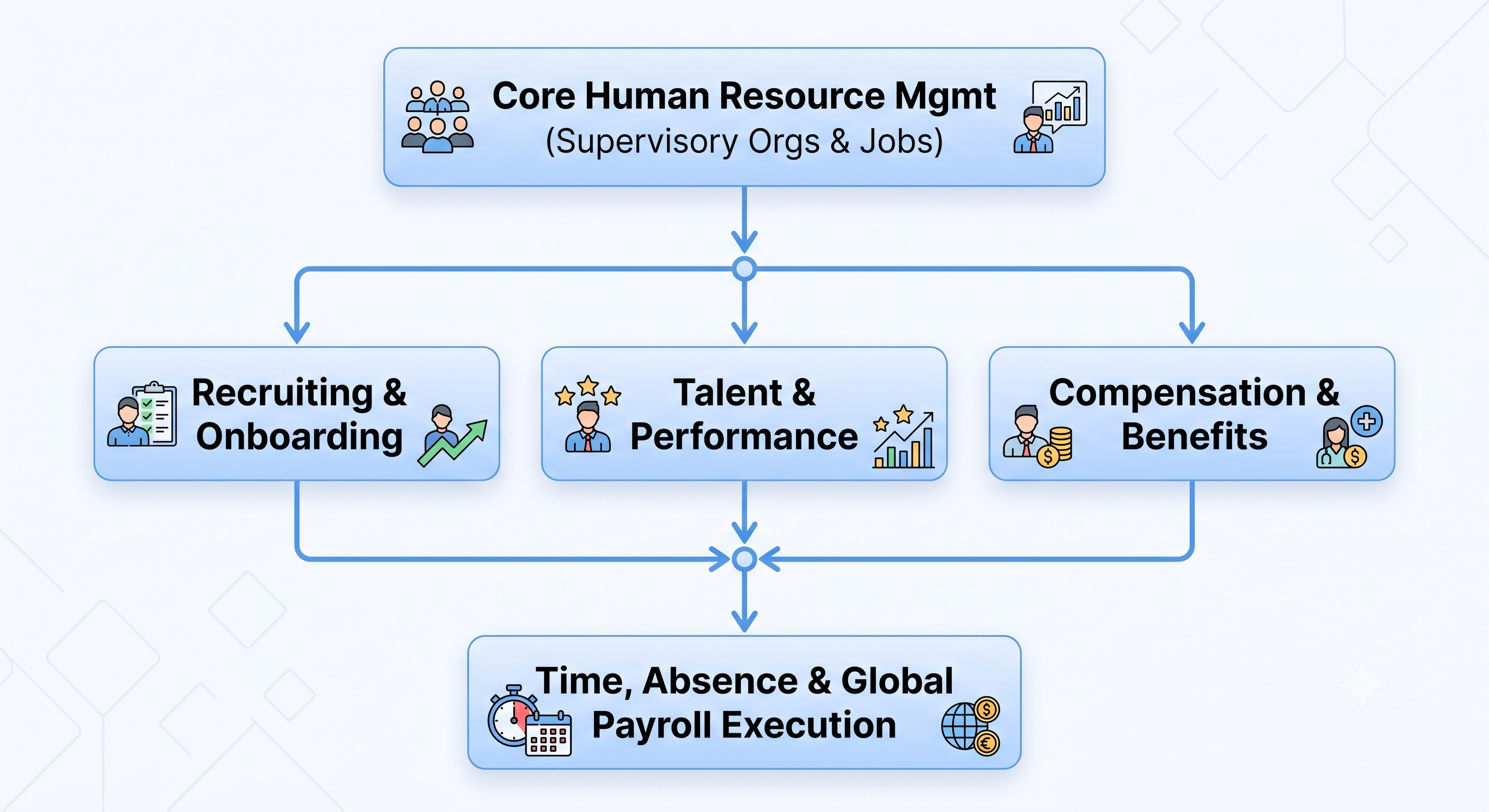
Essential HRM
Essential HRM serves as the basis of the entire concept. It describes the foundation of the organization through the implementation of Supervisory Organizations.
Supervisory Organizations: This is the primary organization in Workday. It is required that every employee is attached to a Supervisory Organization. Supervisory Organizations determine the hierarchy of supervisors, approval processes, aspects of security, and define standard rules of business processes.
Staffing Models: Organizations have the choice between Position Management (positions are defined, approved, and managed regardless of whether employees are holding them) and Job Management (hiring regulations are defined on an organizational level without specifying the positions). Normally, Position Management is used by big companies that have strict budgets for staff numbers.
Job Profiles and Families: A Job Profile lists general duties of employees, education background, classification of a worker as exempt/ non-exempt, rank of management, and pay scale for a job. Job Profiles are incorporated into greater Job Families, which provide standardization in career development paths.
Recruitment and Onboarding with Workday
Workday Recruiting has an embedded applicant tracking system (ATS) with workforce planning and budgeting.
Candidate Relationship Management: Recruiters build talent pools, track prospects, run targeted email campaigns and use machine-learning algorithms to match candidate skills to job requisitions.
Dynamic Offer Generation Workday will pull salary ranges, allowances and approval path from job profiles and budget rules to provide an automated offer letter upon approval.
Integrated Onboarding – When an offer is accepted, candidate data becomes employee data. Pre-Day One activities (such as pre-onboarding activities, paperwork such as W-4, I-9, setup of IT hardware, employee training) will begin prior to Day One.
Wage & Benefit Administration Advanced
Using Workday, companies can establish sophisticated compensation plans that span multiple countries, currencies and compliance rules.
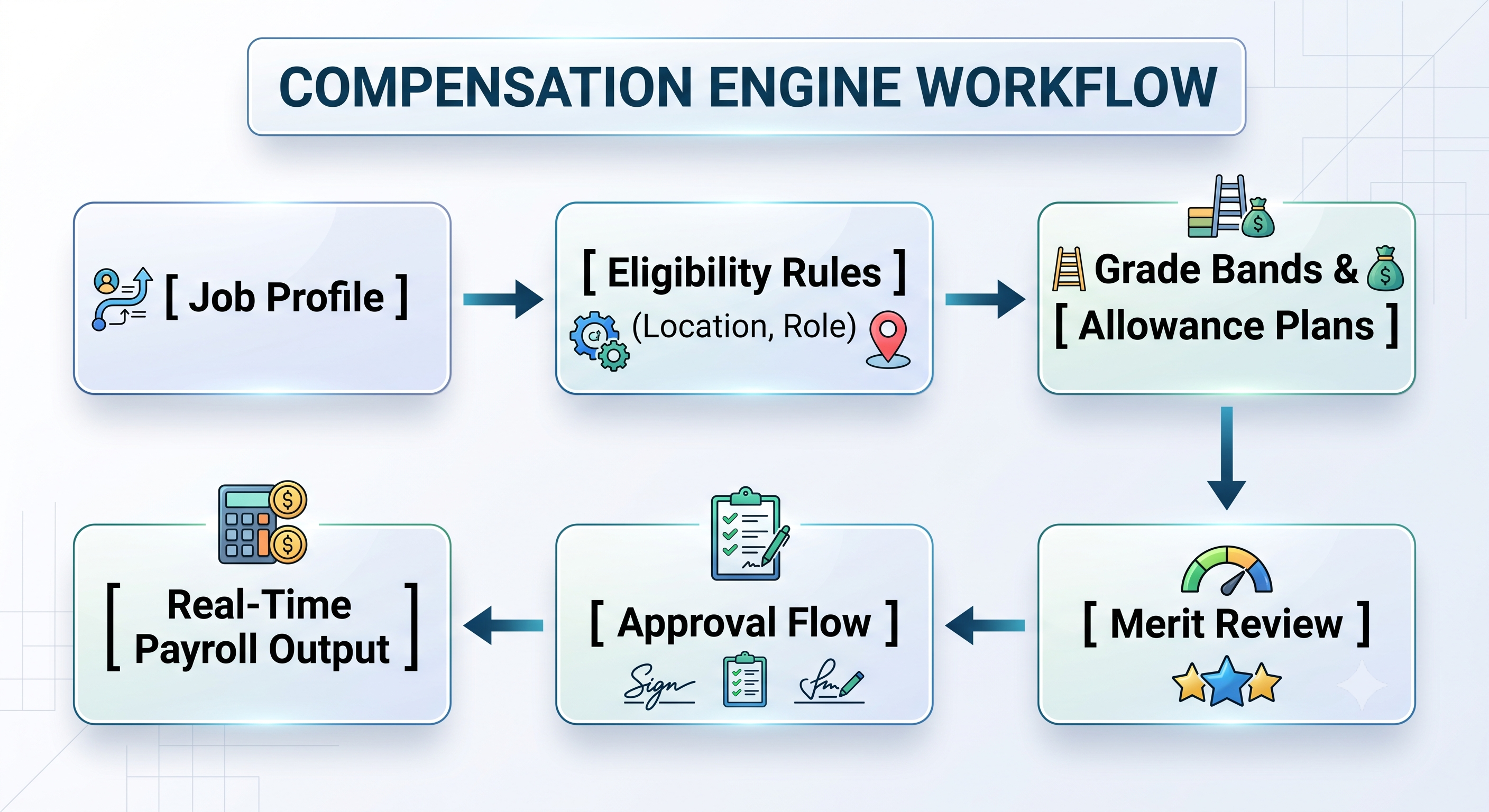
Compensation Package Components Packages are built around Base Salary, Salary Scale, Performance Pay, Incentives, Allowances (e.g. car allowance, rent allowance) and Commission.
Compensation Eligibility Rules: Administrators create logic rules (e.g., Country = USA AND Management_Level = Director) so the right compensation packages are applied when an employee is hired or transferred without manual intervention.
Cycles Related to Merit: Supervisors conduct annual cycles of merit increases, bonuses, and stock distribution by using budget tracking monitors that limit the expenses and stop approving extra budgetary expenditures.
Benefits System: Facilitates open enrollment periods, life-event management systems (like marriage and dependents), health coverage calculations, retirement contributions tracking, and electronic data exchange systems (for example, 834 transmissions) insurance companies.
Talent, Performance, and Learning
Workday’s integration of performance management into everyday business processes is designed to enhance retention and career development.
Skills Cloud Architecture: It is a machine-learning ontology that organizes millions of professional skills and evaluates employee skills against the existing job requirements and upcoming vacancies in the organization.
Continuous Performance Management: Workday replaces annual performance evaluations with continuous employee check-ins, peer feedback, goal cascading, and real-time performance assessment.
Succession Planning: It uses an innovative 9-Box technique to create talent pipelines for major managerial positions in the company.
Tracking Time, Managing Absences and Global Payroll Processing
Tracking Time: Allows users to track their time by entering their time data at a computer, using a mobile application to clock in or out of work or using physical clocks to record their time. The system is capable of computing complex terms of overtime, differential pay for shifts, and penalties for the meal breaks as it computes it before the payroll is processed.
Managing Absences: The system makes it possible to build complex plans of accruals, paid time off policies, parental leave rules, and official sick leaves according to the requirements of the local labor laws.
Global Payroll Processing: Workday provides payroll processing systems for significant markets such as the USA, Canada, the UK, France that calculate gross and net amount of remuneration, garnishments, retro-pay, and tax payments right in the system. For the other countries, Workday Payroll Exchange sends computation data to local payroll service providers in real time through standard APIs.
Comparative Module Matrix
In order to find out how legacy modular systems differ from Workday unified systems, it is necessary to analyze the chart below.
In contrast to traditional HR technologies, which work by using numerous independent databases connected to each other through batch processing techniques, Workday Cloud HCM connects all these operations in one integrated system that operates in-memory and is object-oriented. As a result of this innovation, Workday is able to replace rigid processes with configurable Business Process Framework (BPF) and flexible role-based security processes that follow the company’s Supervisory Organizations model, which allows distribution of the technology updates every six months without the administrative burdens of the past.
In-depth Analysis: Business Process Framework (BPF) and Security Configuration
The two fundamental systems that allow Workday to be flexible without necessitating the use of custom code are the Business Process Framework (BPF) and Security Group Architecture.
Business Process Framework (BPF)
All transactional changes made in Workday (e.g., Hire, Transfer, Promote, Terminate, Request Leave) make use of a Business Process. A Business Process is a configurable flow chart of steps followed either in sequential or parallel order.
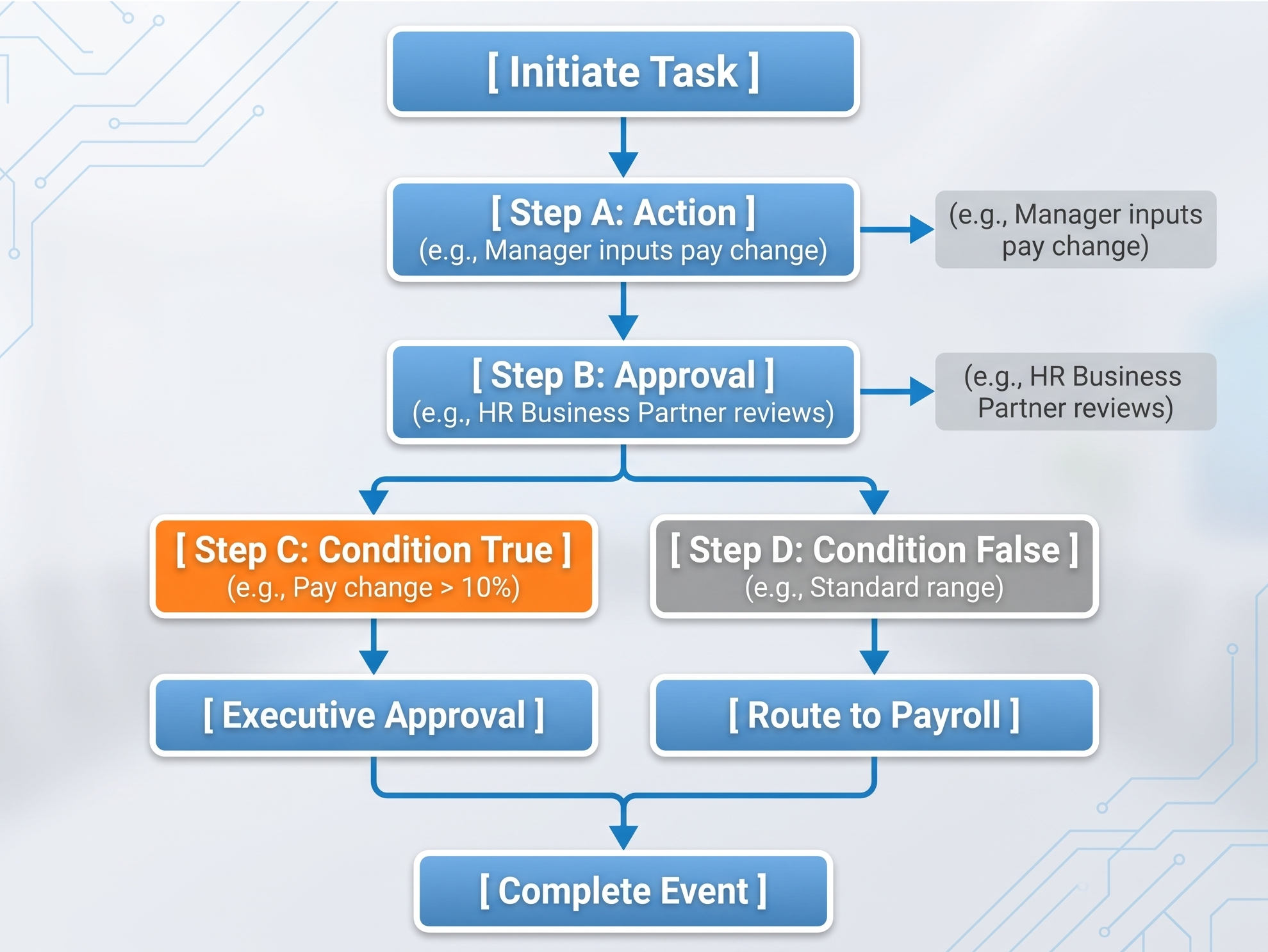
Types of Steps in the Business Process Flow:
Initiation: The initial action in the business process triggered by the eligible user or the integration process.
Action: A job that requires data entry (e.g. proposing compensation, or providing a reason for change in the job)
Approval: A decision point dedicated to a specific role involved in the process. The approval process may take the form of a one step approval process, series of approvals or approval process that is routed through a hierarchy of supervisory decisions until it reaches the designated manager.
Condition Rules: Logical gates evaluated dynamically at the time of execution. For instance when an increase in the salary base is higher than 15%, the flow might be directed to the VP of HR, otherwise it might be a subject to bypass the employee approval..
Service Step: A type of automation that requires system execution such as pdf generation and employment contract issuing.
Integration Step: An automated trigger that generates and sends information packages (xml/json) to the outside system (e.g. IT supplier) immediately after process completion.
Security framework and administration
Workday utilizes field security through a contextual model which is based on Business Processes and Domains. Security Groups assign users or positions access.
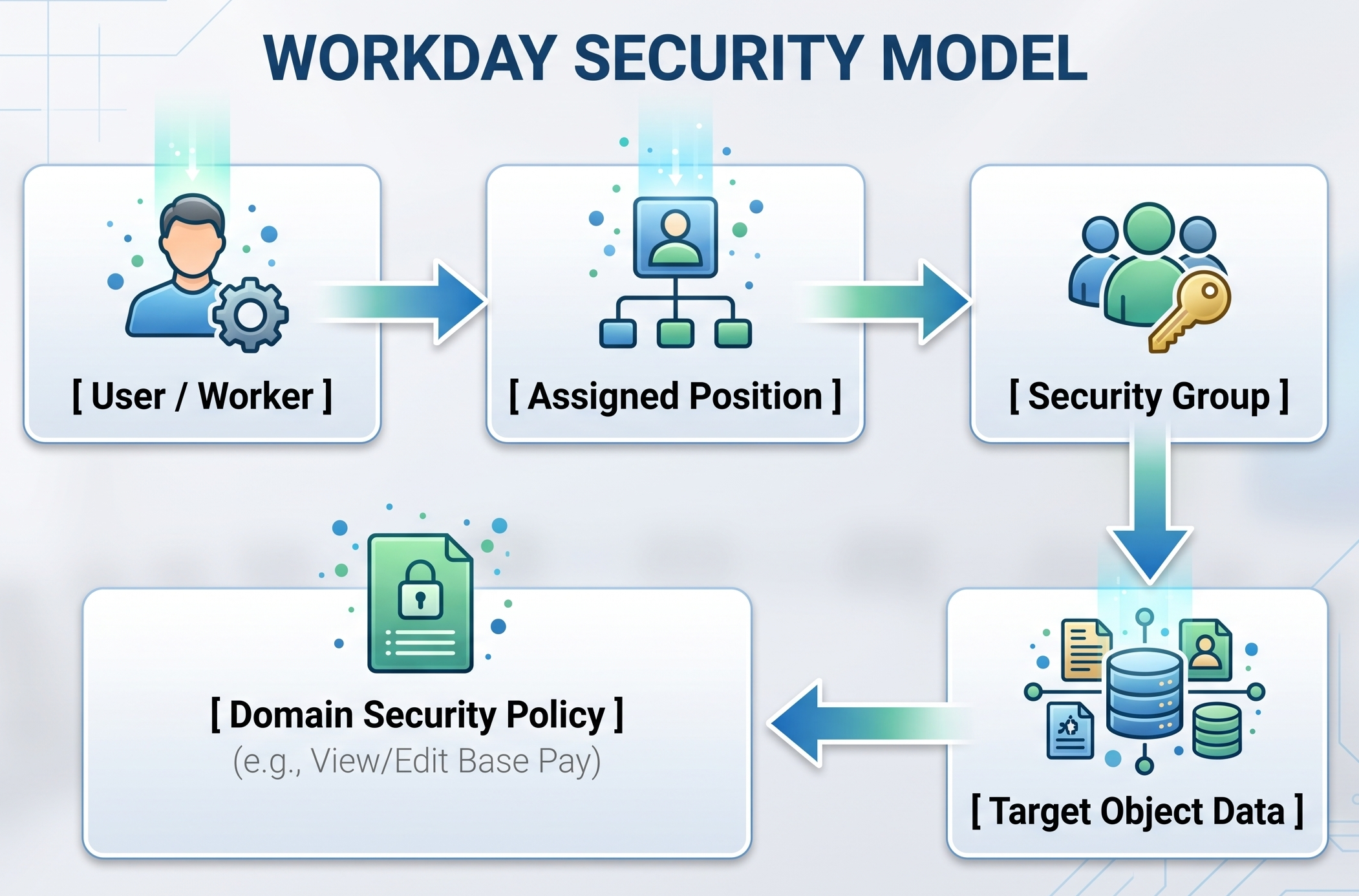
Different types of Security Groups:
Role-Based Security Groups (RBSG): this is the most widely used security model in Workday. Permission for access is linked with the job title of an employee (e.g., "HRBP - EMEA," "Manager - Engineering"). When an employee changes positions, the access permissions are simply revoked and passed to the new employee.
User-Based Security Groups (UBSG): given and assigned to a particular user, the model is used for system administration, integration developers, and global tenant configurators (e.g, "Security Administrator," "Integration Developer").
Segment-Based Security Groups: restricts the access to specific parts of information in a domain (e.g., limiting a benefits specialist only to medical plans information).
Intersection & Aggregation Groups: joins different security definitions with the help of logical AND, OR, and NOT operators to ensure more precise regulation of information distribution.
Governance of the Policy:
Domain Security Policies: Define whether a security group can access or alter certain data fields (ex. Social Security Numbers, Salary Levels, Date of Birth).
Business Process Security Policies: Define what security groups can initiate, approve, cancel, recant or audit specific workflows in BPF.
Enterprise Integration Framework: Link Workday with Stack
Enterprise software will never be used by itself. Workday has three types of tiers to create secure and reliable links among various components of enterprise IT stacks:
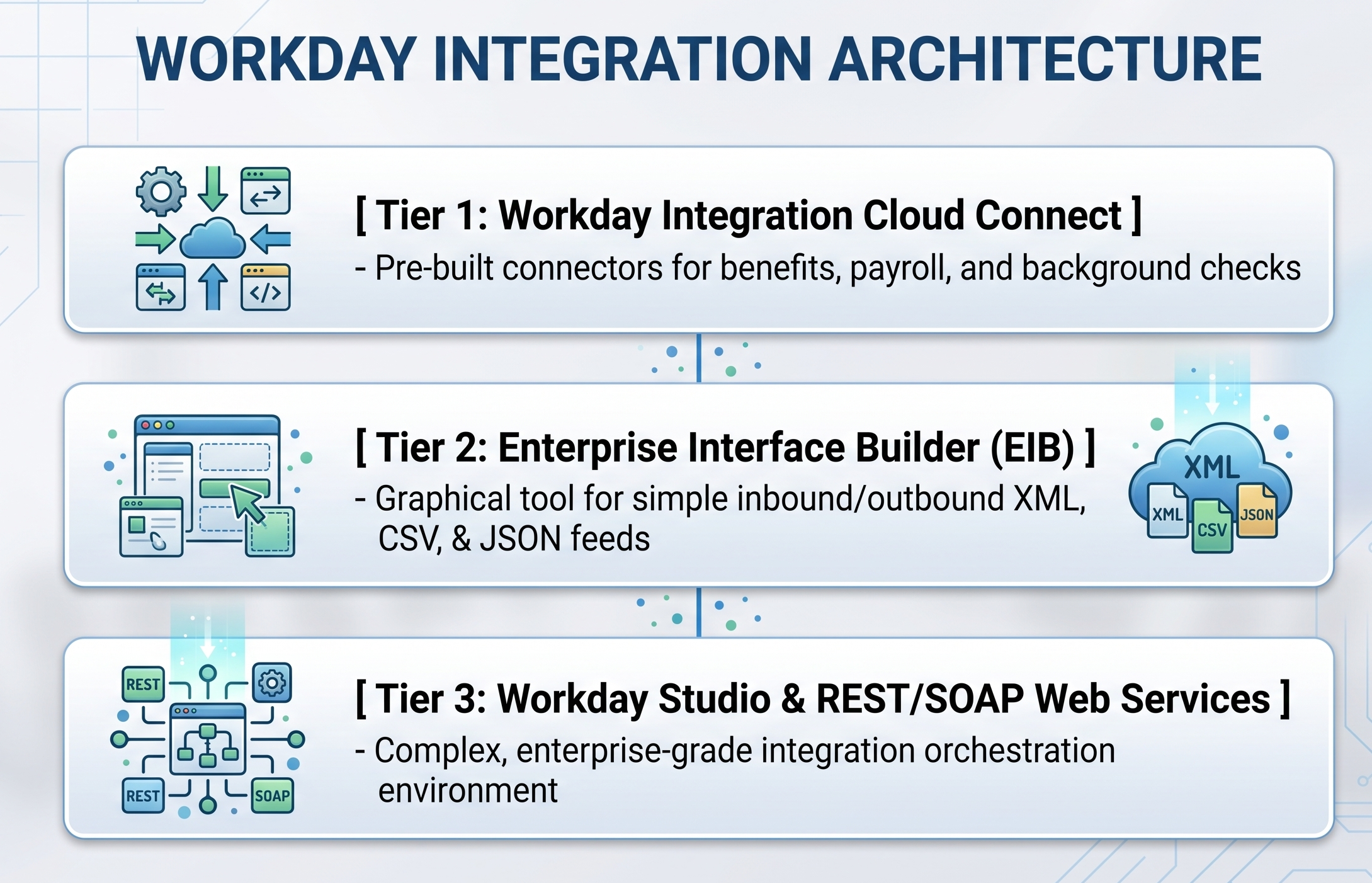
1. Enterprise Interface Builder (EIB)
EIB is a tool for integration and enabling data transmission that requires little or no coding.
Outbound EIBs: It fetches data using custom reports and changes into XML, CSV, or JSON format through XSLT and transfers it via SFTP, HTTPS, or AWS S3.
Inbound EIBs: It retrieves Excel or other structured documents from remote storage and uses standard Workday web services for running bulk transactions like annual merit pay increases for the staff, or mass onboarding of new employees.
2. Workday Integration Cloud Connect
The company has its own library of integration connectors that are pre-developed and certified by vendors. This library allows seamless integration between different endpoints of third-party vendors such as payroll and crime checkers and reduces the need for any custom integrations.
3. Workday Studio
Workday Studio provides an integration tool using the features of the IDE that is powered by Eclipse. This provides the organization with the solutions that follow syntax rules of Workday.
The processing of big data is done simultaneously using multithreading.
There are numerous sophisticated features in this project including error logging, exception handling, and automatic re-trials.
The project invokes many REST/SOAP APIs simultaneously.
The project implements complex data transformation using XSLT 2.0/3.0, Java, or Groovy scripts.
Dynamically channeling payloads using real-time calls to external web service.
Implementation Lifecycle & Data Migration Methodology
Moving an organization to Workday HCM needs proper methodology of deployment. Workday has implemented a unique methodology called Workday Deployment Methodology which helps an organization to move away from traditional waterfall projects in favor of iterative prototyping methods.
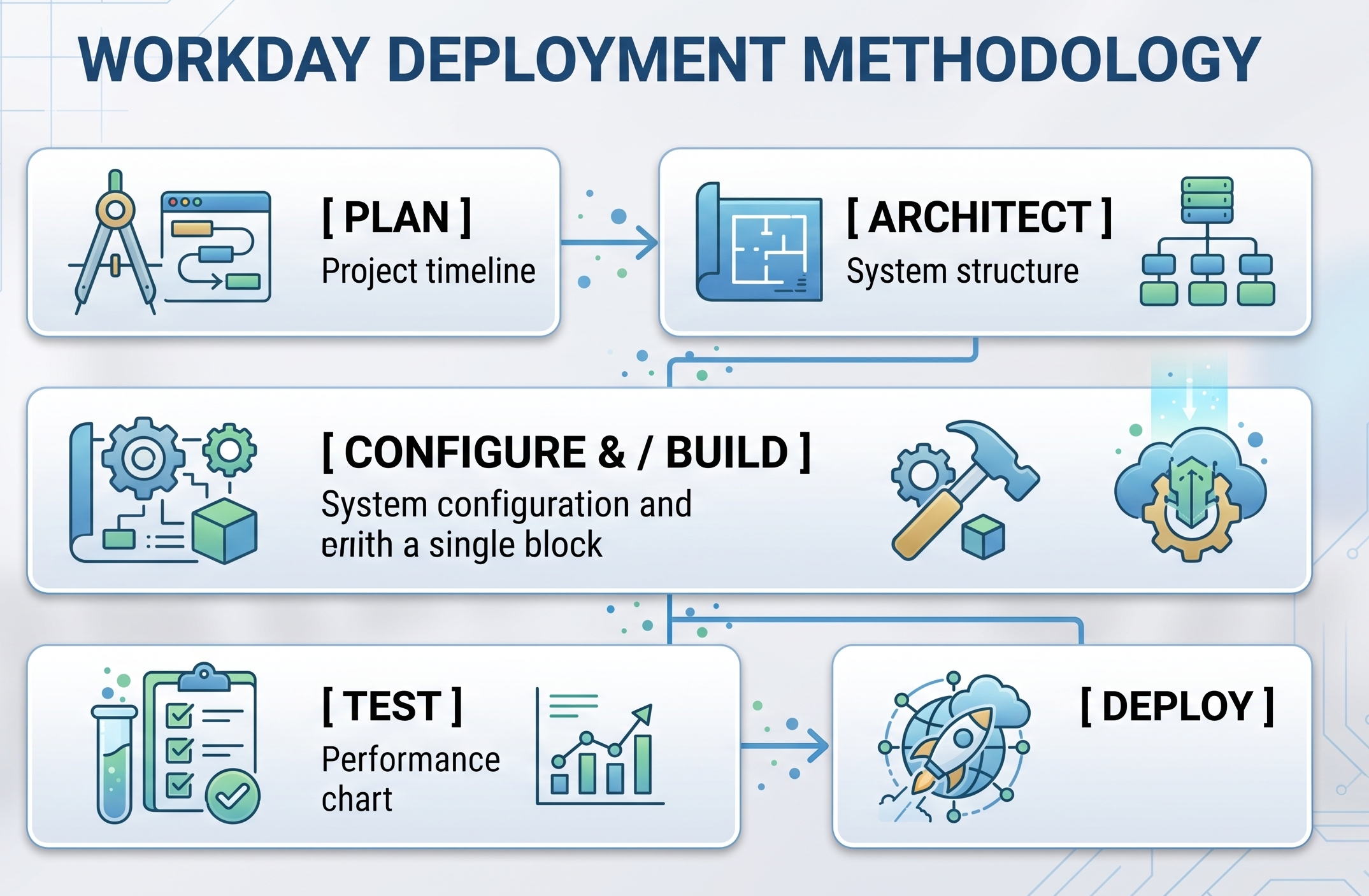
Phase 1: Planning
Deciding who will be in charge of the project, getting buy-in from all necessary leaders involved in the project, putting in place the right governance structure for the project, preparing cloud environments, and deciding how to measure project success.
Phase 2: Design
Conducting the discovery workshops with business leaders to define functional requirements. Deliverables include working on the Foundation Data Model (FDM), workforce structure hierarchy, job levels mapping, and designing the security matrix.
Phase 3: Installation and compilation
Setting up business processes, compensation plans, benefit rules and reports in the test environment. The development team is also working on the creation of the integration tools.
Phase 4. Testing
Heavy testing to ensure functionalities are working, and security and integration are stable.
Unit Testing (UT): The process flows and steps of integration are tested.
End-to-End Testing (E2E): Testing the processes from end to end.
User Acceptance Testing (UAT) Business users test for functionality.
Payroll Parallel Runs: Running payroll in Workday and at the same time in legacy systems to make sure the amounts are correct.
Phase 5: Implementation
In addition to implementing final production tenant cutover scripts, loading snapshots of living employee data, moving integrations into production, and handing over operational support to the hypercare team.
Data Migration Architecture
Generally, data migration is regarded as the technically demanding workstream in implementing an enterprise system. The legacy data has to be fetched, cleansed, transformed, and finally loaded into Workday, keeping up with the order of dependencies:
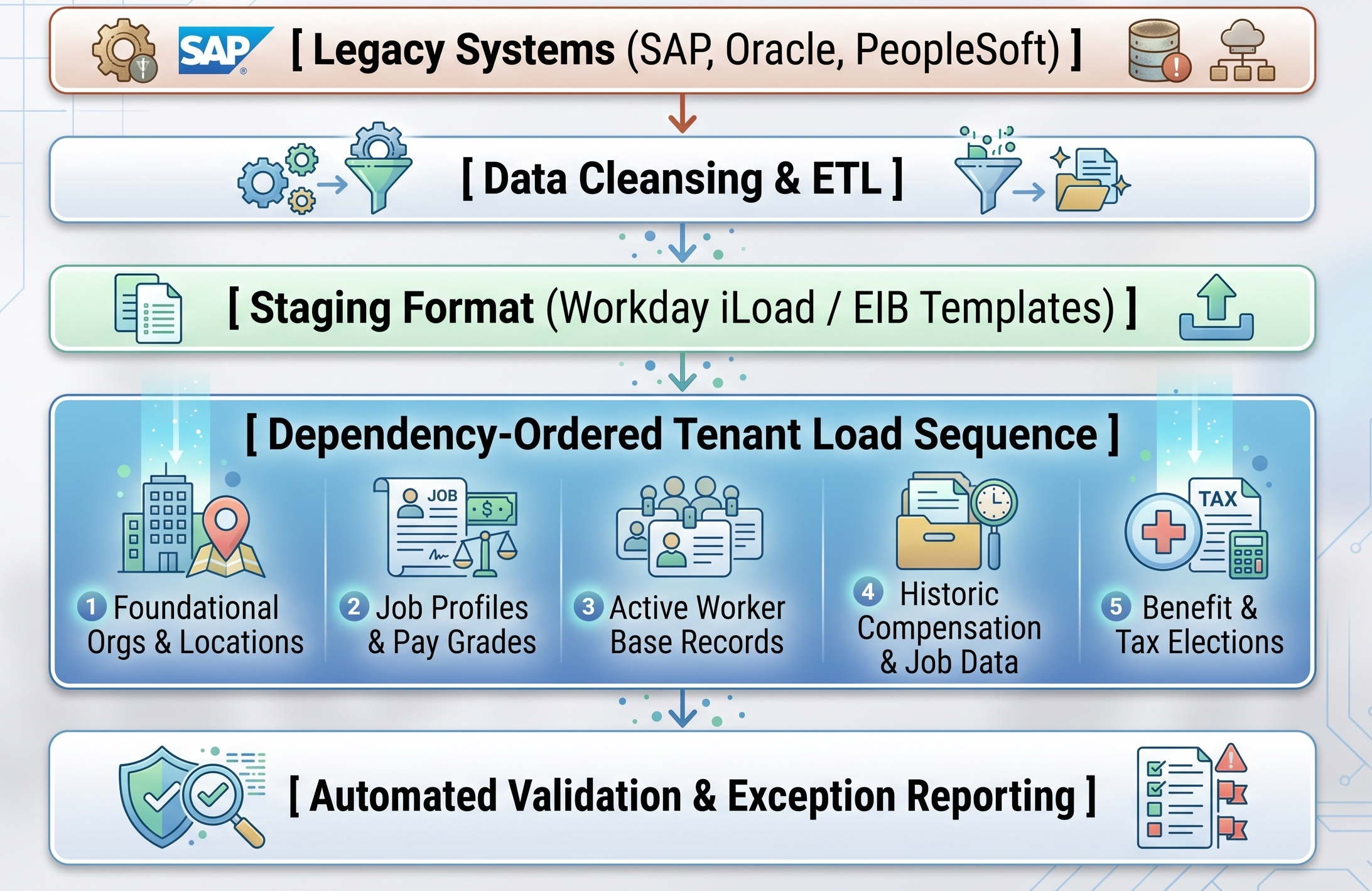
In the situation when any administrator tries loading the "Worker" record without loading the "Job Profile" and "Supervisory Organization” objects relevant to it, the process of loading will be blocked since it is faced with unresolved dependencies on referring objects.
Reporting, Workforce Analytics, and AI Innovation
Workday perceives analytics as an integral part of the system as opposed to an external one. Since reports generate results from live operations data, management can make decisions based on up-to-date metrics.
Types of Custom Report Engine
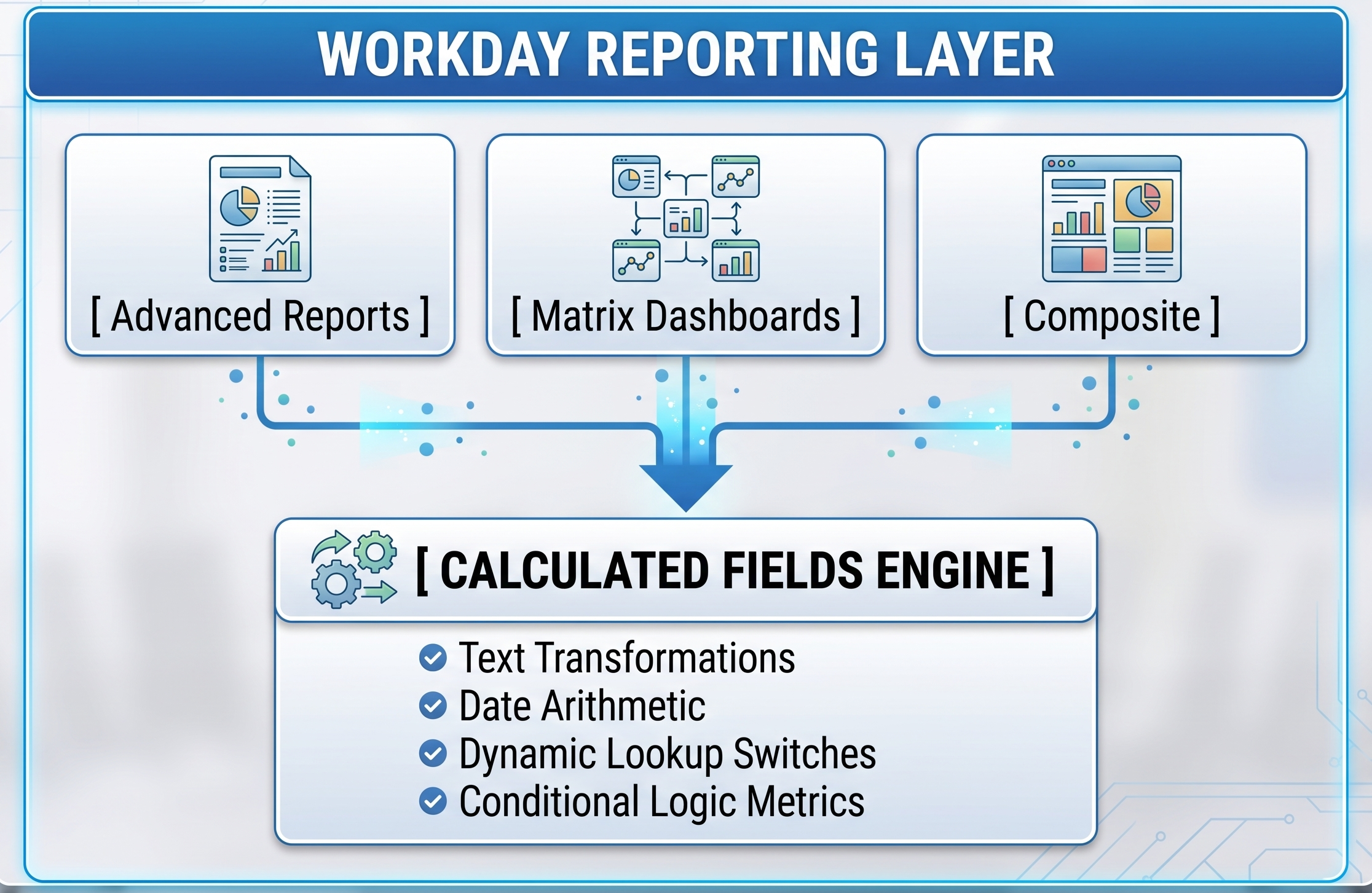
Simple Reports are tabular lists of data that allow collecting needed information quickly.
Advanced Reports is an upgraded version of data collection which includes multi-level data gathering with calculation fields, filtering of subsidiary object managers, conditional statements use.
Matrix Reports summarize operations results from different rows and columns so that it is easy to analyze.
Composite Reports integrate and summarize an array of independent data sources such as human resources, company budgets, and salary calculations.
Engine for Calculated Fields
Through the use of calculated fields, administrators are able to perform dynamic transformations of data at run-time and do not need to change the data that is stored under them. Some examples include:
Performing complex concatenations and string extractions for integration purposes.
Running conditional logic (If/Then/Else) to dynamically group information.
Running conditional logic (If/Then/Else) in order to group the information dynamically.
Making lookups for related objects' properties across the hierarchy of the organization.
Innovations in AI and Machine Learning Embedded
Workday integrates artificial intelligence in its central business procedures:
Identifying Various Skills in Cloud: The machine learning tool works by processing the unprocessed data (job descriptions, curricula vitae, project journals) and subsequently normalizes and determines the required employee skill sets without any human intervention.
To assist both HR and technical personnel in keeping pace with these upcoming cloud needs, practical workday online training programs offer specialized hands-on modules on Core HCM, security configurations, custom reporting, and integration pipelines.
Retention Risk Analytics: Different indicators like duration, position in range, management changes, and duration since last promotion are used by machine learning models to determine the employees who are about to quit.
Generative AI Automation: Use of embedded GenAI tools allows to automatically create job descriptions, performance review summaries, employee learning recommendations, and contract terms using active BPF processes.
Automated Document Processing: The document capture allows to extract structured data from resumes, employee tax forms, and paper invoices automatically.
Strategic Value Addition and Business Impact
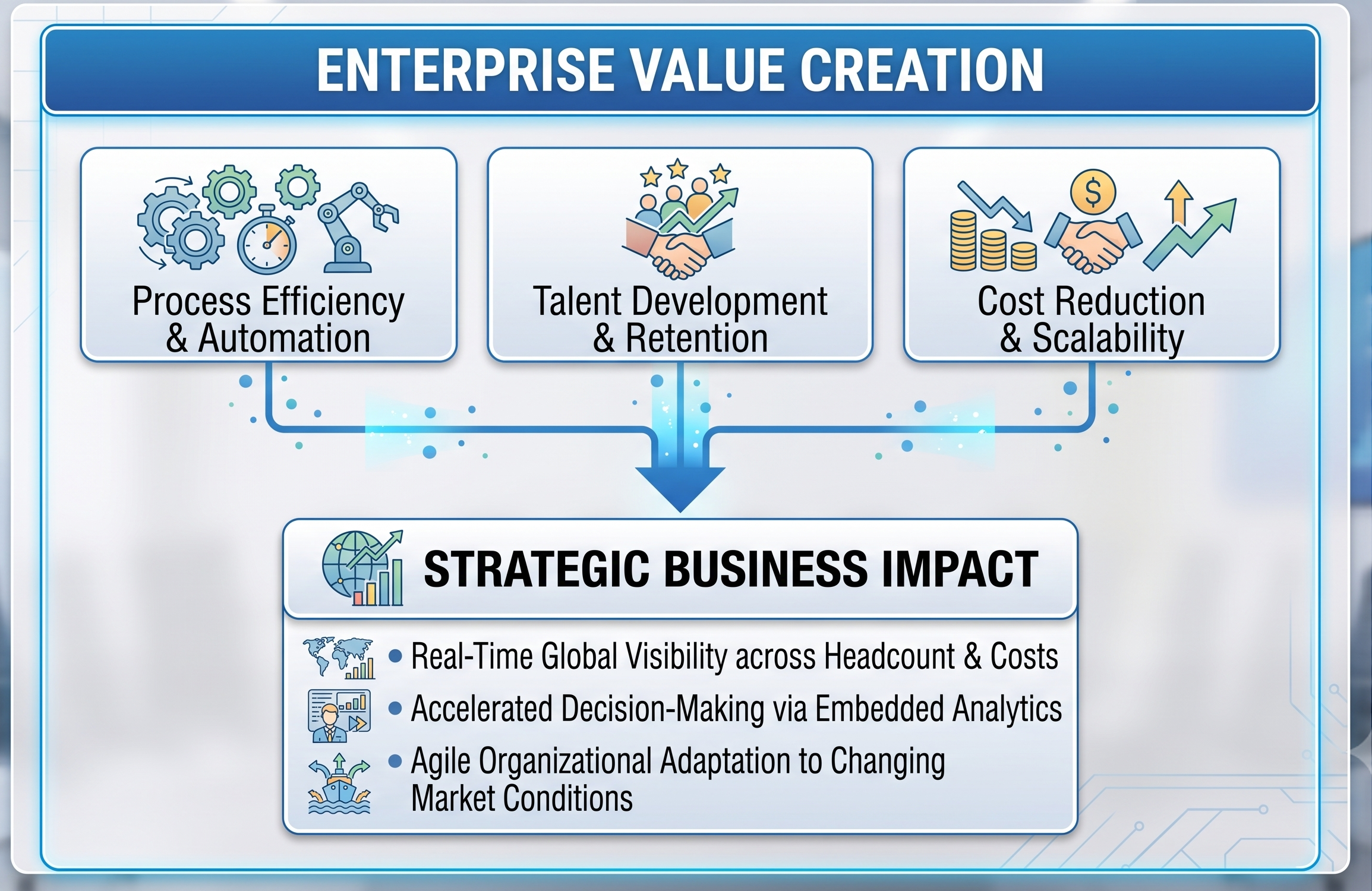
Moving from the old HR systems to Workday HCM requires a lot of effort and funds, but brings a lot of strategic and operational benefits in the long run.
Automating Administration & Improving Process Efficiency
Workday protects administrative expenses by introducing mobile self-service procedures in place of forms, manual calculation sheets and email approvals. Thus, the HR department spends less time on tedious processes and devotes more time on strategizing talent management.
Universal Visibility
With all employee information stored in one location, the management can rapidly access any information regarding labor expenses, number of staff, surveys on vacant jobs and turnover problems.
Business Flexibility
Due to changes in market conditions, companies have to quickly modify their structure. Due to Workday’s method, an administrator can make necessary changes to the organization and even adjust reporting lines without having to stop the system.
As businesses are quickly adopting cloud-based HR systems, the need for professionals who are certified and have practical knowledge of how to implement such systems is continually increasing. Those interested in mastering configuration, workflow procedures, and security systems can join Workday HCM online course offered at OnlineITGuru.
Conclusion: The Future of Workforce Orchestration
As world workforce paradigms shift to become more decentralized, flexible and skills-based, companies must look for technology platforms with scalability and flexibility. Workday HCM meets these needs due to its unified cloud architecture, in-memory object store, configurable business process engine, and embedded machine learning capabilities.
Workday makes the transition from Human Capital Management as an administrative support function to being a core operational strategy by putting all employee lifecycle data into a single data platform. Companies that take advantage of Workday's real-time analytics, automated workflow processing, and skills-based talent architecture are ready to respond to ever-changing needs of their employees and ensure that global talent is engaged and used effectively.
IT consultants, HR professionals, and cloud architects working toward a career in this domain must stay in sync with the innovations in technology. Using OnlineITGuru for getting industry-specific Workday courses online from anywhere can provide firsthand project experience and hands-on training on Workday configuration, integration, and security management.