
The Master Blueprint to Red Hat OpenShift: Architecture, Curriculum, and Career Guide
Last updated on Jul 22, 2026
Red Hat OpenShift has emerged as the enterprise standard platform for managing Kubernetes. Being built over vanilla Kubernetes, OpenShift incorporates essential development tools, enterprise security, multi-cloud, and lifecycle management within one platform.
If you are moving from being a sysadmin to becoming a container orchestration specialist, working as a DevOps engineer who designs CI/CD pipelines, or being an SRE responsible for maintaining the multi-region clusters’ stability, your mastery of OpenShift will require a methodic approach that combines both theory and practice.
This guide covers a full breakdown of the curriculum, the structural outline of our openshift course online, step-by-step learning strategy, and certification process to help you master Red Hat OpenShift.
Understanding OpenShift - The Architecture & Core Principles
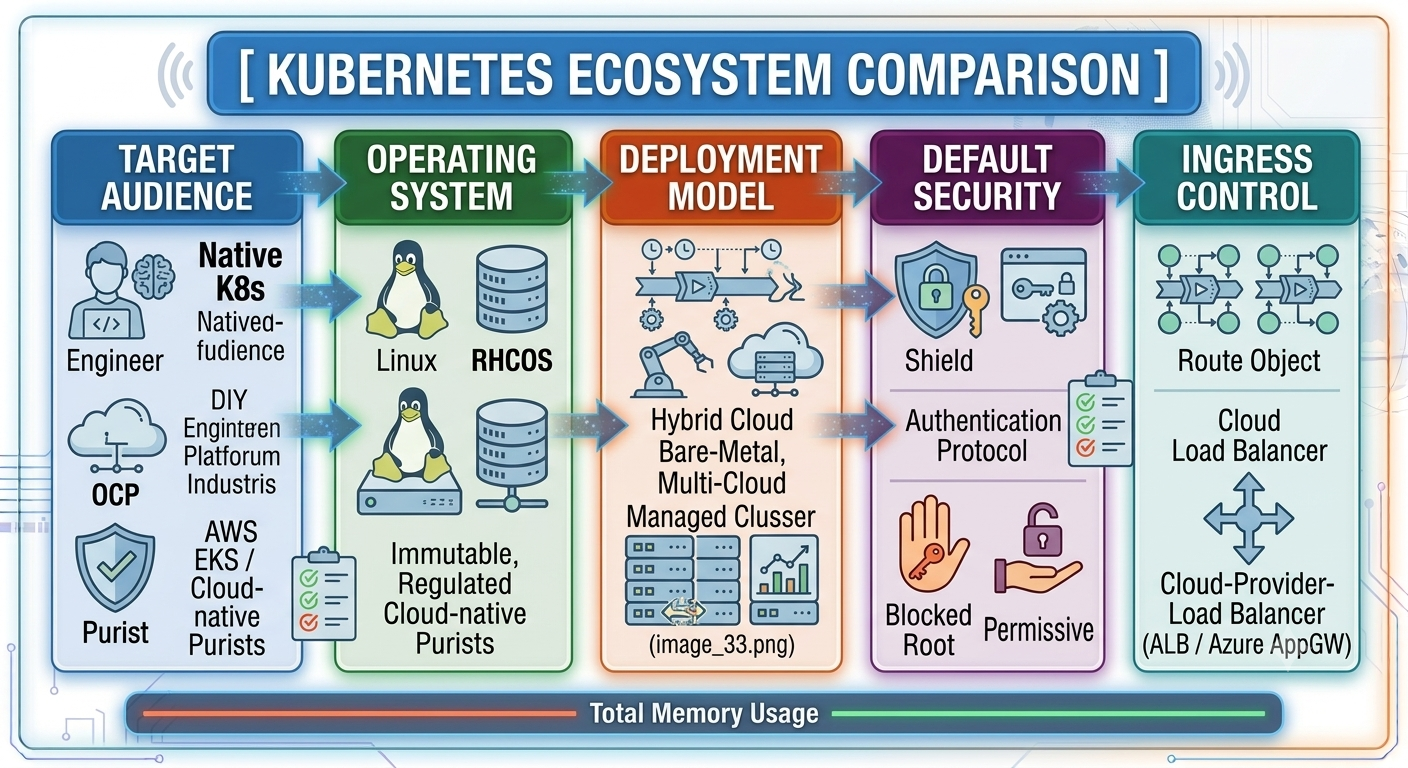
In order to grasp the reason why enterprise companies use OpenShift rather than upstream Kubernetes, let us review the architecture of the platform. Upstream Kubernetes gives you just basic container orchestration and everything else - like ingress controller, security, storage provisioning, monitoring, and dev tools – is left for the team to configure.
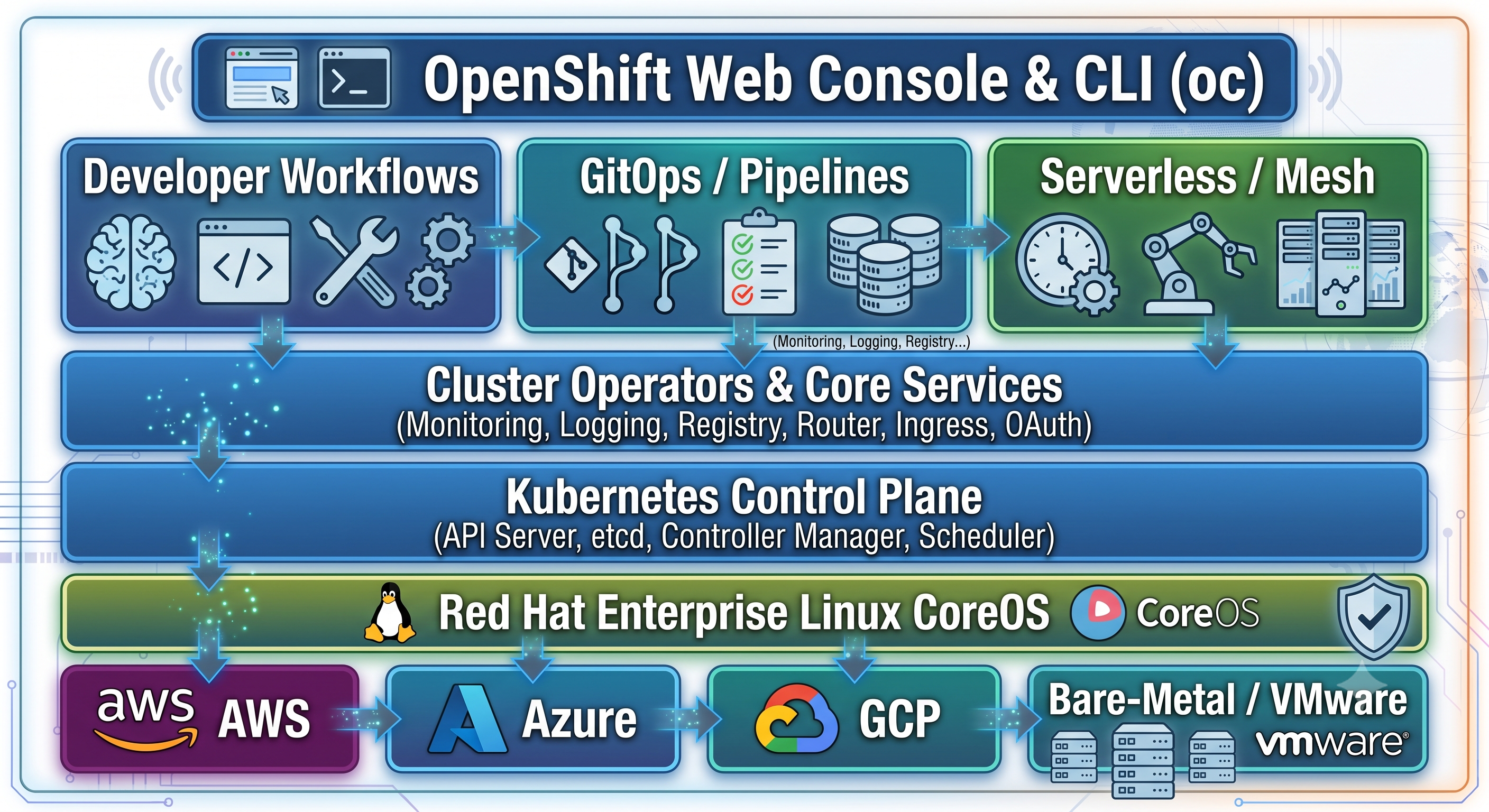
Key Architecture Pillars
Red Hat Enterprise Linux CoreOS (RHCOS): Nodes for OpenShift control plane execute only on RHCOS, which is an immutable and container-centric OS that is directly controlled by the cluster through MachineConfigs.
Cluster Operators: OpenShift utilizes native operators for managing key parts of the platform, including the router, internal registry, SDN networking, and authentication. The cluster takes care of its own health and self-updates.
Security Context Constraints (SCC): SCC is an extension of the regular Kubernetes security context and serves as a platform-wide policy controlling the pod execution rights (for instance, prohibiting containers from executing as root).
Routes and Ingress: OpenShift had the concept of Route prior to Ingress being standardized within Kubernetes. The Route object provides TLS termination, pass-through, and in-built HAProxy load balancer capabilities.
OpenShift Learning Path
Below are listed 8 modules comprising the comprehensive curriculum covered in our complete openshift online course.
Module 1: Containers and Kubernetes Introduction
Module 2: OpenShift Architecture and Core Command Line Interface (CLI)
Module 3: Workload Management and Deployments
Module 4: Enterprise Networking, Ingress & Security
Module 5 Data Management and Data Storage
Module 6: Security, RBAC and Identity Management
Module 7: Operations and Maintenance
Module 8 - Advanced GitOps, CI/CD and Service Mesh
Module 1: Basic Knowledge of Containers & Kubernetes :
There is some rules to run a OpenShift cluster, one most important thing learners aware of the primary knowledge of containerisation:
Container runtimes - CRI-O; Podman; and Docker
Dockerfile, multi-stage builds; OCI compatible images
The prime components of the Kubernetes system - Pods, Deployments, ReplicaSets, Services, Namespaces, etc.
Difference between kubectl run (instructive control) and kubectl apply -f manifest.yaml (to declarative control) .
Module 2: Basic knowledge of OpenShift Architecture and Core CLI Tools
Understanding of OCP cluster architecture, Control Plane, Infrastructure and Worker nodes.
Navigating the oc command-line interface and comparing oc and kubectl command syntaxes.
Work with OpenShift Projects (tenants, or multi-tenant wrappers over Kubernetes namespaces).
Using OpenShift developer and administrator web consoles.
Module 3 – Deploy Applications and Manage Workloads
Application deployment using S2I, container images, and Helm charts.
S2I, Container Images and Helm Charts for application deployment.
The process of creating container images from git code push events is automatic thanks to the use of ImageStreams and BuildConfigs. Additionally, ConfigMaps and Secrets are used for the management of application settings.
Health check parameters (Liveness, Readiness, Startup probes) are used to ensure the finality of the application which promotes high availability for the application.
Module 4: Ingress and Security in Enterprise Networking
Basic concepts of Software Defined Networking (SDN) as well as the functioning of the OVN-Kubernetes CNI plugin.
Usage of Routes for accessing workloads from outside (Edge, Passthrough, Re-encrypt TLS termination).
NetworkPolicies to block Inter-Pod communication.
MetalLB configuration (bare metal load balancer, LoadBalancer type service)
Module 5: Storage Provisioning and Persistent Storage Management
Static and dynamic storage allocation.
Persistent Volumes, Persistent Volume Claims and StorageClasses.
Configuration of block storage (ReadWriteOnce) versus file storage (ReadWriteMany).
The unification of Red Hat OpenShift Data Foundation (ODF/Ceph) for the administration of cloud-supported storage
Module 6: Protection, RBAC, and Identity Management
Identity provider setups (HTPasswd, LDAP, Active Directory, Keycloak/OIDC)
Usage of RBAC (Role Based Access Control) to assign groups and users with ClusterRoles and Roles.
Making Security Context Constraints to limit container permissions.
Resource exhaustion is prevented by configuring project-level ResourceQuotas and LimitRanges.
Module 7: Day-2 Operations, Monitoring, and Maintenance
Prometheus, Grafana and Alertmanager built-in for cluster-wide monitoring and telemetry
Clusterwide aggregated logging with Loki, Vector and Elasticsearch operators.
Strategies to upgrade over-the-air and node pools.
Backup and restore of the control plane state using etcd snapshots and OADP (OpenShift API for Data Protection) .
Module 8: Advanced GitOps, CI/CD & Service Mesh
Implementing GitOps strategy with OpenShift GitOps (Argo CD).
Creating cloud-native CI/CD pipelines using OpenShift Pipelines (Tekton)
Microservice traffic management, observability, and mTLS security with OpenShift Service Mesh (Istio/Kiali/Jaeger).
Hands-on Roadmap to Learn OpenShift Practically
For gaining practical knowledge of OpenShift, follow this sequential roadmap or enroll in an interactive openshift course online for performing the best in your career.
1.Set Up Your Sandbox Environment:1-2 Hours
Install Red Hat OpenShift Local (previously called CRC/CodeReady Containers) on your local machine, or sign up for a free cluster with the Red Hat Developer Sandbox. The sandbox provides you access to the OpenShift environment as administrator and developer.
2.Master Core Command Line Interface Operations:2-3 Days
Access the cluster via command line interface (oc). Gain skills in making projects, deploying basic containers, reading pod logs, running commands in the containers and troubleshooting failed deployments (oc status, oc describe, oc logs).
3.Set up security & Identity Providers:3-4 Days
Configure HTPasswd Identity Provider, create individual user IDs for developers & operators and define strict Role Based Access Control (RBAC) policies via Cluster Roles & RoleBindings.
4.Deployment & Security of Multi-Tier Application:1 Week
Deploy Front End application and Database Backend. Make use of Secrets and ConfigMaps for storing sensitive credentials, create storage PVCs dynamically for the database and deploy the front end using Route with TLS Encryption.
5.Automate GitOps & Updates:1-2 Weeks
Install OpenShift GitOps Operator. Create manifests in Git Repository. Make use of Argo CD for syncing application deployments based on the changes committed to Git.
Certification Pathways
Red Hat provides official performance based certification pathways.
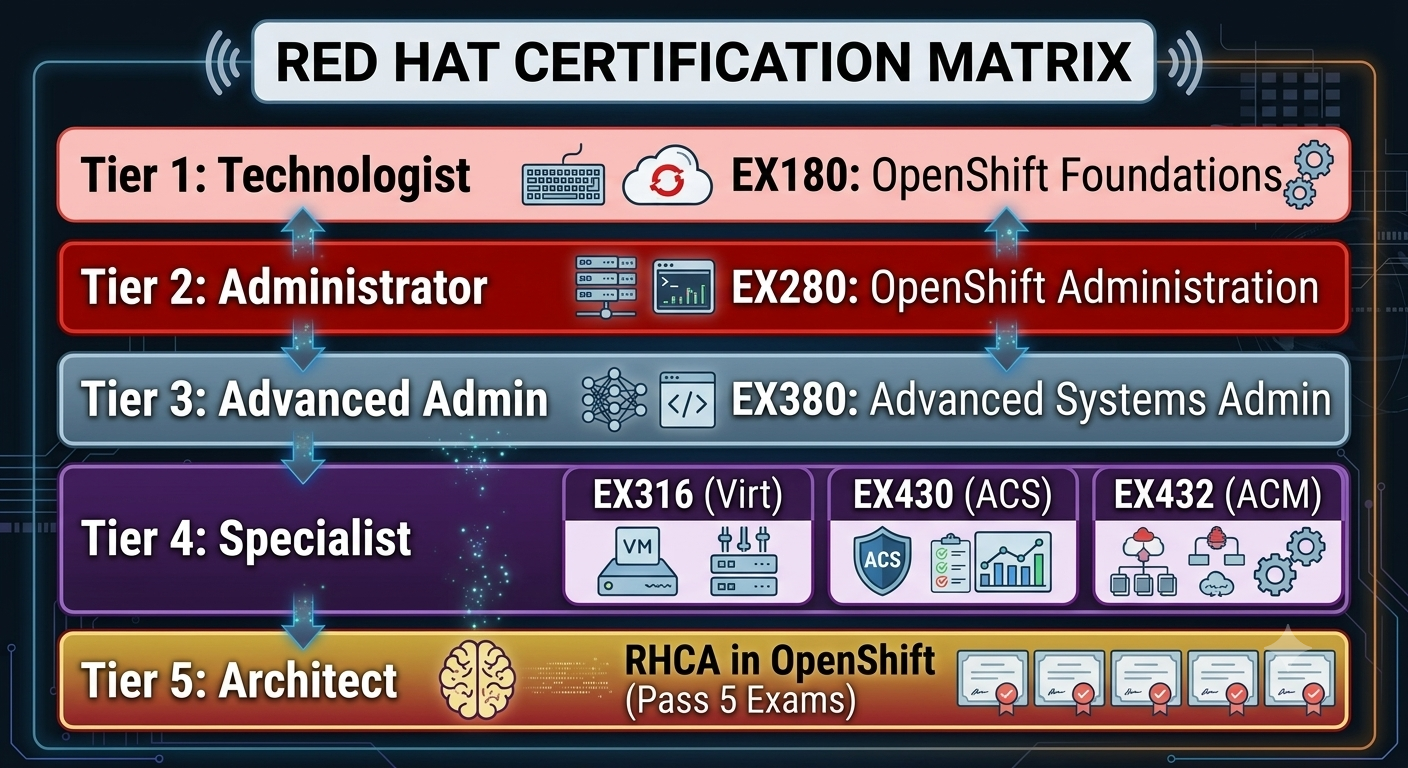
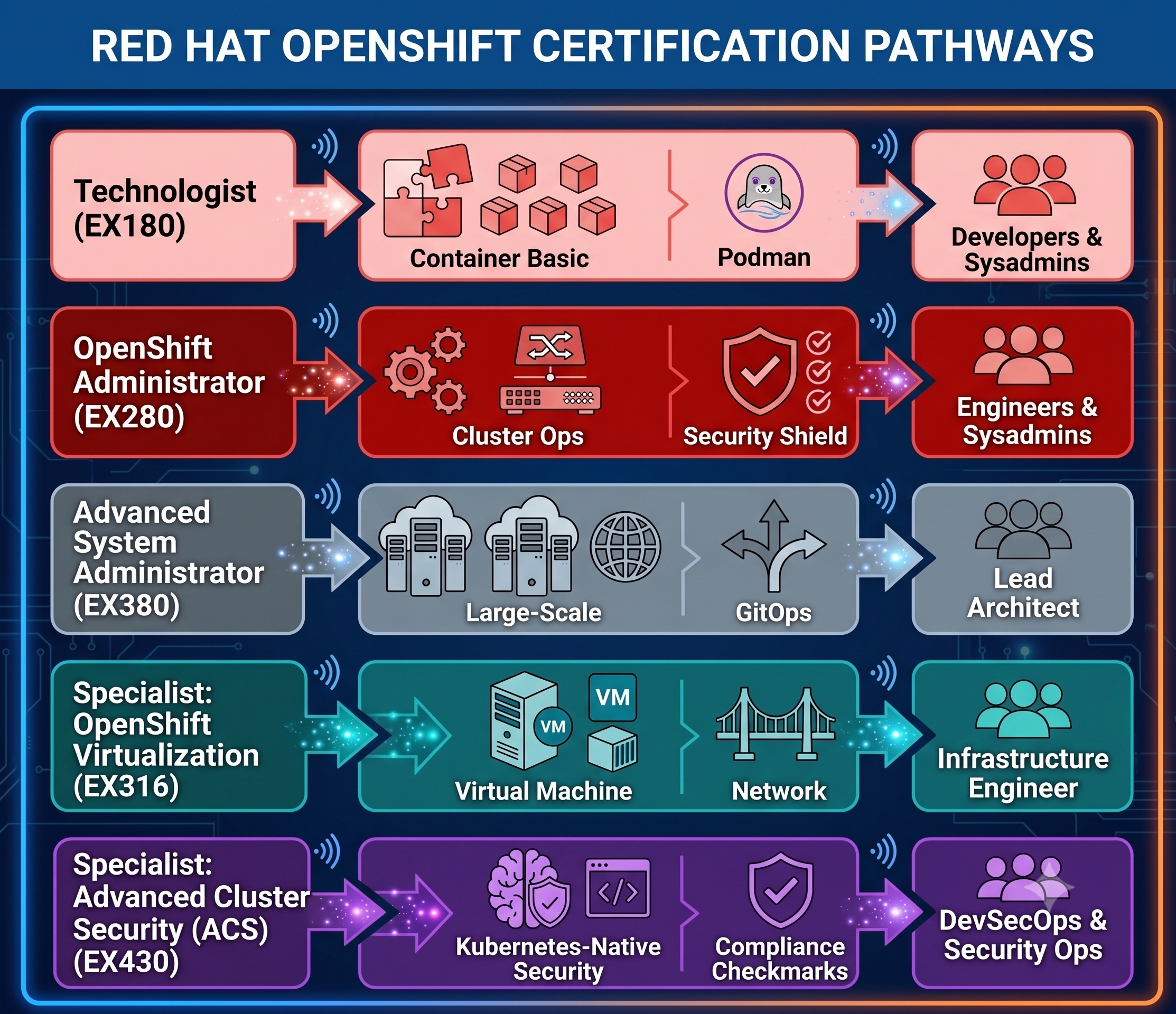
Exam Realities: The red hat certification exams are purely practical exams conducted in a live lab environment. There are no multiple-choice questions. It is about whether you can get your configuration to work and survive a node reboot.
Comparing OpenShift with Other DevOps Platforms
Having an understanding of how OpenShift compares to other Kubernetes platforms provides better architectural choices:
In-Depth Analysis of Core OpenShift CLI Commands & S2I Architecture
Despite the fact that the OpenShift web console offers a convenient graphical user interface, cluster management operations and automation in production environments depend largely on the oc command-line interface. The oc CLI adds platform-specific functionality to the core set of kubectl commands, including project management, built-in containerized build feature, log streaming, and nodes diagnostics.
Navigating between oc CLI and kubectl commands
oc is the backward-compatible wrapper for kubectl – any kubectl command will have the exact same effect when executed with oc. However, there are a number of simplified syntax constructions for enterprise-grade tasks in oc:
Project Context Change: Instead of typing a lengthy command like kubectl get pods --namespace=my-app you change the context using oc project my-app and then type oc get pods.
Remote Cluster Login: Token-based authentication is used to login to remote clusters with the following command: oc login [https://api.cluster.example.com:6443](https://api.cluster.example.com:6443) --token=sha256~xxx instead of manually modifying ~/.kube/config file.
Application Deployment: Start-up applications in no time from the source code and/or images by using the oc new-app, which deploys DeploymentConfigs/Deployments, Services, and BuildConfigs altogether.
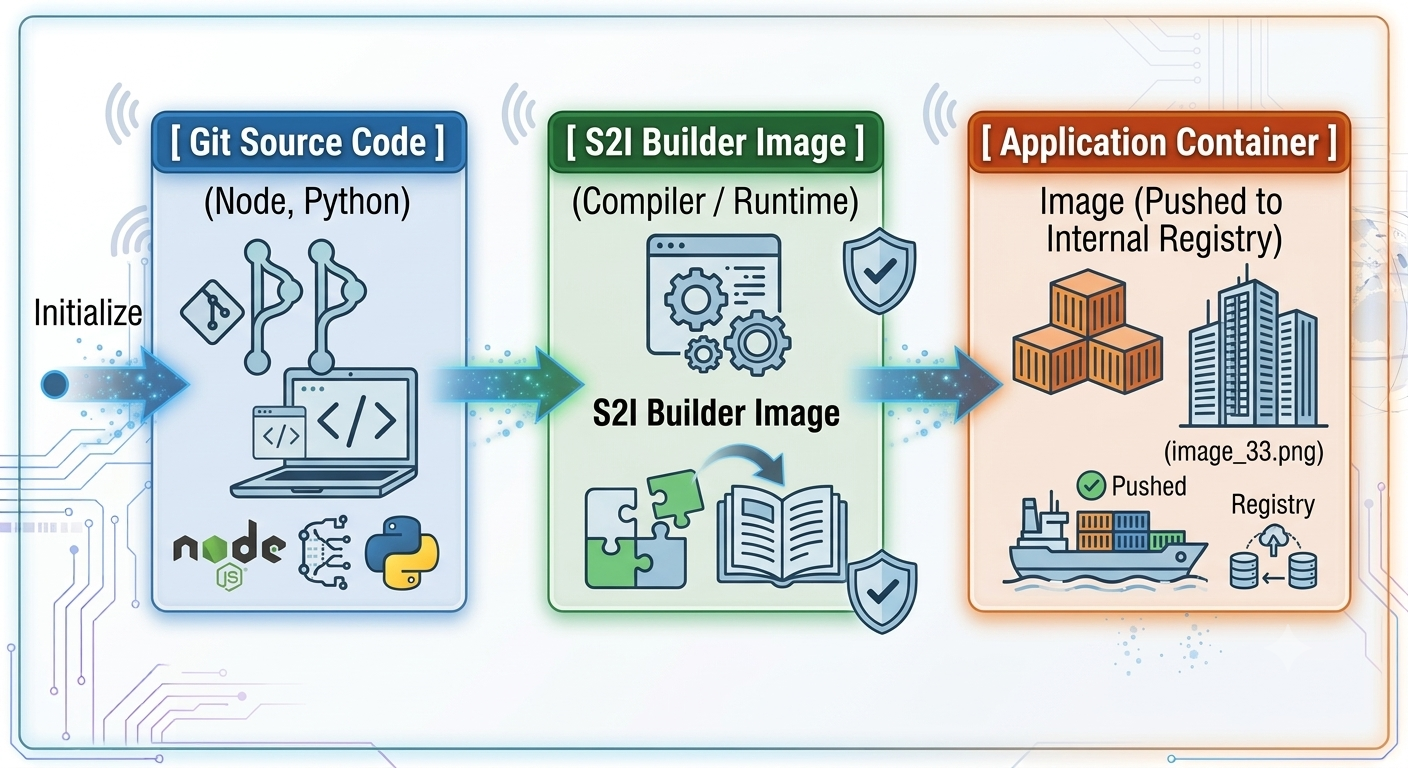
Behind the scenes: How S2I functionality works
1. Assembly request: OpenShift will examine the repository, find out the language framework (e.g. Node.js) when the command is executed and associate it with the suitable S2I Builder Image.
2. Invocation of S2I script: OpenShift will put source code in a temporary builder container and will execute two shell scripts: assemble’: acquires dependency files (for example, using npm instal or pip instal commands) and builds binary code; run’: executes the command for the container operation (e.g. npm start or python app.py).
Container Image Creation: OpenShift manufactures a container image with the congregate software layer and the base OS layer and automatically uploads it to the OpenShift Image Registry.
3. Deployment Trigger: A new deployment rollout is initiated at the worker nodes upon changes in the ImageStream.
Stateful Workloads Storage Strategy
If you want to run stateful workloads (databases, message queues, distributed file stores) in OpenShift, you need to know about dynamic volume provisioning and storage abstractions.
Storage Abstract Architectures
OpenShift abstracts storage with three core abstractions:
PersistentVolume (PV): A piece of physical/virtual storage that is provisioned in the cluster (e.g. AWS EBS volume, VMware vSphere disk or Ceph RBD).
PersistentVolumeClaim (PVC): The storage request of the developer, including the requested capacity, access mode and storage tier.
StorageClass: Driver and parameters for the provisioner used to dynamically provision PVs as defined by the cluster administrator
Introduction to Storage Access Modes
The way pods on different nodes connect to a storage volume depends on the access mode you choose:
ReadWriteOnce (RWO) : The volume can be mounted by a single node as read-write. Good for traditional relational databases, like PostgreSQL or MySQL.
ReadWriteMany (RWX) The volume can be simultaneously mounted as read-write by many different worker nodes. Important for shared file systems, content management systems or web servers serving static media.
ReadWriteOncePod (RWOP): Available in newer versions of OpenShift. It restricts a volume to a single pod across the whole cluster. avoids data corruption from multiple pods on the same node writing to the same disk at the same time.
Red Hat OpenShift Data Foundation (ODF)
OpenShift Data Foundation (formerly OpenShift Container Storage) provides software-defined storage as a built-in Ceph storage operator in OpenShift. ODF provides a common storage platform for both public cloud and bare metal deployments:
Block Storage (Ceph RBD): High performance and low latency persistent volumes optimized for transactional databases (ReadWriteOnce).
File Storage (CephFS) Shared file systems with multi-node concurrent access support (ReadWriteMany).
Object Storage (NooBaa / Ceph RGW): S3-compatible object storage interface for unstructured data flows, backups, and cloud-native applications.
Security Context Constraints & Enterprise Security Architecture
OpenShift includes security by default. Kubernetes will run pods as the root user by default unless otherwise specified, but OpenShift has strict execution controls for each workload.
Security Context Constraints (SCCs)
Custom resource Security Context Constraints (SCCs) define a set of conditions that must be met for pods to be admitted into the cluster. These restrictions govern things like running privileged containers, mounting host paths, allocating host ports, and Linux capabilities.
OpenShift Predefined Key SCCs
restricted-v2:Default SCC applied to user workloads in modern OpenShift distributions. Forces pods to run as an arbitrary non-root UID, drop all capabilities, disallow privilege escalation and restrict host path volume mounts.
anyuid: It allows pods to run as any user, including UID 0/root. This option is usually required if the user is running older containers that were designed to run outdated third-party container images that do not specify a non-root user.
hostmount-anyuid: It also allows any UID to run and mount host paths. This is used mainly by monitoring and logging applications.
privileged: It provides the pod the ability to control the devices and the complete kernel of the host node. Restricted to system level operators and platform components only.
How OpenShift assigns arbitrary UIDs
When an OpenShift project is created, the control plane derives a unique, non-overlapping set of User IDs (UIDs) and Group IDs (GIDs) from the project annotation. For instance, Project A will have a UID range 1000670000/10000. If Dockerfile declares USER 0, then the restricted-v2 SCC ignores the metadata at runtime and runs the process with an unprivileged UID such as 1000670005. It makes sure that if the container somehow escapes from its runtime, it would not have any elevated privilege in the host RHCOS node.
Enterprise Secret Management Practices
Keeping credentials in plain text inside Git or embedding credentials in manifest files compromises security. Nowadays, OpenShift adopts dedicated patterns for secret management:
External Secrets Operator (ESO): Sync secrets directly from the external enterprise vaults (for instance, HashiCorp Vault, AWS Secrets Manager, Azure Key Vault, etc.) into the native OpenShift Secret objects automatically.
Sealed Secrets: Encrypt Kubernetes secrets into SealedSecret objects using asymmetric encryption. Then the secret is safe to commit into the Git repository. Only the controller running in the OpenShift cluster has a decryption key.
Volume-mounted Secrets: Secrets are injected directly into the application pods via memory file mounts (tmpfs) instead of environment variables, making sure that credentials do not leak via process inspection (ps aux) or crash dump of the application.
Day-2 Operations & Multi-Cluster Management
Running an enterprise OpenShift cluster involves the maintenance of the cluster, its updates, disaster recovery, and orchestrating multi-cluster fleets across different locations.
Over-the-air (OTA) Cluster Upgrades
OpenShift automates the process of platform upgrades by means of the Cluster Version Operator (CVO). The CVO requests Red Hat Update Service for a valid upgrade graph making sure that all the dependent Cluster Operators are upgraded in the proper order.
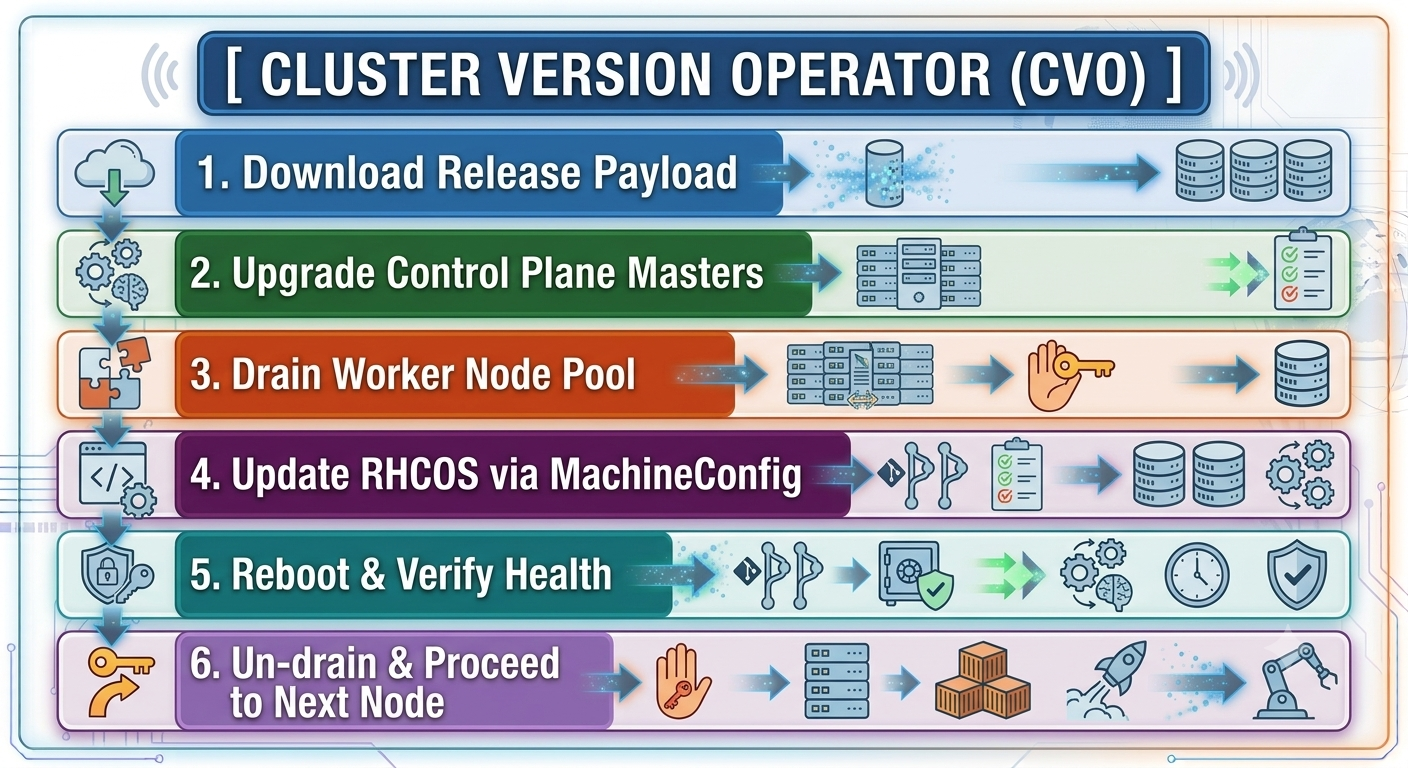
Safe Node Pool Updates Using Machine Config Operator
Control Plane Update First: In this case, master nodes that use RHCOS are updated individually. All services of the control plane will be available throughout the update procedure.
Cordon & Drain Worker Nodes: In case of updating worker nodes, the Machine Config Operator (MCO) cordon the node (the node becomes unschedulable) and drains running pods to other nodes.
Operating System Pivot: The underlying RHCOS operating system is updated through rpm-ostree in an atomic manner.
Restart & Health Check: After restart into the new kernel and runtime, once the cluster operators ensure that the node is working correctly, the node is un-cordoned and becomes schedulable again.
OpenShift API for Data Protection (OADP)
OADP operator supports backup and restore for application metadata and state stored in Persistent Volume using Velero with cloud object storage.
Core Disaster Recovery Functions
Control Plane Backups: Backup etcd key-value snapshots to protect against the catastrophe where you lose the ability to run the control plane or recover from any corruption within the cluster.
Application-Specific Snapshots: Application level backups of specific OpenShift projects, such as deployment config, routes, builds, secrets, and underlying PVC volumes through CSI snapshots.
Cluster Migration: Restore applications deployed in on-premises OpenShift cluster to the cloud-based OpenShift cluster (e.g., ROSA on AWS or ARO on Azure) in case of regional disaster outage.
Management of OpenShift Clusters Through RHACM and RHACS
In case if an enterprise is responsible for managing many OpenShift clusters, including those on the edge, on-premises, and in different clouds, then these enterprise teams deploy centralized tools:
Red Hat Advanced Cluster Management (RHACM): Governance, policy enforcement, application lifecycle management, and multi-cluster observability across all OpenShift clusters.
Red Hat Advanced Cluster Security (RHACS): A Kubernetes native platform for security operations built on top of StackRox.
Troubleshooting & Debugging OpenShift Clusters
When issues occur in production, platform engineers need to quickly identify whether the problem is linked to application code, networking policies, via resources, or through the operating system of the nodes.
Diagnosing Workload Failures
In the event of pod crashes or failures, use the following procedure using the oc CLI.
Condition of Resources and Events
First, use oc describe pod . At the end of the output file look at Events for common indicators such as:
ImagePullBackOff / ErrImagePull: wrong image tag, missing registry secret or firewall blocks access to the container registry.
OOMKilled (Exit code 137): container process has exceeded the memory limit imposed on it. This problem can be solved by increasing the memory limit in the manifest or monitoring the memory consumed by the application.
CrashLoopBackOff: the application has been started but returns the error code. Application logs should be checked to determine the cause of the problem.
FailedScheduling: there is not enough allocated CPU and memory resources on worker nodes, or there are no nodes that have the same nodeSelector, tolerations or persistent volume binding as those of the workload’s.
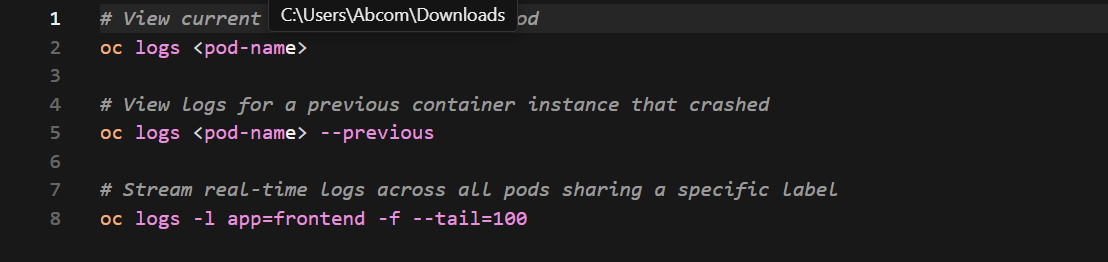
Fetching Application & Container Logs
Next Generation Node-Level Debugging
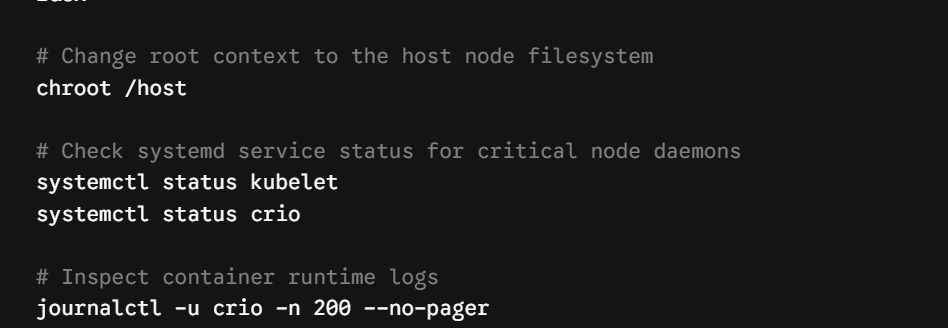
If a worker node goes NotReady, or has kernel problems, you can start an interactive admin shell right on the node, without having to SSH in with keys:

Once in the debug session, change the root context to access the host file system directly:
Checklist for Enterprise Production
Before adding production-ready applications to an OpenShift cluster, ensure that the following operational prerequisites are met:
Infrastructure and Capacity
Ensure worker nodes are distributed evenly among at least 3 different Availability Zones (AZs) or power racks.
Ensure there are at least 3 dedicated control plane (master) nodes and 2 infrastructure nodes to run routers, registries, and monitoring stacks apart from the workloads of users.
Assign dedicated high-performance disk storage (SSD/NVMe) for etcd nodes to avoid write latency timeouts.
Security and Compliance
Implement an enterprise Identity Provider (LDAP/Active Directory/OIDC) and disable the default kubeadmin user after confirming access.
Ensure that you have default project level ResourceQuotas and LimitRanges enabled to prevent any runaway deployments from eating up memory/CPU of the cluster.
We set default NetworkPolicies to deny everything, and require application teams to specify allowed ingress/egress pathways.
Operations and Resilience
Use OADP to perform automatic daily backup of the etcd key-value store and application persistent volumes.
Configure remote notification endpoints in Alertmanager such as PagerDuty, Slack or ServiceNow for critical cluster alerts.
Automate GitOps Workflows All application deployment manifests and cluster configurations are done only through version controlled repositories.
Conclusion: Moving Forward with Enterprise Containerization
From being just a container orchestration platform, Red Hat OpenShift has transformed itself into a fully-fledged enterprise-grade cloud-native stack. By providing a layer above the vanilla Kubernetes stack, OpenShift fills the gap between the flexibility of the open-source platform and enterprise security, reliability, and operations.
By understanding how the OpenShift architecture works, one can understand why it is chosen by highly regulated organizations and hybrid cloud environments. Integration of Red Hat Enterprise Linux CoreOS (RHCOS) provides an immutable and self-healing OS base, and native Cluster Operators make sure that all platform components including networking, internal registries are automatically updated. Security Context Constraints (SCC) ensure that containers cannot be launched in privileged mode.
Foundation : Containers, Podman, CRI-O & Kubernetes Primitives
Architecture : RHCOS, Cluster Operators, SCCs & Route Objects
Operations : S2I Builds, Dynamic Storage, RBAC & Monitoring
Automation : GitOps (Argo CD), Pipelines (Tekton) & Service Mesh
Mastery : Multi-Cluster Fleet Governance (RHACM) & Disaster Recovery
For platform engineers, system administrators, and developers, knowing the basics of container deployment is not enough when it comes to mastering OpenShift:
Platform Administrators will learn how to perform Day-2 operations, including managing over-the-air cluster upgrades, configuring enterprise identity providers, provisioning persistent storage with Red Hat OpenShift Data Foundation (ODF), and working with disaster recovery strategies with OADP.
DevOps and Site Reliability Engineers (SREs) will have to leverage automated build workflows such as Source-to-Image (S2I), define workloads using OpenShift GitOps (Argo CD) and manage complex communication between microservices with OpenShift Service Mesh.
Security Teams can use native governance tools like Red Hat Advanced Cluster Security (RHACS) to perform continuous container image scanning and compliance checks across edge, public cloud and bare-metal nodes.
As organizations become multi-cloud and adopt edge computing architectures, the ability to run workloads consistently across heterogeneous infrastructure is critical. OpenShift helps with this by providing a consistent operations layer, whether your cluster is running on AWS, Azure, Google Cloud, VMware, or bare-metal hardware. That benefit is extended even further with tools such as Red Hat Advanced Cluster Management (RHACM) that provide a single-pane-of-glass governance across dozens or even hundreds of distributed clusters.
If you want to earn industry-recognized certifications like the Red Hat Certified OpenShift Administrator (EX280) or architect scalable platform engineering environments for your organization, take a structured openshift online course combined with hands-on experience. As a modern cloud-native engineer, stay ahead of the curve by combining your theoretical knowledge of Kubernetes primitives with hands-on experience in troubleshooting, security hardening, and GitOps automation. OpenShift is not just a container runtime, it’s the operational backbone of modern enterprise software delivery.