
Understanding OpenShift Terminology: Projects, Pods, Services, and Routes Explained Simply
Last updated on Aug 1, 2026
Moving into the cloud-native world can be comparable to learning a foreign language. You can start recognizing containers, orchestration, control planes, and ingress in all discussions, which causes simple things to look intricate.
When you start using Red Hat OpenShift, you will deal with common Kubernetes terminology and special OpenShift modules that ease the process of deployment at the enterprise level.
If you are a developer, system administrator, or just a fan of technology, this guide is tailored to you.
We will cover the four components of OpenShift applications - Projects, Pods, Services, and Routes. By reading this guide, you will see how they work together to make any application accessible.
Understanding the Basics: Functionality of OpenShift Applications
Instead of defining the concepts separately, it is practical to realize how an application works inside OpenShift.
Compare a situation in which you decide to open a restaurant, for example.
Project: The special physical building that hosts the restaurant. The project fixes the borders, keeps the restaurant secure, and guarantees safety from other businesses.
Pod: The kitchen that has everything the cooks need. It contains all necessary tools and supplies to fulfill its tasks.
Service: The passing space inside, which is always available for waiters.
Route: The front door that welcomes customers who want to order food upon entering.
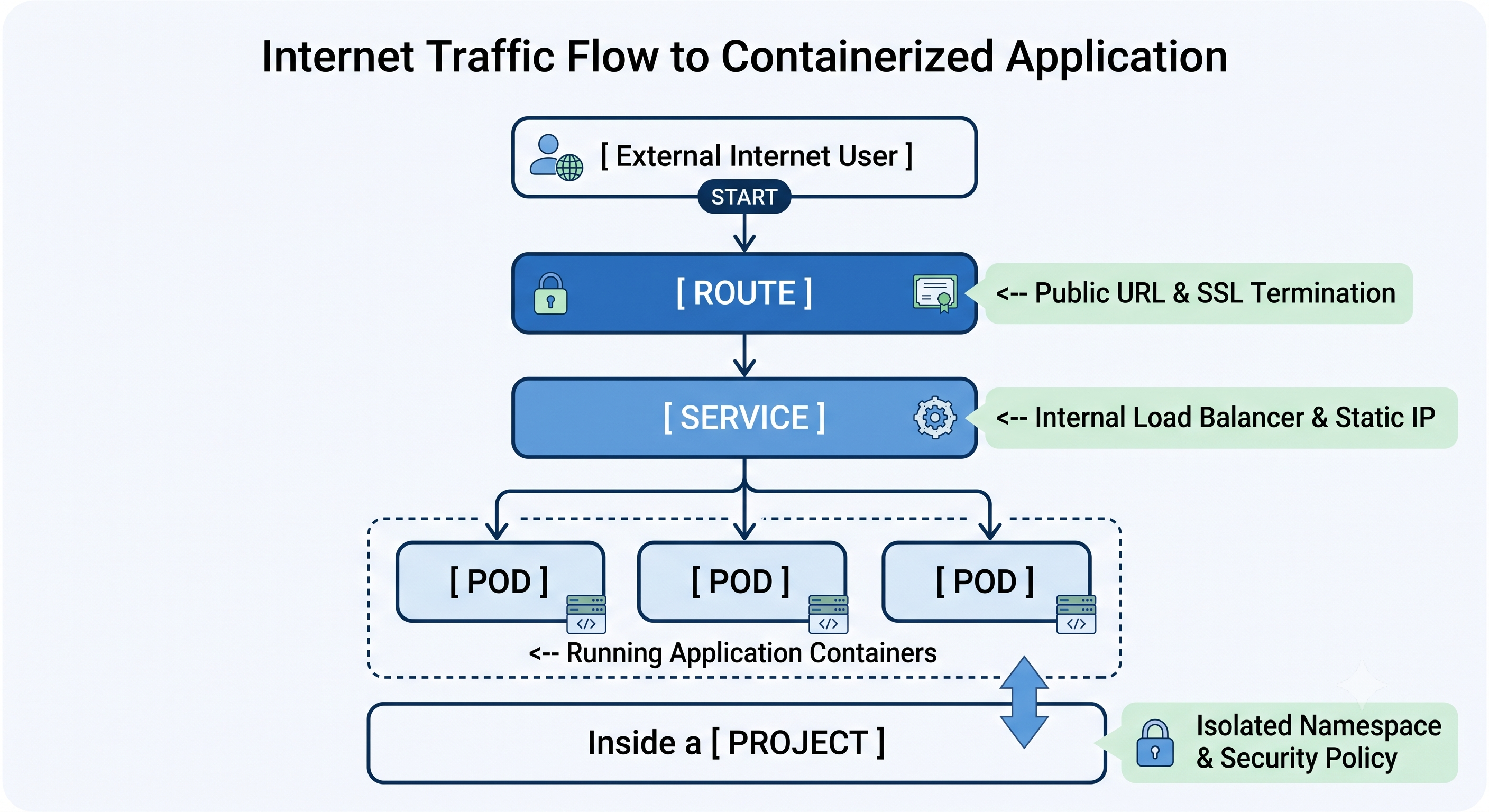
When a user operates your app, their request travels downwards through the hierarchy outlined above that includes Route, Service, and Pods, whereas all of this exists safely within a Project.
Projects: Your Secure Workspace
In standard Kubernetes, workloads are organized into groups known as Namespaces. Namespace is a logical group of resources isolated from all other Namespaces in a cluster.
OpenShift modifies the concept of Kubernetes Namespaces by adding a higher-level abstraction, which is called Project.
What a Project Is
Project in OpenShift refers to Kubernetes namespace with some access controls, security policies, and limits in resources. It’s considered an isolated workspace where the teams deploy applications without disturbing or even seeing the other applications deployed in the same cluster.
Why OpenShift Uses Projects, Not Pure Namespaces
The reason for OpenShift using Projects instead of standard Kubernetes Namespaces is that OpenShift makes significant improvements with regard to provisioning, security, access control, and resource management.
Concerning the security topics, Kubernetes namespaces are permissive by default, so the containers will run as root unless they are specifically restricted. On the contrary, OpenShift projects are secure as they employ security context constraints (SCC) automatically, which impede the execution of commands as root and improve isolation.
Regarding access control, Kubernetes by default uses role-based access control (RBAC) that should be set up manually after creating a namespace. On the other hand, OpenShift projects come with RBAC built-in already.
Finally, regarding resource quotas, it is necessary to apply separate ResourceQuota manifests to set limits.
Key Project Features
Security Context Constraints (SCC) – rules that define the actions a pod may perform and the system resources it may use. The SCCs are assigned in the automated way reducing the opportunity for containers to affect the functioning of the host node.
Resource Quotas and Limit Ranges – the limits set by system admins limiting the use of CPU and RAM by a project.
Handy commands for projects

If you want to have a practice in these commands in real business environments, enrolling in a professional redhat openshift training course at OnlineITGuru helps develop the skills along with live cases.
Pods: The Core of Compute
In a classic environment, one would launch an application on a Virtual Machine or a conventional server. In a containerized set-up such as OpenShift, the minimal deployable unit in effect is Pod and not single container.
So what does the term Pod mean? Pod is a cover for more than one closely associated container that has the same IP address, storage volumes, and lifecycle.
See Pod as a cowshed or a pea-pod that consists of components closely associated with one another.
Pods with one container vs Pods with multiple containers.
In 90% of instances, a Pod has only one container, for instance, Node.js web server or a Python API.
Nonetheless, these arrangements with multi-container pods do exist as in Sidecar Pattern, where the second container only plays the supportive role.
Mature Container: This type of container runs a main application (e.g. web service).
Sidecar Container only solves the additional tasks like streaming logs, computers’ security certificate updating, or serving as a proxy.
Due to both containers having the same network namespace in the Pod, they can communicate with one another through the localhost device.
Defining Features of Pods
Transient Nature: Pods are not permanent. Whenever a worker node suffers a crash or exhausts its resources, OpenShift kills the affected Pod and brings another Pod in the cluster up elsewhere.
Dynamic IP Addressing: A Pod is assigned a new internal IP address every time it is recreated or restarted. Hence, you should refrain from hard-coding the IP address of any Pod in your application configurations.
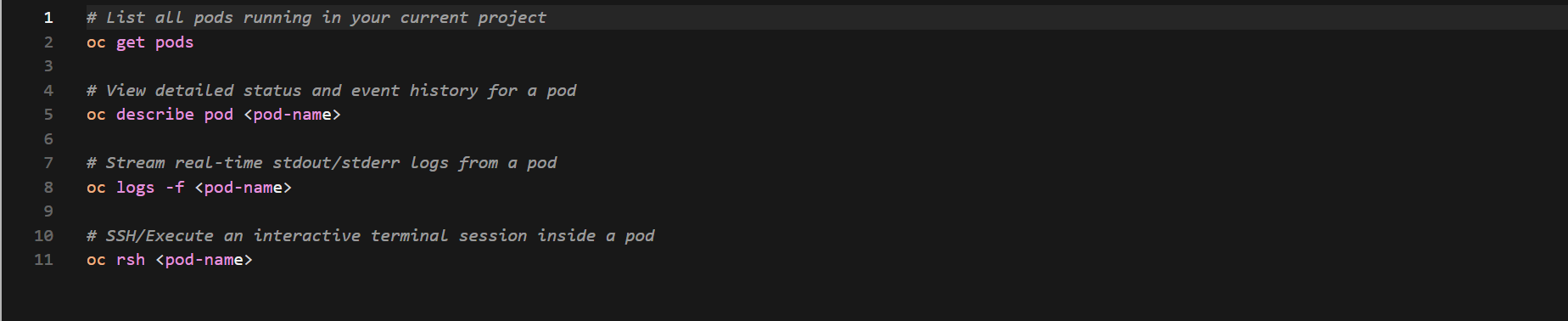
Handy Commands for Pods
4. Services: The Stable Internal Connector
Since Pod IPs are temporary and change with every container restart, what mechanism allows other microservices to communicate with them?
This is where Services come into play.
What is a Service?
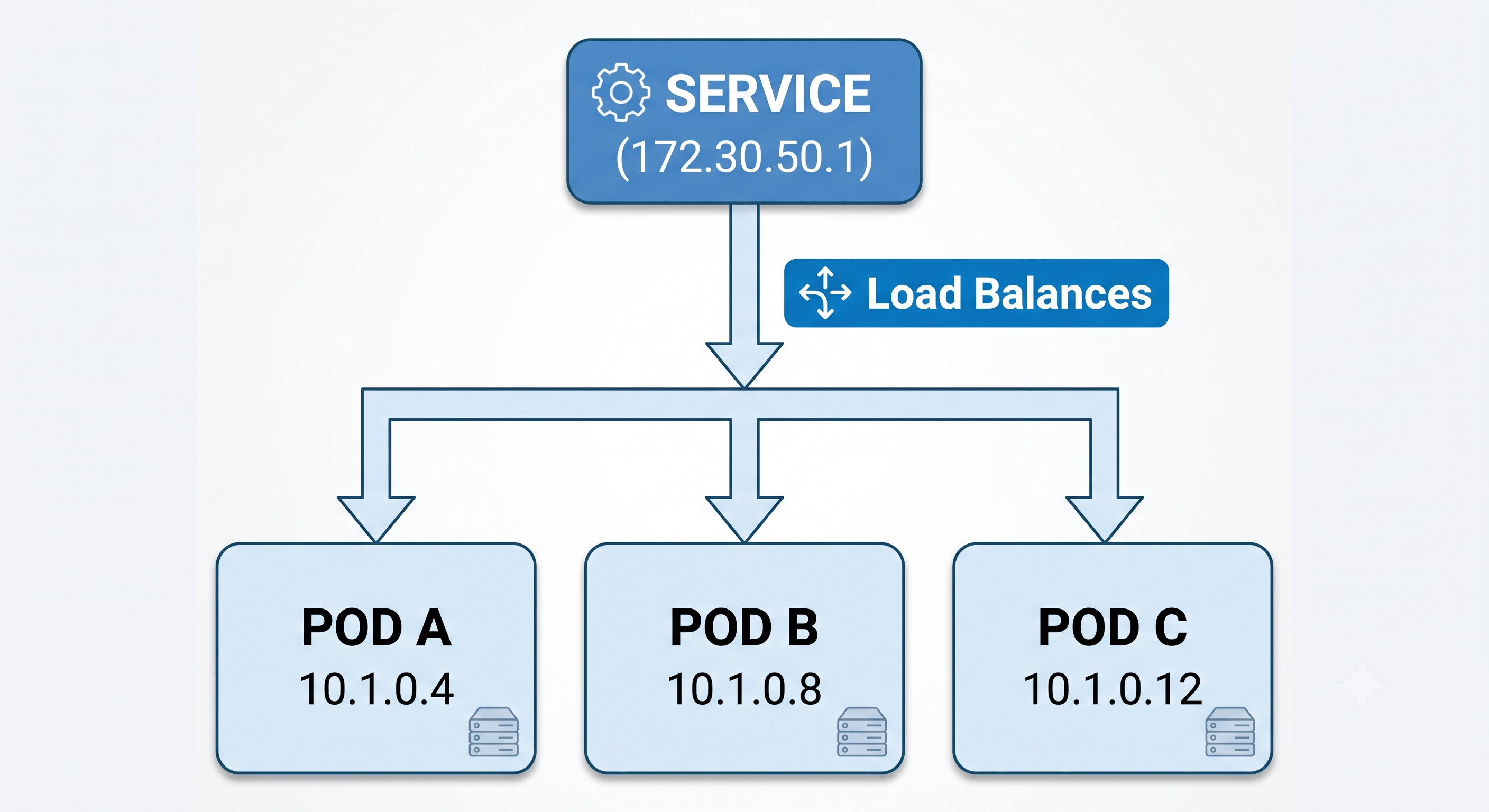
OpenShift Service is an internal layer that serves as a permanent IP address, DNS name, and load balancer for a group of similar Pods.
Whereas Pods are temporary, the Service is stable and operational for the entire period of its existence. It maintains the up-to-date registry of the active Pod IPs and distributes the internal traffic among them.
How Services Locate Their Pods: Selectors & Labels
Services do not keep track of Pods through the manual record of IPs. Instead, they use Selectors and Labels.
Labels represent key-value pairs that are associated with Pods, for instance: app: frontend, env: production. Selectors are search criteria on the Service level such as: "Find all Pods with app: frontend labels."
If you increase the number of Pods of your application from 2 to 10, OpenShift will automatically assign the app: frontend label to the 8 new Pods. The Service instantaneously identifies them and starts sending internal traffic to them.
Service Types ClusterIP (Default): The Service is available on an internal cluster IP. Ideal for back-end databases or APIs that cannot be accessed externally.
NodePort: The Service is accessible through each Node IP address at a fixed port.
LoadBalancer: The Service works with public cloud providers (AWS, Azure, GCP) to create an external cloud load balancer.
Useful Commands on Services

Routes: Making Applications Accessible to the External World
Service is used for internal communication within the cluster, while the web browser/mobile application can't access the ClusterIP directly.
To connect internal clusters to the outside world, OpenShift employs a native OpenShift concept called a Route.
What is a Route?
Route in OpenShift is a resource that exposes the Service and provides it with the publicly accessible hostname (URL), like my-app.apps.example.com.
Actually, OpenShift launches an HAProxy Ingress Router internally. The Route configures HAProxy so it accepts external requests and routes them directly to the internal Service.
OpenShift Route and Kubernetes Ingress:
In classic Kubernetes, there is an Ingress resource that should be configured together with an externally launched Ingress Controller (for example, NGINX). Red Hat introduced Routes before the Ingress API was implemented in Kubernetes. The Routes have built-in TLS termination, support wildcard domain names out-of-the-box, and are configured using YAML files more easily. OpenShift also supports the standard Kubernetes Ingress resources.
TLS Termination and Route Security Types
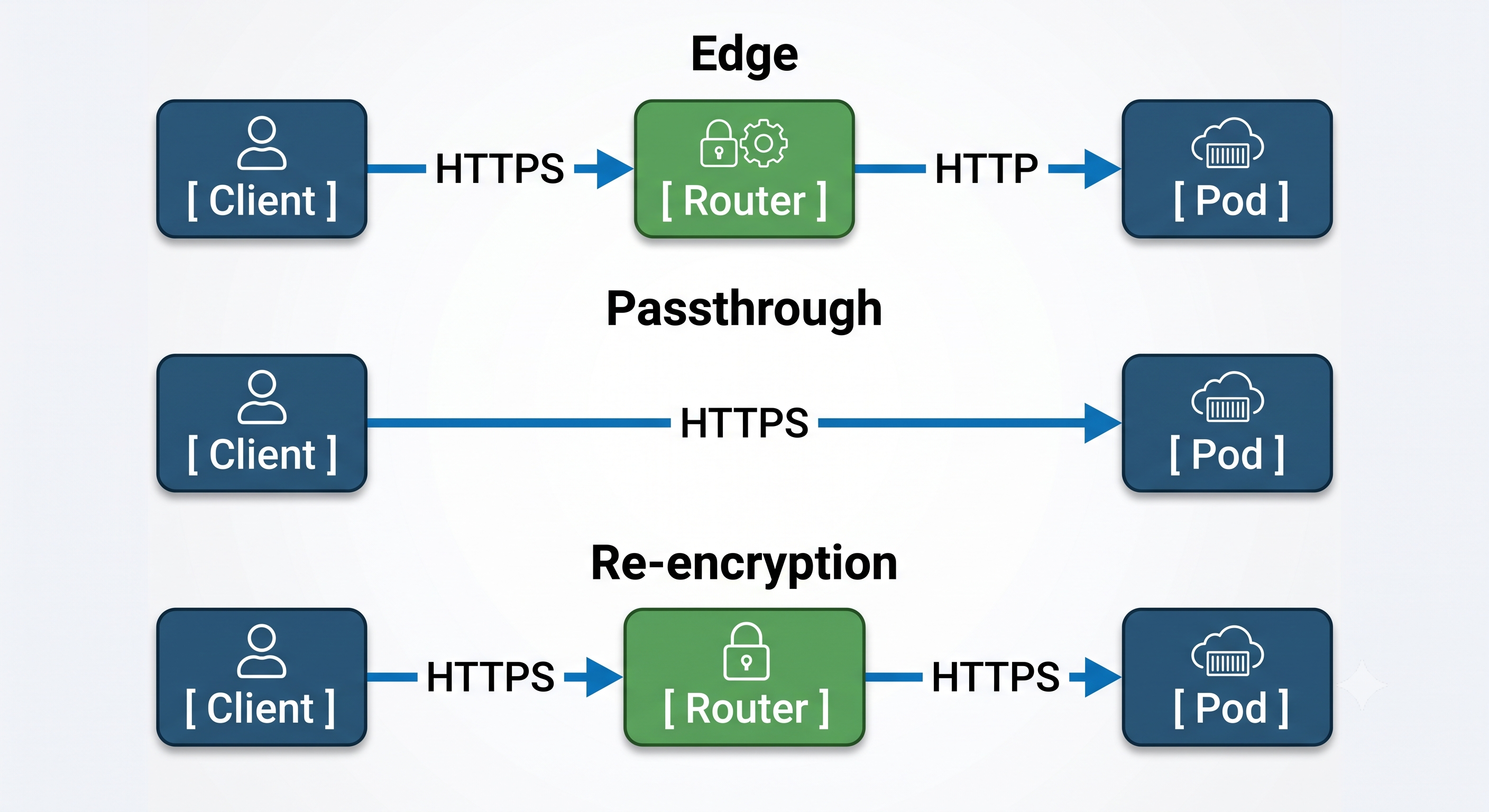
Routes work seamlessly with transport layer security (SSL/TLS encryption) You can choose between three types of termination:
Edge Termination: This is SSL/TLS decryption at the OpenShift Router layer. Then the traffic goes to a Pod as plain HTTP.
Passthrough Termination: Bypasses the router entirely; sends encrypted data directly to the Pod. Data is decrypted within the Pod app.
Re-encryption: Traffic decrypted at the router for header inspection/validation, and re-encrypted before being sent to the internal Pod.
Useful Commands for Routes

An Example: Step by Step
Now the time has come to see how these different pieces can work together in a real life setup.
Suppose you want to get your Python Flask-based application inventory-api up and running.
1. Step One: Create the Project
Be sure you have the right app space:
2. Step Two: is to implement the app (creates Pods)
OpenShift creates a deployment configuration that results in Pods with the Python container in it. Pods are assigned a unique internal IP address of 10.128.2.15.
3. Step Three: consists in providing the service.
Port 5000 of the Python app is opened for internal communication. OpenShift sets up the service. The service is now called inventory-service and has a stable internal IP address of 172.30.100.45. The service is associated with the Pods that have app: inventory-api label.
4. Step Four: requires setting up the route.
This way, the inventory-service is open for the world to see. OpenShift provides the route to the service. [http://inventory-api-inventory-team.apps.cluster.com](http://inventory-api-inventory-team.apps.cluster.com).
Now, once the user opens the URL in the browser:
The request reaches the route on the cluster border.
The path of the request goes to the service now.
The service shares out the load among operational Pods.
The request is processed by the app inside the sandbox of the project and the answer is sent back to the user.
Learning with basic scenarios indeed helps you lay down your basic knowledge, however knowing how to execute such deployments in real life is much simpler with a professional openshift course.
Summary Cheat Sheet
An OpenShift Project implements itself as a boundary that is isolated and safe, and yet is designed around the standardized Kubernetes namespace. The ultimate aim of the project is to assure a number of tenants catered for, maintain security protocols, and impose resource quotas.
The project opens another tier of operation called the Pod which represents a minimal constitutive unit that is capable of being deployed. The pod consists of one or more containers that are located in the same place and serve the purpose of performing the assigned task.
One more subject connected to the pods is the Service that is responsible for handling the IP address, DNS name, and a balancer of the related group of pods. The Service performs its functions similar to the order counter in a restaurant.
The route can be viewed as an external entry point for applications that assign an external and readily available URL to a service. Think of the route as a restaurant's front door, warmly welcoming visitors into the restaurant. Thus, in essence, the major purpose of a route is to allow the application to be visible on the web.
Advanced Methods of Managing Traffic and Routing
After comprehending the route from a Route to a Service and down to a Pod, you can use the built-in capabilities of OpenShift for implementing advanced tactics and traffic control.
A/B Testing and Canary Deployments
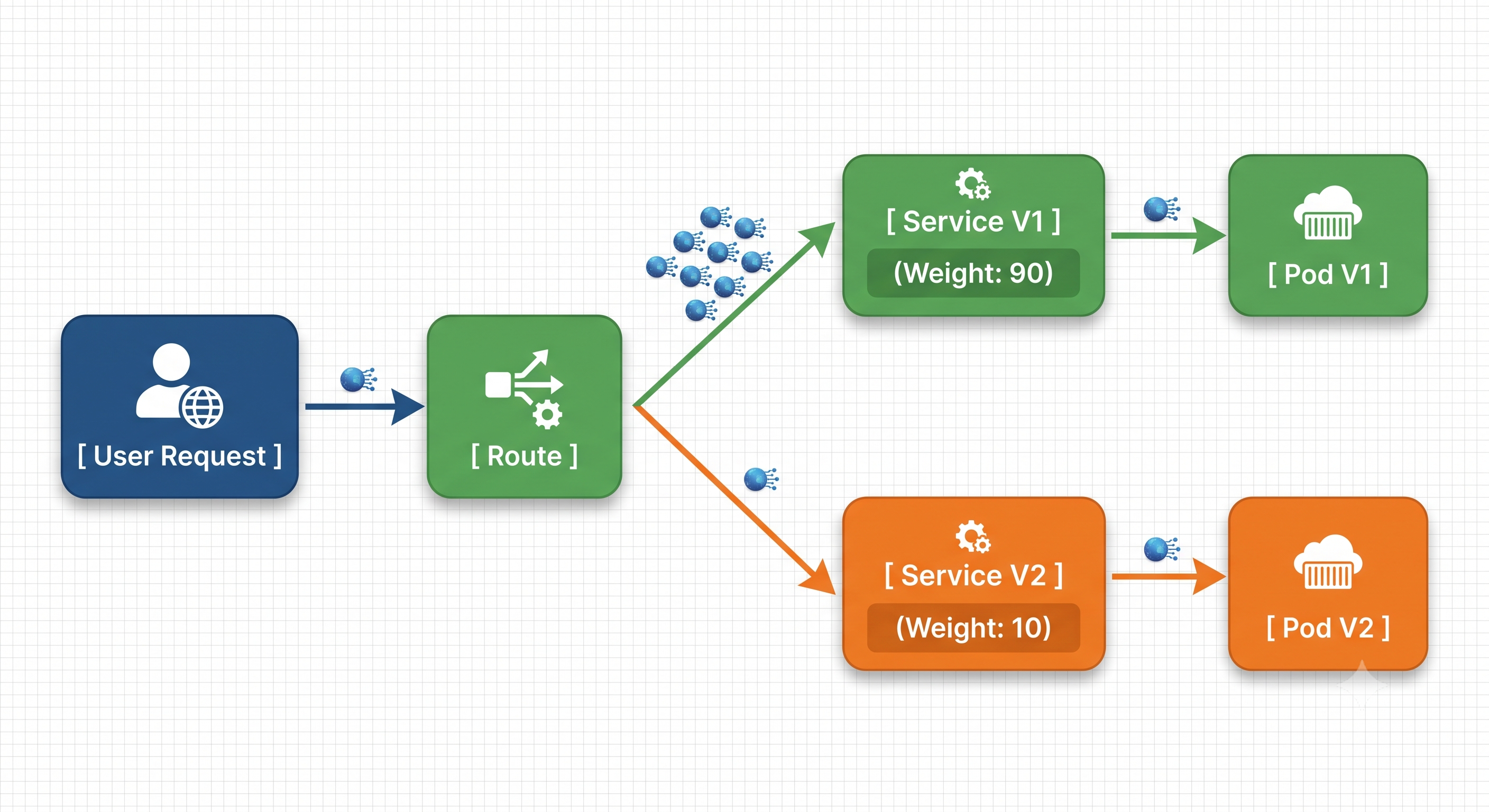
Even though it is possible to release a new version of your software to all your clients at once in production, it can be a perilous process. OpenShift Routes can split traffic in a native manner, letting you perform canary releases and A/B testing without a full service mesh, for instance, Istio or Linkerd in your infrastructure.
OpenShift Route can point to multiple Services at a time, which means that it can distribute user traffic according to the weight.
Example Use Case
Assume that you are moving from version v1 of your microservice to version v2. You would like to maintain around 90% of the production traffic on the stable version v1 while testing version v2 with the remaining 10%.
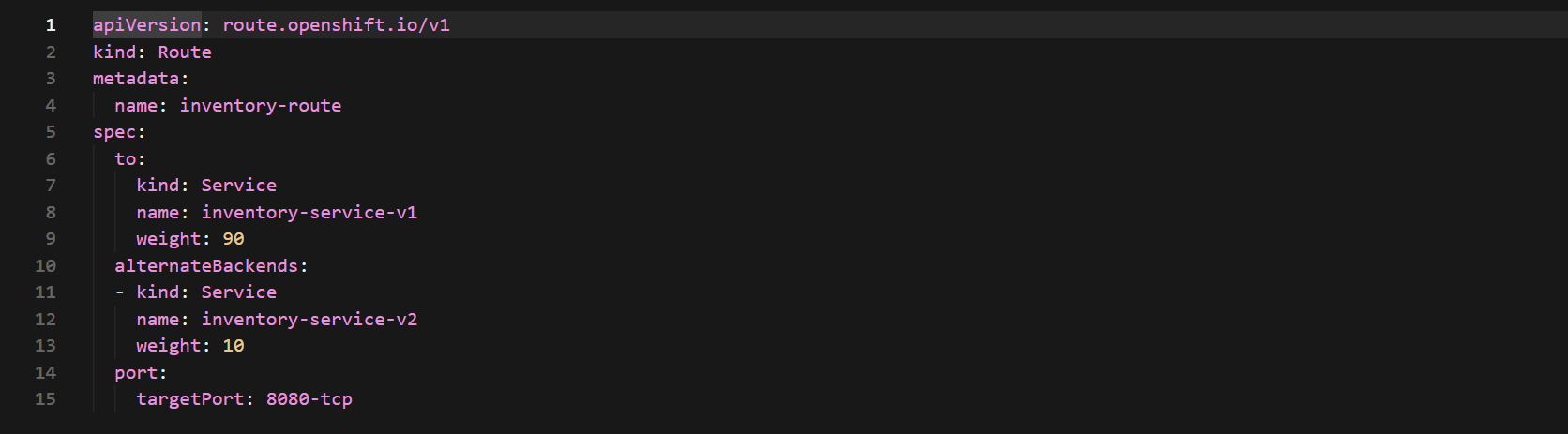
In your journey towards mastering inventory-service-v2, you will be able to change the weight of the instances through the oc command line interface or web console.

Path and Header-Based Routing
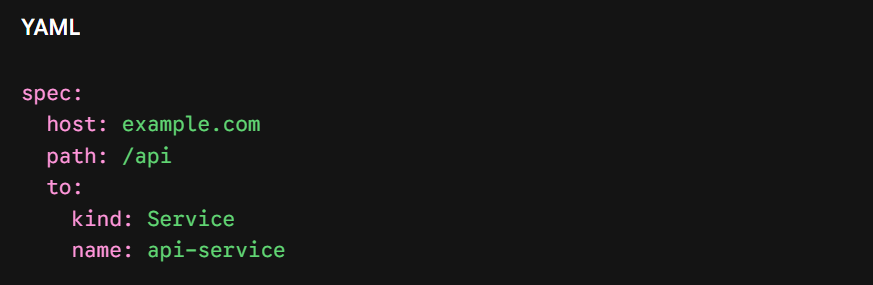
Another approach to routing is the ability to examine incoming HTTP requests to route traffic to different destinations based on the URL paths. This means that a single domain name can host multiple separate backend microservices in your Project.
[https://example.com/api](https://example.com/api), Routes to api-service
[https://example.com/analytics](https://example.com/analytics), Routes to analytics-service
[https://example.com/](https://example.com/), Routes to frontend-service
Persistent Storage for Stateful Applications
Up to this point, Pods have been viewed primarily in their role as temporary computing entities. A Pod hosting a database (e.g., MySQL, PostgreSQL or MongoDB), upon crashing or being migrated, will lose any information stored in its local filesystem. To ensure safe operation of stateful applications, OpenShift separates storage management from Pod management using three important storage elements: Persistent Volumes (PV), Persistent Volume Claims (PVC), and Storage Classes.
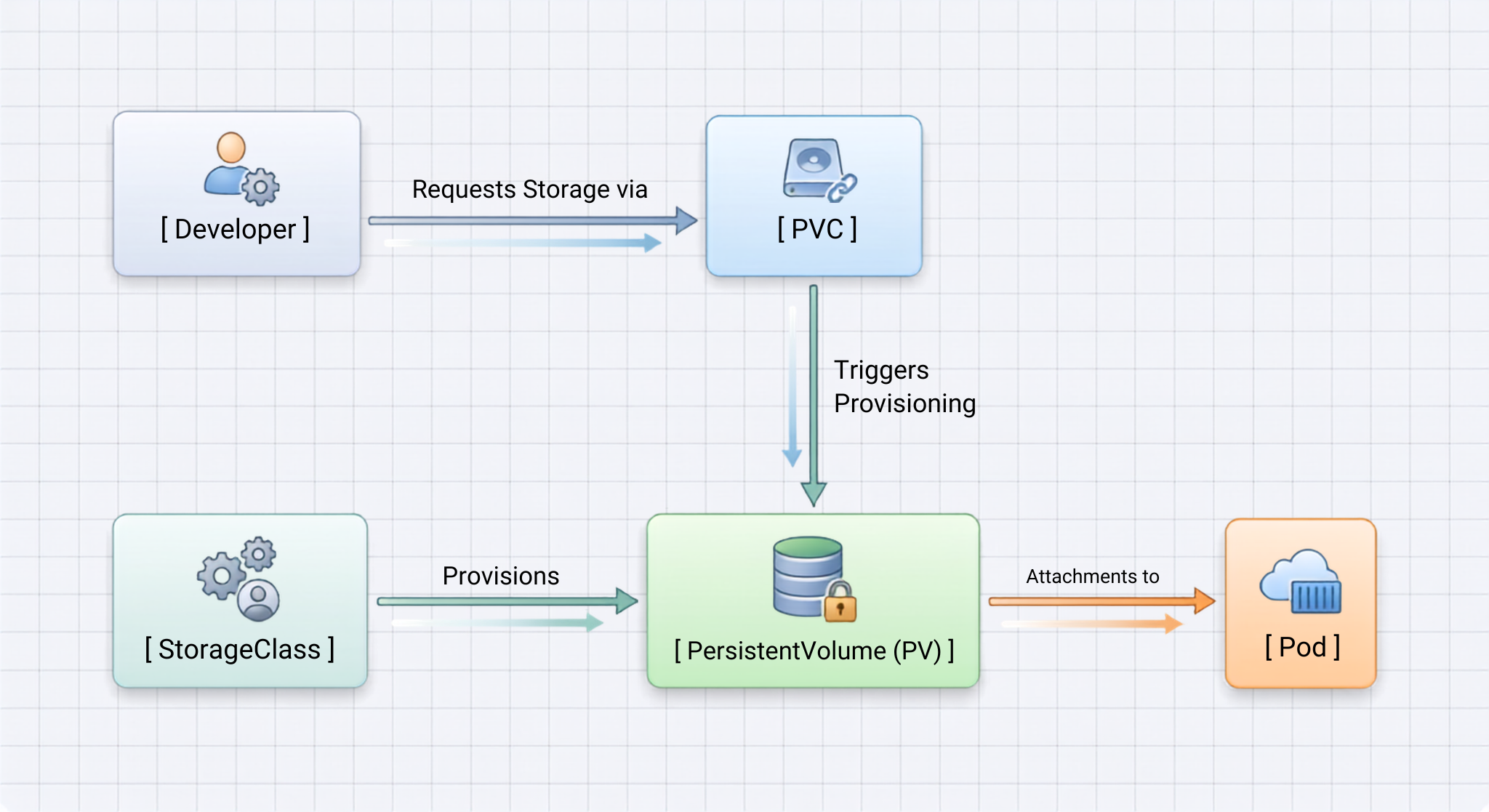
1. PersistentVolume (PV)
PersistentVolume denotes physical storage inside the cluster allocated either by an administrator or automatically created using some storage plugin (e.g., AWS EBS, Azure disk, Ceph/Red Hat OpenShift Data Foundation, or NFS). PV is a cluster-wide resource and does not belong to any single project, or installation.
2. PersistentVolumeClaim (PVC)
The PersistentVolumeClaim is a storage request made by the developer. The engineer proposes how much storage is required (e.g., 50 Gi) and what type of access mode is needed. Upon receiving this request, OpenShift searches for the existing PVs or dynamically creates a new one.

3. Access Modes Explained
While making a storage request with PVC, it’s important to establish how Pods can have read-write access to the given volume:
1. ReadWriteMany (RWX): The volume can be mounted ReadWrite by only a single instance at any time. Often used for traditional databases without clustering, e.g. PostgreSQL.
2. ReadWriteMany (RWX): The volume can be mounted as ReadWrite by many nodes. This helps in content management workflows, like when several users are uploading images.
3. ReadOnlyMany (ROX) : The volume will be mounted by many clients in read-only mode. Good for delivering configuration files.
Day-2 Activities: Supervision, wellness checks and problem solving
Getting the application running is only half the battle. The 3 main skills needed to deploy an OpenShift environment in production are application health management, computing resource management and failure assessment.
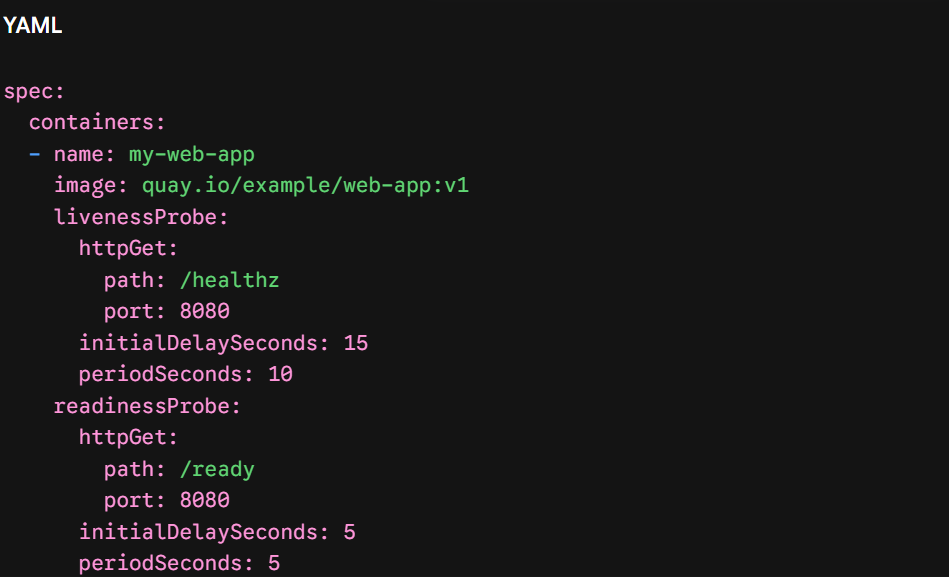
Health Monitoring: Alive and Ready probes
OpenShift uses probes to determine the internal state of your containers in Pods.
OpenShift knows the internal state of your containers within Pods through the use of probes. If there are no probes, OpenShift may only be aware of whether the primary process in the container is active or not.
1. Readiness Probe checks if a Pod is ready for Service.
If this test is successful, the Pod IP will be included in the Service endpoints. If this test fails, OpenShift temporarily removes the Pod IP address from the Service endpoints to avoid 502 errors.
2. Liveness Probe checks if a container should be restarted.
If this test is successful, nothing will be done; the app still works. If it fails, OpenShift kills the container and starts a new one in the same Pod.
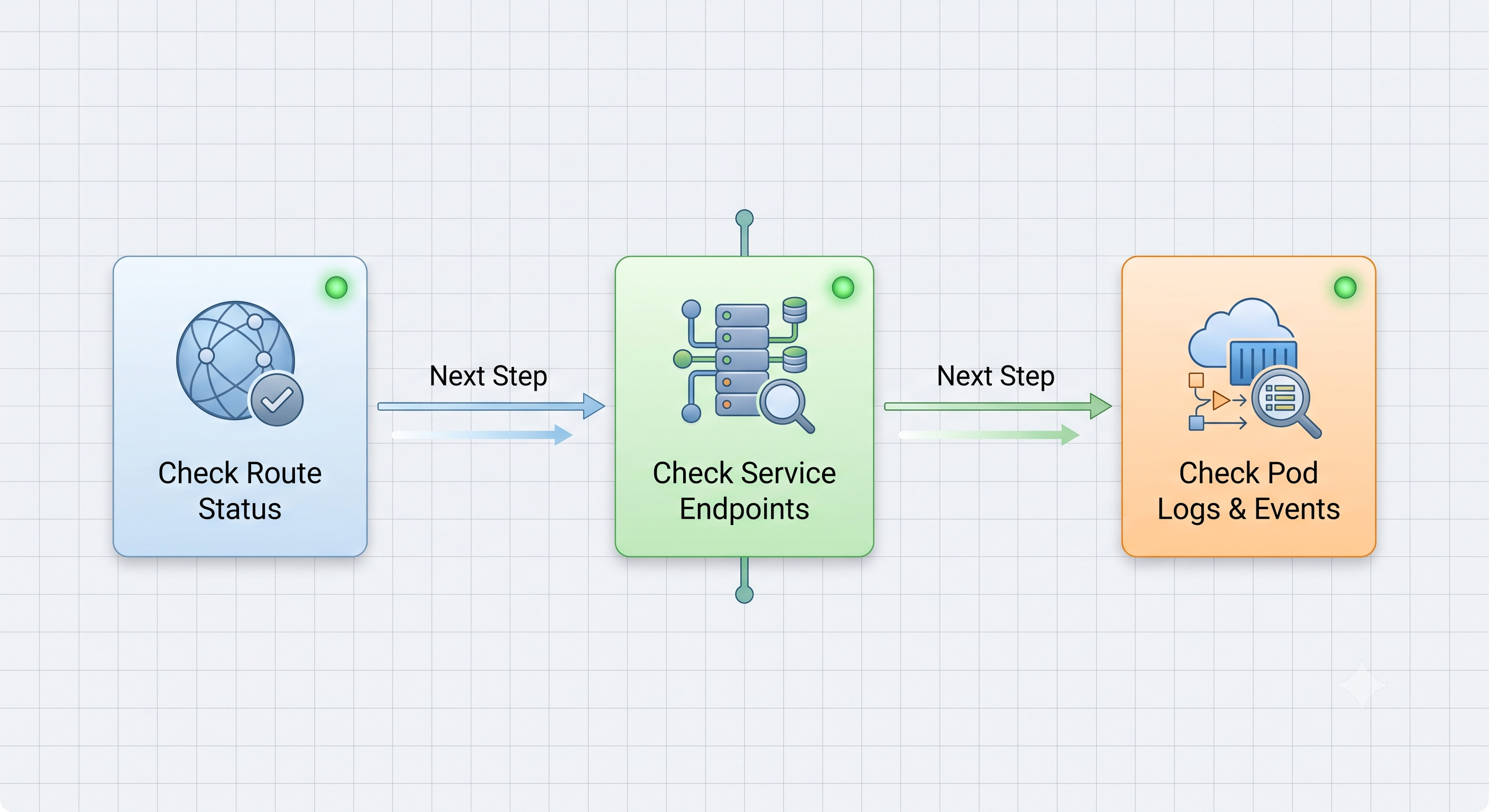
Troubleshooting Process in Sequential Manner
In the event that an application fails to function in the OpenShift environment, engineers use the resource hierarchy approach by performing the required troubleshooting process:
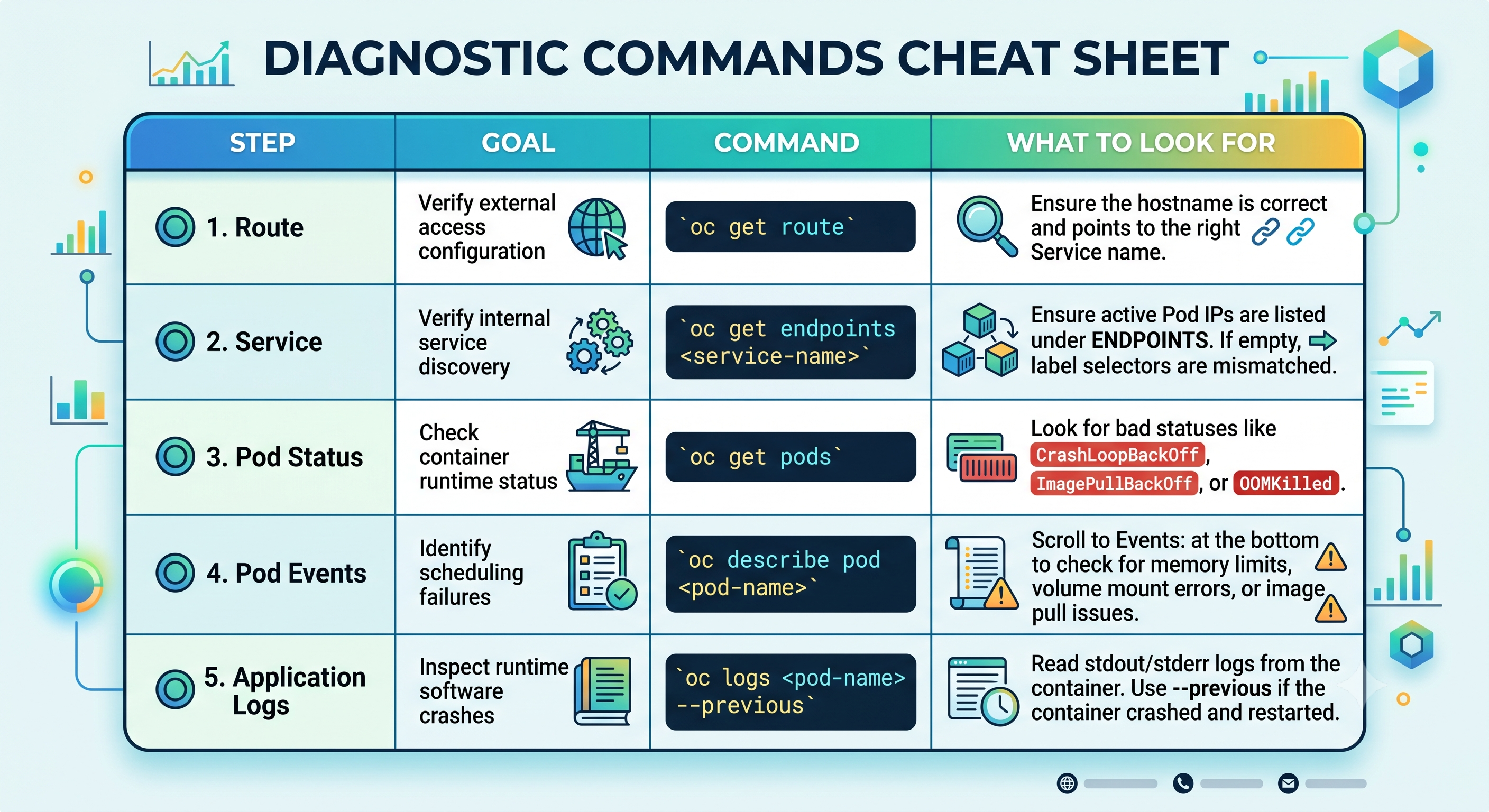
Actually, acquiring knowledge in diagnosing live cluster failures occurs successfully owing to the effective hybrid lab implementation openshift training online where you learn to troubleshoot real production settings.
Revised Thorough Overview of Architecture
After discussing storage and day-2 processes in addition to core networking, we can visualize the complete business scope of an OpenShift application in this manner:
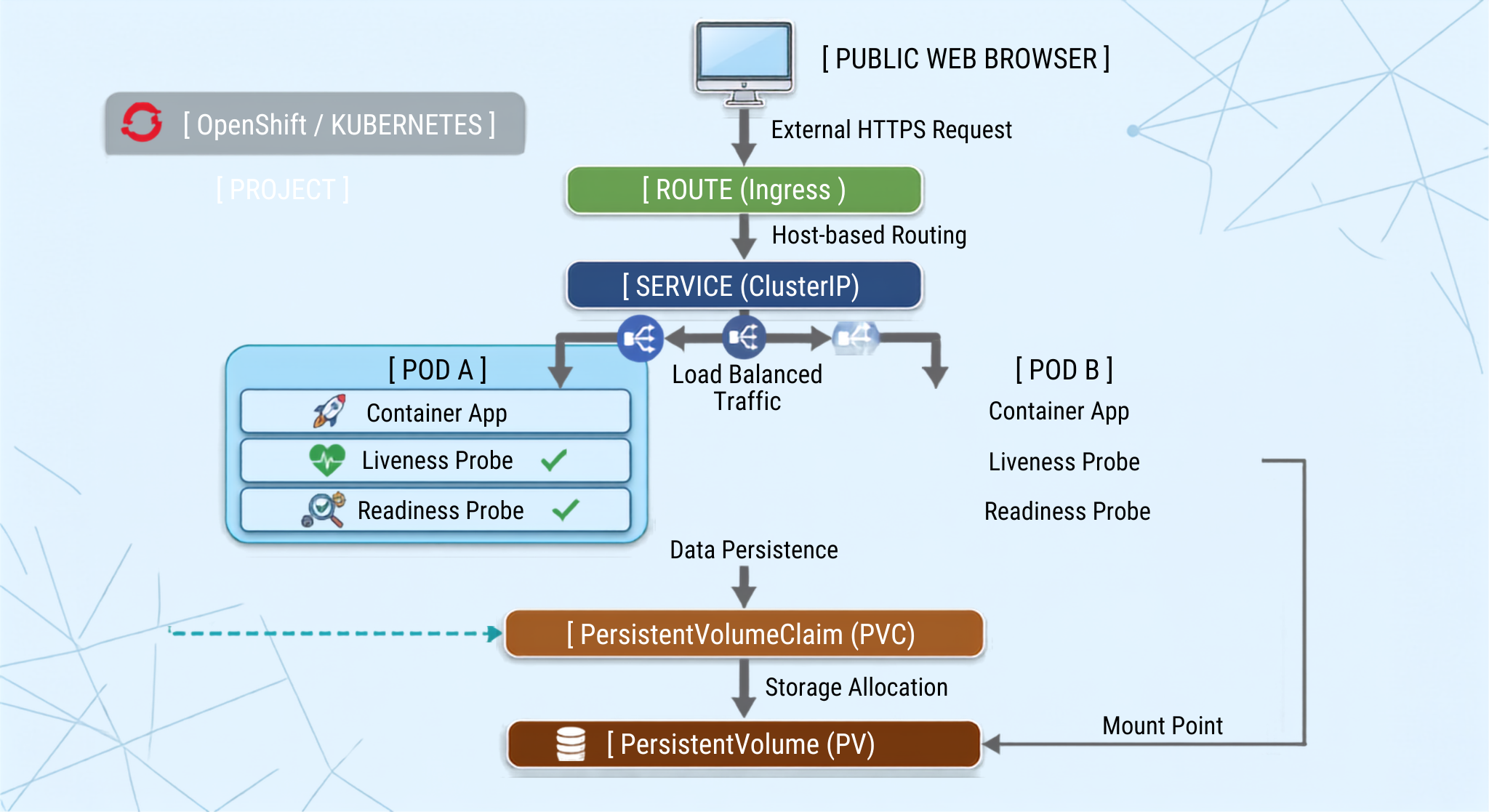
Once you link these architectural ideas, you have ensured a proper, professional knowledge of how container workloads operate on Red Hat OpenShift.
Conclusion: The significance of OpenShift Abstractions
Navigating through enterprise containerization may seem to be a complicated process. Although Kubernetes is the main engine behind container orchestration, Red Hat OpenShift makes managing containerization simpler through the means of creating an array of suitable abstractions. When you have learned about the four essential elements, you have the blueprint for writing reliable, scalable, and secure cloud-native applications. Now you are ready to test advanced features of open shift training such as Deployments, BuildConfigs, Source-to-Image (S2I) technology, and Operators with ease.
If you want to enhance your technical skills and get prepared for Red Hat’s certifications like EX280, you may opt for specific open shift training at OnlineITGuru and learn from professionals in your field.
If one understands how various OpenShift elements function as a part of containerization projects, he/she becomes capable of confidently working with applications using OpenShift.
Thus, it is worth payment attention to the main functions performed by the OpenShift components:
– Projects provide necessary isolation and security for teams working on their projects;
– Pods perform the computing processes;
– Services make containers' IP addresses stable;
– Routes serve as an access point to the web.
When you know how these four core elements function, you possess the prototype for constructing cloud-native applications that are highly dependable, expandable, and safe. You can now try out sophisticated OpenShift options like Deployments, BuildConfigs, Source-to-Image (S2I) technology, and Operators without any problems.