
Understanding Workday Cloud Connect Integration Features
Last updated on Nov 17, 2026
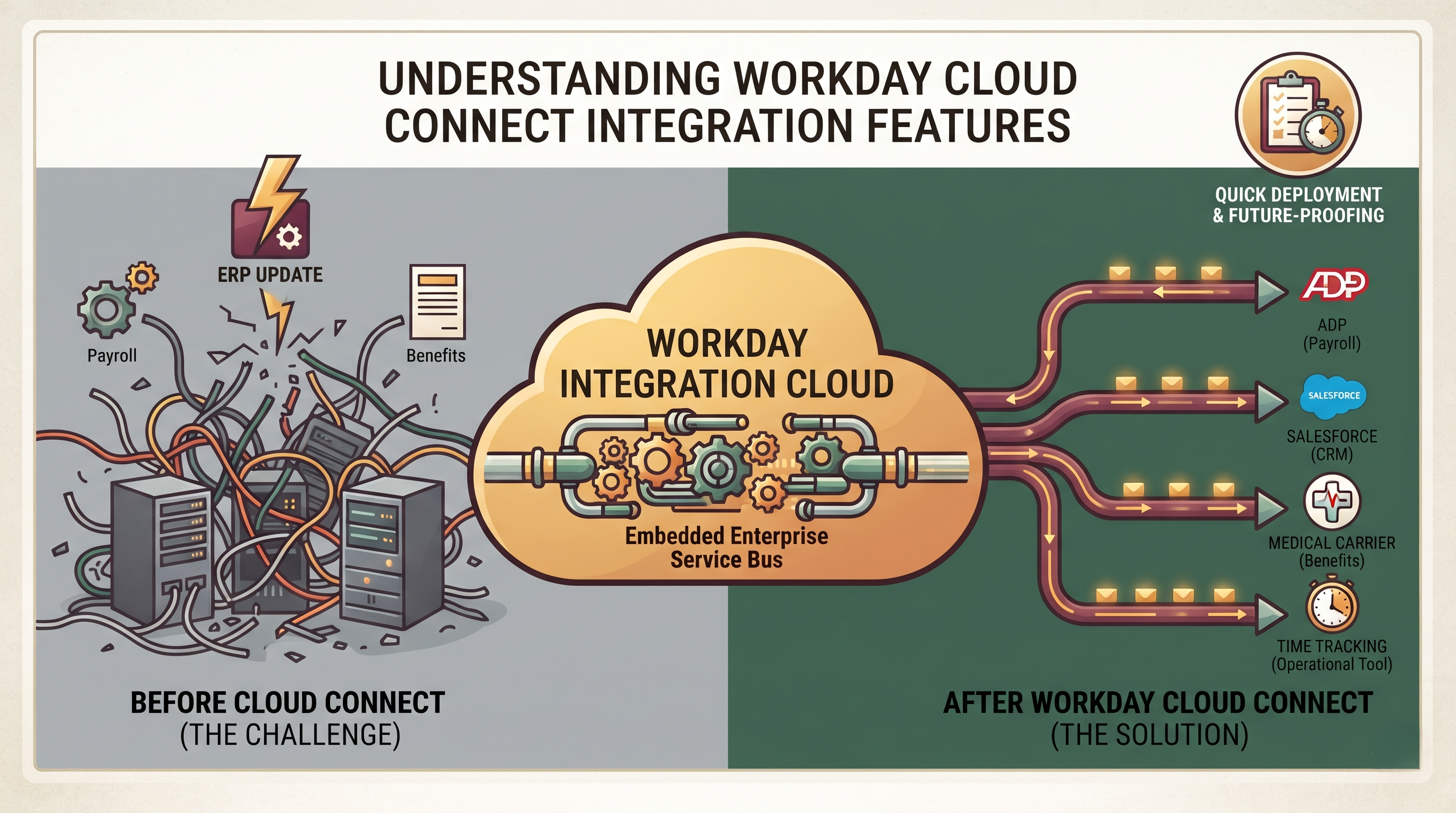
Enterprise Integration & Workday
You don't often see a business running on one single monolithic software system in today's business world. Instead, they depend on a wide ecosystem of applications from human resources and financial management to customer relationship management, payroll processing and benefits administration, and specialised operational tools. As companies grow, the need for these disparate systems to be able to talk to each other seamlessly becomes a necessity.” Data silos result in operational inefficiencies, higher risk of compliance errors and inability of leadership to have a consolidated, real-time view of how the organization is performing.
In this context Workday is the leading cloud-native system of record for enterprise human capital management and financial management. Workday is the system of record for personnel data, organisational structures, compensation and core financial information. It must therefore continuously communicate with external systems. Workday addressed this need by building Workday Integration Cloud, a technology platform that allows simple, secure and governed data exchange in a simplified way.
Central to this ecosystem is the Workday Integration Cloud Connect, a suite of pre-built, fully-managed integrations. These integration tools and packages close the gap between Workday and third-party vendors, eliminating the traditional complexities of building, hosting and maintaining custom integration middleware. Workday Integration Cloud Connect provides organisations with the capability to seamlessly and securely integrate core business processes with external services with reduced costs associated with administrative overhead in the future. In effect, if one happens to be an IT professional or consultant and wants to develop these skills, then it is recommended that one sign up for workday integration training.
Cloud Evolution Era Integration Challenges
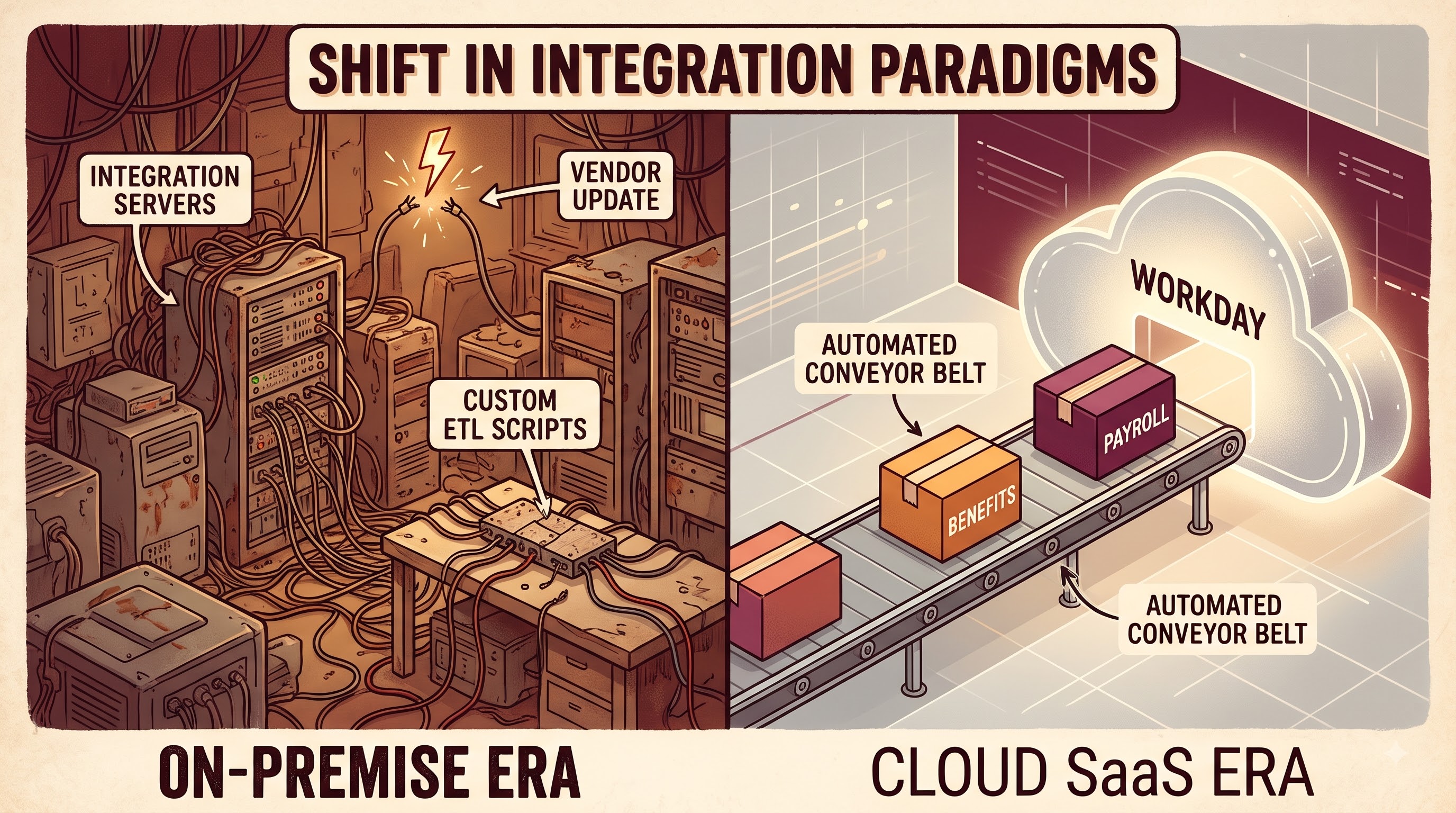
Historically, on premise architectures have been complex, expensive and fragile for enterprise integration. IT departments used traditional Enterprise Service Bus products, custom-coded Extract, Transform and Load scripts, point-to-point flat file transfers, and dedicated integration servers in the data center. These old solutions had many challenges. An enterprise software vendor’s version update would often break custom integrations, requiring manual remediation, extensive regression testing, and significant capital investment. Secondly the physical integration servers had to be maintained and running which means having specialised technical staff, good disaster recovery processes and constant security patching.
This paradigm was turned on its head when cloud applications were offered as Software-as-a-Service. SaaS models have relieved organisations of the overhead of managing the underlying hardware and application code, but have introduced new integration dynamics. Cloud applications are updated regularly either every six months or quarterly. If you build integrations on static API endpoints or custom scripts that don’t respond to changes in the cloud application’s structure, they break.
Workday’s answer to this architectural challenge was to house its integration platform in the same cloud environment where its core applications live. Workday Integration Cloud is a single platform-as-a-service layer that keeps integrations in sync with the core system. With Workday Integration Cloud Connect, you get a prebuilt layer that takes the technical complexity out of connecting to external third party vendors. Organisations don't need to build custom logic from scratch for common industry processes like benefits enrolment, payroll transmission or time tracking. Or they may utilise prebuilt connectors that are continuously updated, tested, and maintained by Workday or certified partners.
Basic Design and Operation
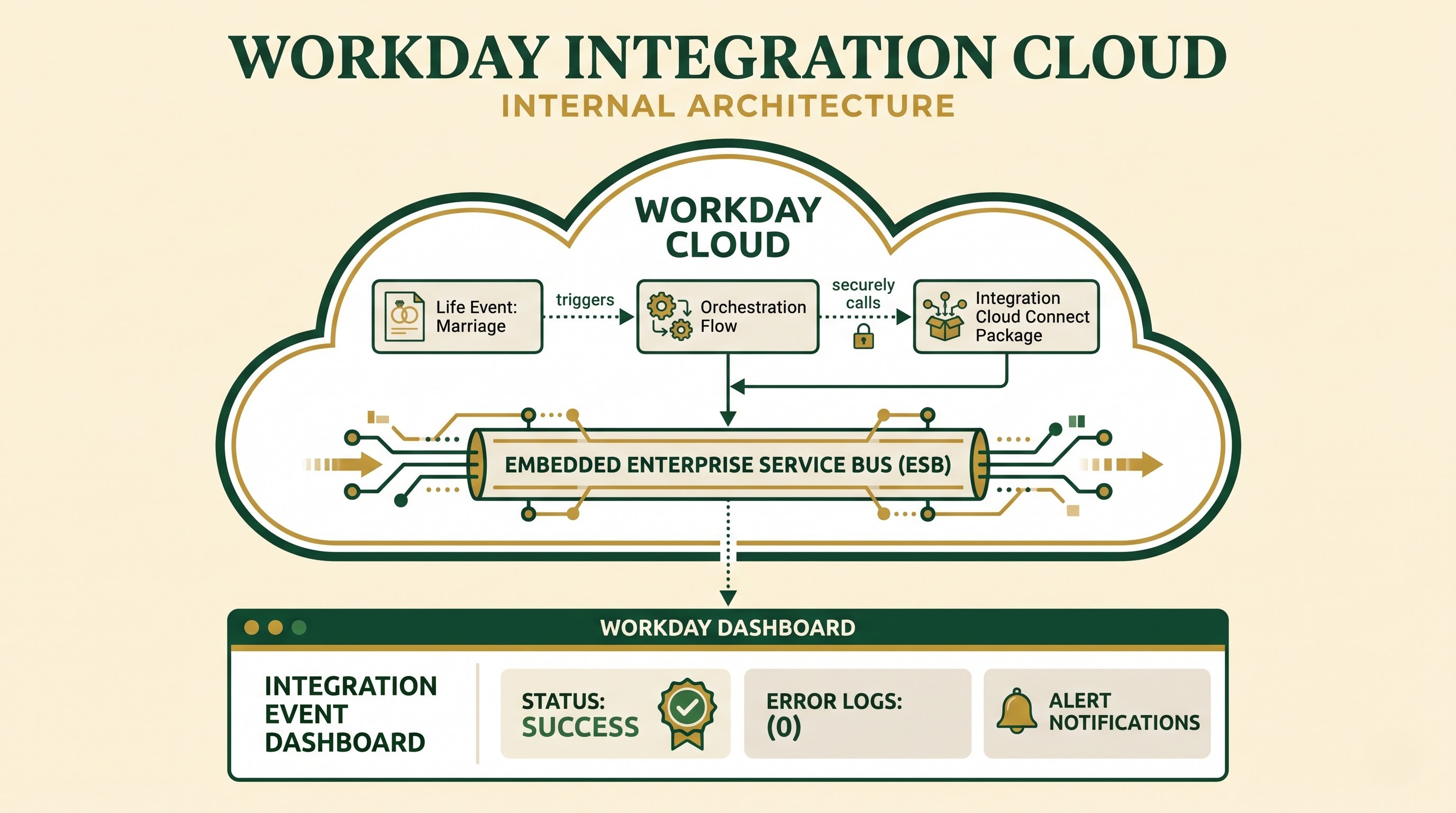
Before we can get into Workday Integration Cloud Connect, we need to first understand the overall Workday integration cloud architecture. The platform is built on top of an embedded enterprise service bus infrastructure that supports message routing, data transformation, security enforcement and error handling. Workday Integration Cloud is built into the Workday cloud environment, natively, as opposed to traditional middleware that sits outside the application boundary.
The native hosting model has some operational benefits unique to it. First, customers don’t need to buy, configure and maintain separate on-premise integration servers or third-party cloud hosting environments. Second, Workday has a role-based security model at the upper level that consolidates security. Workday HCM and Financial Management integrations are automatically assigned permissions to view, edit and launch integrations to enforce strong data governance and compliance with privacy regulations.
The second major architectural pillar is the Workday business process framework. Workday offers business process definitions you can configure to control the flow of work, approvals, and automated tasks. These business processes can include Integration Cloud Connect packages. If an employee has a life event like marriage or a birth of a child, the proper workflow can automatically trigger a Cloud Connect package to send the new dependent information to an outside benefits provider without any human interaction, for example.
The Workday user interface is familiar and all integration activities are controlled and monitored in it. Functional analysts and system administrators don’t need to dig through raw server logs or log into separate monitoring consoles. Instead, they can view integration event dashboards, monitor successful transmissions, drill down to detailed error logs, and set up automatic email notifications to alert designated personnel when an integration fails or throws a validation exception.
Workday Ecosystem Integration Tool Types
To get a better idea of where Integration Cloud Connect fits in, it’s helpful to understand how it relates to other parts of the Workday Integration Cloud tool set. Workday offers a range of integration tools to meet a variety of business needs and levels of technical complexity.
The bottom of the scale is the Enterprise Interface Builder, or EIB for short. EIB is a no-code form-based tool for functional consultants and system administrators. Users can schedule outbound reports, export data in CSV, XML or JSON, and ingest simple inbound flat files without custom code. EIB is great for simple data transfers from point A to point B with no complex conditional logic or merging of data from multiple sources.
At the other end of the spectrum is Workday Studio, an advanced integration platform for developers. It also has strong support for programming paradigms like Java, Spring integration, complex looping and branching logic, multi-source data aggregation, and complex XSLT transformations. Workday Studio offers a rich graphical development palette. Studio is for very customised enterprise requirements that cannot be handled by standard configuration templates.
Workday Integration Cloud Connect sits between simple file transfer and custom developer-built assemblies. Cloud Connect eliminates the need to create an integration from scratch using either EIB or Studio. Cloud Connect provides prebuilt, configurable integration solutions that are built for specific business domains and third party vendor relationships. Instead, Cloud Connect These solutions are usually broken down into individual Connectors and complete Cloud Connect Packages.
What are Connectors and Cloud Connect Packages?
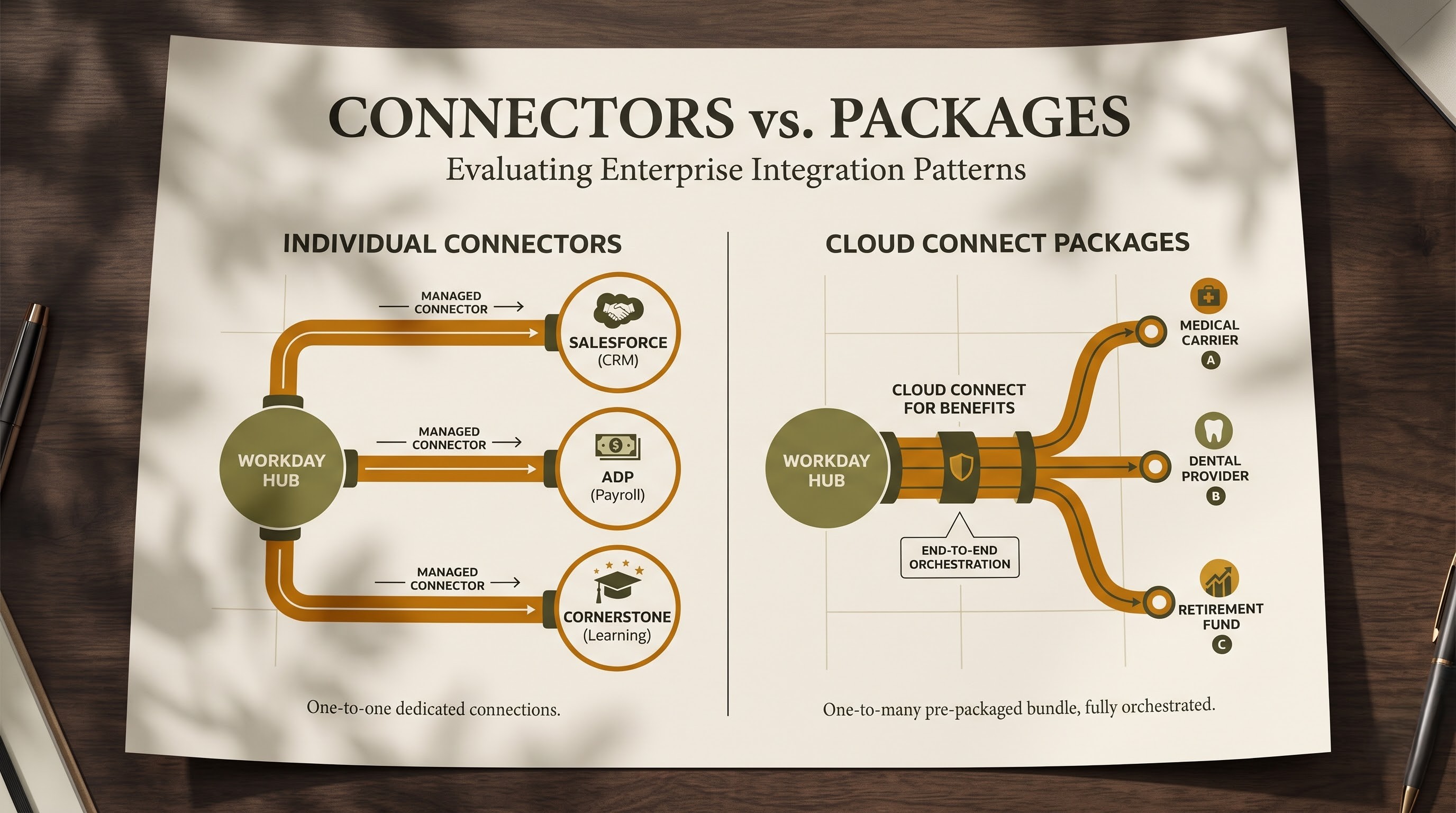
The Workday Integration Cloud Connect portfolio provides pre-built integrations to simplify common business scenarios in human resources, payroll, benefits and financial management. They are supplied as single connectors and in larger integration packages.
Each connector is intended to connect Workday with a specific external system or group of service providers. For example, there are connectors to manage expense reports, send time-tracking data, sync procurement data and integrate with third-party niche platforms. They contain pre-configured processing logic, data transformation templates and error handling routines. They are prebuilt but also highly configurable to allow for organization specific field mappings or slight variations third party system configurations.
Cloud Connect Packages take it a step further to provide end-to-end integration orchestration for complex business domains. A good example is Workday Cloud Connect for Benefits. Benefits administration is known to be very complex, with many outside carriers, non-standardized data transmission methods, and strict compliance requirements like HIPAA. Cloud Connect for Benefits gives you a single catalogue of prebuilt connections to hundreds of medical, dental, vision, retirement and insurance providers.
With Cloud Connect packages, HR administrators don’t have to learn the technical interface specs of all the insurance carriers. Workday supports standard industry electronic data interchange formats, such as ANSI ASC X12 834 files, and retains the integration logic. When an employee enrols in a plan or makes a coverage change following a life event, Cloud Connect packages the data to carrier specifications and sends it securely via encrypted channels or secure file transfer protocols. If a carrier makes a change to its data format or compliance standard, Workday updates the integration package in its regular release cycle so the customer does not have to rewrite custom code.
Lots to be gained for enterprise organisations
Workday Integration Cloud Connect helps organisations deliver transformational benefits across many dimensions, and fundamentally change the way IT and functional departments collaborate.
Quick Deployment and Time to Value
Custom integration projects can take months to finish, including requirements gathering, technical design, custom coding, unit testing and debugging. An organization can dramatically reduce the time it takes to deploy with prebuilt connectors and packages. Workday does a lot of the heavy lifting for you – defining data schemas, setting up transformation rules, standard error handling, etc. Implementation teams map their organization's specific data values to the pre-built template, which significantly reduces time-to-value.
Less Hassle maintenance Future proofing
One of the biggest hidden costs of custom integrations is ongoing maintenance. Vendors on the outside have a constant change in their file specs, API schemas and data needs. In a typical custom-coded environment, every vendor change is an emergency maintenance cycle for internal IT staff. Workday works with certified third party partners and vendors to build a joint Integration Cloud Connect roadmap. Workday will version and maintain the integration applications as vendor requirements change or Workday releases its bi-annual core application updates. This ensures compatibility and protects the enterprise from integration obsolescence.
Removal of on-premise middleware infrastructure
Workday Integration Cloud Connect is hosted 100% in the secure Workday cloud, eliminating the capital and operating cost of on-premise integration servers, middleware licenses and dedicated hosting facilities. This reduces infrastructure management overhead and generally simplifies the enterprise IT footprint.
Reallocate strategic IT resources
In many traditional organisations, highly skilled IT developers spend a lot of time writing and maintaining routine data integration scripts and file transfer utilities. This frees up valuable technical resources to be re-deployed on high-value, strategic initiatives that directly drive business growth, innovation and digital transformation – moving standardised, repeatable integration tasks to prebuilt Cloud Connect solutions.
Improved data integrity and visibility
In sensitive areas such as payroll, tax filing and employee benefits, accuracy is paramount. Integration Cloud Connect has good error reporting and validation checks. In the event of data anomalies (e.g., no national identifier for a dependent, invalid address format) the Workday interface will provide the administrators with clear, actionable error messages. This transparency enables teams to quickly identify and resolve data discrepancies before they lead to critical operational failures.
Security Governance and Compliance
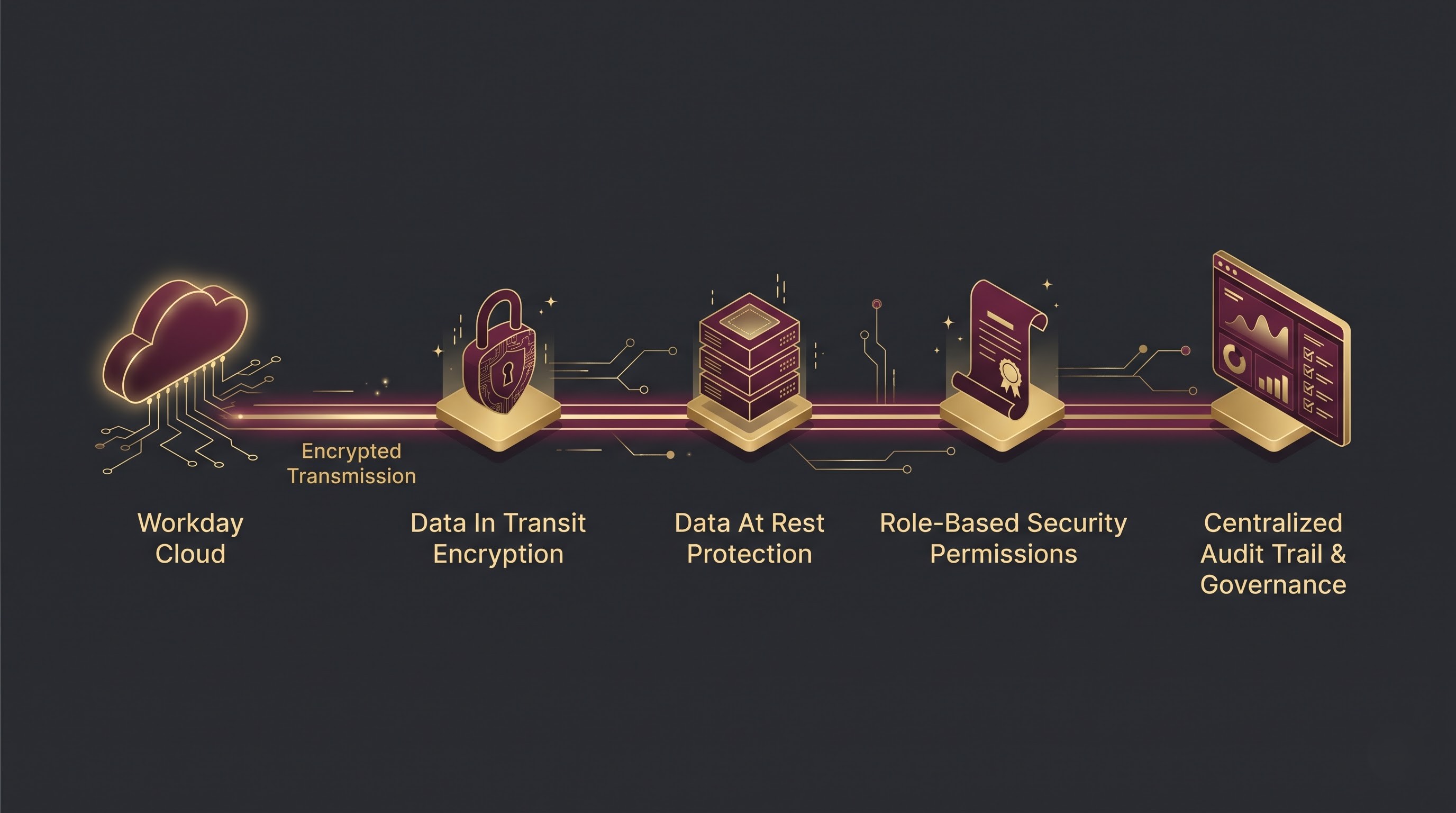
Security today can’t be an afterthought to enterprise architectures, it must be baked into the fabric of every data exchange. Workday Integration Cloud Connect makes sure the same high-level security controls that protect the entire Workday platform protect data at every point in its lifecycle.
Workday encrypts data both in transit and at rest when sending data to external third-party systems. Data transmissions use secure protocols such as Secure File Transfer Protocol, secure web service calls and encrypted API endpoints, depending on the external partner’s needs. Very fine grained role based security permissions can hide or limit sensitive data such as social security numbers, banking details and compensation figures.
Governance is also simpler. All integration definitions, schedules, and event logs are in Workday, and compliance auditors have full visibility into who kicked off an integration, when it ran, what data it touched, and if there were any errors. This single audit trail meets rigorous regulatory requirements and enables global internal compliance reviews.
Best Practices for Implementation and Management
While Workday Integration Cloud Connect simplifies enterprise integration, successful implementation depends on careful planning, adherence to best practices, and alignment between IT and business stakeholders.
Organisations pursuing an integration strategy should always start with the least complex solution and work their way up. As part of the Workday implementation methodology, administrators should first determine if a requirement can be met by a standard configuration or an EIB. If the integration is into a well-defined space such as benefits administration, standard payroll formatting or time tracking, organisations should be looking to see if there is a prebuilt connector or existing Cloud Connect package. Always choose a prebuilt connector over custom development. A prebuilt connector will provide the long term benefits of reduced maintenance from day one.
Another best practice is to test extensively in Workday’s tenant upgrade preview windows. Workday releases major updates several times a year, so implementation teams should take advantage of preview tenants to regression test all active Cloud Connect integrations. This ensures that as new platform features are released, custom mappings, notifications and downstream data consumer systems continue to work as expected.
Finally, organisations must have clear ownership models for integration management. Integration Cloud Connect removes the technical hassle of coding, but functional analysts still need to know business process configurations, data mapping rules and error resolution workflows. We train HR, finance and IT administrators on Workday integration monitoring dashboards, so they can trap minor data validation errors before they become an operational bottleneck.
Conclusion
The article on Workday Integration Cloud Connect concludes with a very good summary of how modern organisations are taking to enterprise application integration. This removes the fragile, high maintenance on-premise middleware and custom coded scripts that businesses have to deal with, while providing them with the agility of a cloud-native platform designed to bring together disparate systems. This is not just a technical change but a strategic re-alignment of enterprise architecture, operational efficiency and resource deployment.”
The secret sauce here is Workday’s set of pre-built connectors and end-to-end integration packages. These off-the-shelf solutions help enterprises automate mission-critical, highly complex business processes across human resources, payroll and benefits administration at speeds, accuracy and reliability never before seen. Instead of valuable technical talent writing and debugging mundane data transfer scripts from scratch, organisations may utilise powerful pre-engineered frameworks built to the industry norms and regulatory requirements.
And the operational benefits of running native in the cloud cannot be overemphasised. “The integration layer is hosted in the Workday cloud environment, so organisations don’t have the capital and operational expenditure of managing separate physical servers, hosting facilities and third-party middleware licences,” it says. Security is also just simpler. Strong encryption for data in transit and data at rest ensures that data crossing boundaries is fully protected. Sensitive personnel, financial and compensation records are tightly controlled and managed with fine-grained role-based security permissions. Centralised monitoring and audit trails provide compliance officers and system administrators with complete visibility into every integration event, significantly reducing administrative overhead and risk.
The conclusion also deals with another important aspect of future-proofing and ongoing maintenance. Traditional integration landscapes are full of custom code that breaks on external vendor updates and internal platform upgrades, resulting in expensive emergency maintenance cycles. Workday Integration Cloud Connect enables Workday to maintain, version and update integration applications on an ongoing basis, in step with Workday’s normal release cycle and the roadmaps of third party partners. This guarantees long-term compatibility without disruption, avoiding obsolescence in enterprise integration, and freeing up internal IT teams to focus on strategic, value-driving initiatives.
“Workday Integration Cloud Connect ultimately offers a scalable and resilient foundation as organisations continue to navigate an increasingly connected digital world.” It’s the critical link between the core human capital management records and the larger external vendor ecosystem. Integration Cloud Connect is the must-have for today’s enterprise to achieve operational excellence and sustainable development in the long term by way of data integrity, infrastructural simplicity and organisational flexibility. Those people wishing to pursue their careers by using these cloud computing technologies will benefit greatly from workday integration course on how to incorporate them in the workplace.