
Understanding Workday Staffing Models: Position Management vs. Job Management
Last updated on Jul 27, 2026
When it comes to cloud Human Capital Management (HCM) and Enterprise Resource Planning (ERP), choosing the staffing model in Workday is one of the architectural decisions that will affect an organization the most in the long run.
The migration to Workday involves more than just transferring employees' records from the old database to the cloud. When an organization decides to adopt Workday, it is setting up the basic rules for employees mobility, budget implementation, headcount approval, and security permissions through the organizational structure. There is a very important choice to make in this case: whether to use Position Management or Job Management techniques in the Supervisory Organization.
Workday has established regulations regarding staffing at the level of Supervisory Organizations. If a wrong technique is chosen, or the differences between them are not responded to, the organization may face a number of problems, such as high maintenance expenses, or serious gaps in financial control.
Understanding these structural nuances necessitates familiarity with foundational Workday tenant configuration principles. Professionals who wish to develop their skills in the field usually take a specialized workday online course with OnlineITGuru to get some practical experience in enterprise environments.
Position Management functions as a fixed position on a bus. The position operates as a stand-alone entity before anyone comes into the position. Therefore, the system gives a great advantage in assuring financial control, historical records of position ID, and the ability to create customized positions.
On the other hand, Job Management works like an open working space. There are no positions left empty; job records are created at the moment of hiring based on the positional limitations of the company. Consequently, this system is the best in terms of speed and efficiency.
Companies are not forced into a tough framework since Workday offers the opportunity to use different methods in different departments. Position Management and Job Management have to be employed according to the reliability of monetary control or operational efficiency of a department.
Understanding how the systems work, the needs of your company, and the trade-offs between them ensures your Workday design fits your business purposes.
Workday Staffing Model Defined
In Workday, each worker is affiliated with a Supervisory Organization - known as a Super Org. The workings of Supervisory Organizations is fundamental to Workday HCM since they establish who verifies whom and creates hierarchy for approvals, processes and reporting.
It is important to note that a Supervisory Organization can’t exist without a Staffing Model.
Staffing Model is responsible for creating rules regarding how jobs become open, how employees are counted, and how positions appear in the Super Org. It indicates whether a certain position already exists or has to be created after an employee is hired.
There are three major staffing models available in Workday:
Position Management
Job Management
Headcount Management (variable that is normally used in strict contract and limited volume environments)
When 95% of companies choose the right staffing model, the main question remains whether to choose Position Management or Job Management.
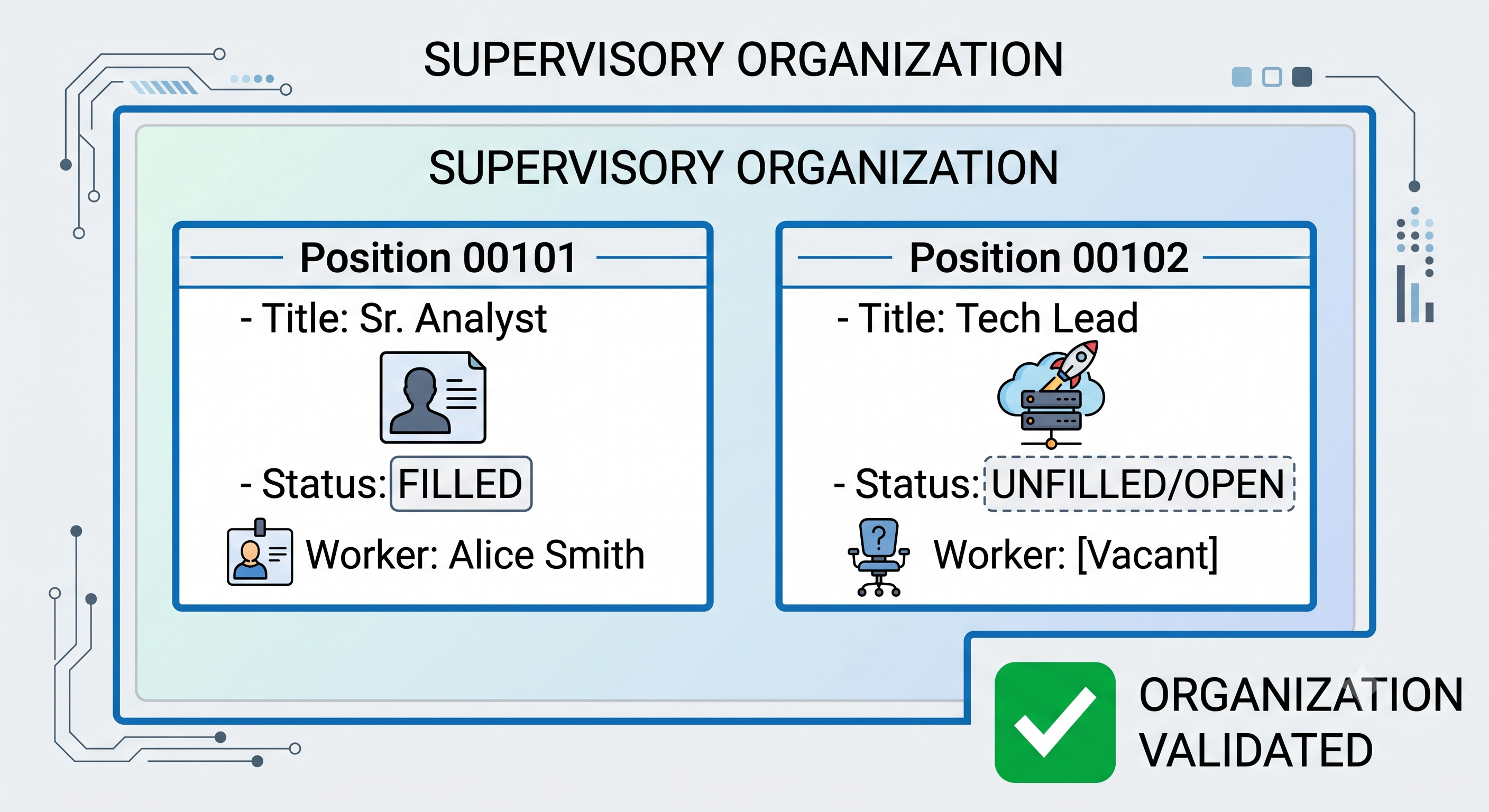
The main idea of Position Management is that it operates according to the “seat on the bus” principle.
In this case, a position exists separately from the individual worker, which makes it easy to determine the vacancy in any position. In this situation, it is important to remember that before recruiting, hiring or transferring anyone to a Supervisory Org, a particular position must be approved and created first.
It may sound like a stadium with its places marked with numbers. For example, Seat 12A remains there even if there is no person occupying it. Even if there was a person in the seat, this does not change anything about the seat.
The following are the unique characteristics of Position Management:
1-to-1 Relationship: Position Management usually implies that every open or filled position represents one worker.
Independent Lifecycle: Each position has its own lifecycle and everything starts with the creation of the position.
Seat-Level Attributes: The job title, job profile, compensation level, location of where this person works, and the type of employee are the elements connected to this position, but not with a particular human being.
Enforced Headcount Restrictions: It is not possible to bring someone on board in a supervisory role unless permission has been granted to do so.
Benefits of Position Management
Specific Budgeting Control: Those working in the finance department value Position Management as budgeting becomes effortless because every available spot in the company has been confirmed.
Extensive Position Records: When John Doe leaves Position 1042 and six months later, Jane Smith joins, Workday will keep track of the history of this position, its previous occupants, salary fluctuations, as well as any organizational changes.
Prior Approval Processes: Approval at multiple levels (Finance, HR, Department Head) can be required to be able to create a position without going through the regular recruitment process.
Selective Overrides: It is possible to ignore the standard rules of job profiles for just one case, without any influence on the rest of the people involved.
Disadvantages of Position Management
Administrative Burden: Whenever a person is hired, an associated position must also be created in the HR system. This can create a lot of work in organizations where vacancies are common (for example, retail, call center, or hospitality jobs).
Lack of Flexibility: If, during an interview, a manager encounters two excellent potential workers, but only has one vacancy to fill, they can only hire one of them and should first go through the process of opening a new position.
Job Management Explained
Basic Idea
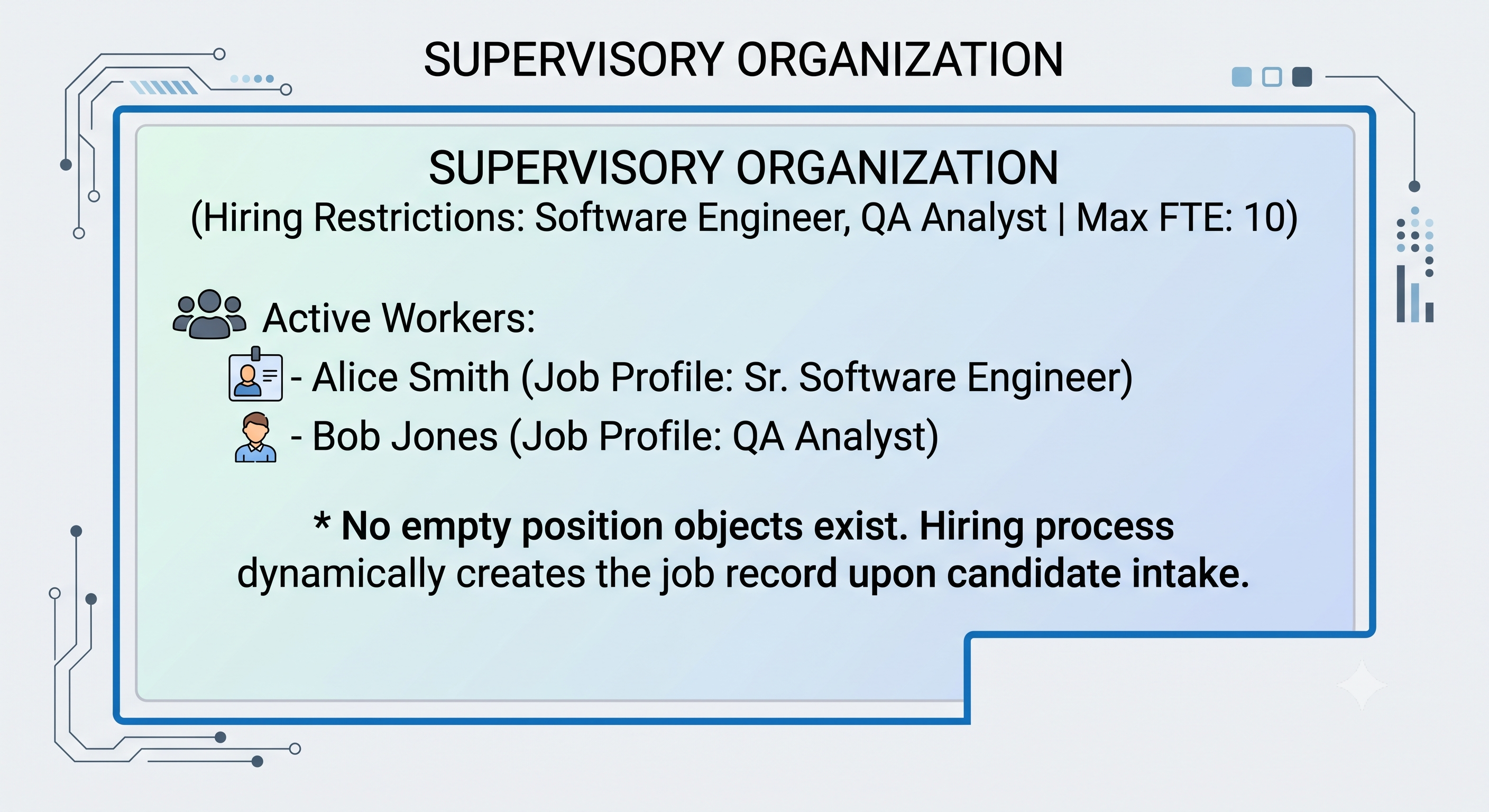
In Job Management, there are no predefined job positions. Therefore, the Supervisory Organization gets the list of job descriptions and allowed number of positions but will just have to create positions when hiring someone or transferring an employee.
This idea resembles an open dance studio where there are no chairs. When someone enters the studio, the space is made for them, and when they leave, there is no trace left.
Key Traits of Job Management
Employee-Centric Connection: The job parameters are closely related to the employee in the entity rather than the phantom ‘seat’ object.
No Vacant Position Entities: You will not find ‘Vacant Position’ in Job Management. The entity has only employee count. When an employee leaves, their job record disappears from the active organization, and the count of employees is 1 less than it was.
Company-Level Definitions: The qualifications, compensation default, and job limitations are very much managed at the Supervisory Organization level or at the universal Job Profile level.
Benefits of Job Managing
Speedy and Agile Operations: Hiring managers can act quickly: if the Supervisory Organization approves the job profile and keeps within its overall headcount, then managers need not wait for the creation of positions before hiring.
Minimal Bureaucratic Burden: HR managers do not have to account for individual position numbers: this minimizes transactional activities in an area of high volume hiring.
Perfect for Flexible Positions: Ideal for situations involving shift work, seasonal hiring, project-based contractors, or academic work where tasks change according to the person hired.
Some Cons of Job Management
Lack of Continuous Seat-Level Tracking: Job information disappears when an individual is terminated from his/her job, making it more difficult to keep track of the history of a job over multiple years (as opposed to tracking an individual person’s history).
Less Detailed Budgeting: Due to the job management model, it is more difficult to allocate exact dollar amounts to exact position numbers as well. The budget controls must be done based on supervisory organization headcount limits or validation from the external financial system instead.
Less Adaptable Exceptions: In case one person in a group requires a special job title or specific pay limit that is different from everyone else, to set this up in job management a new job profile or somebody has to be created which complicates an organization of jobs.
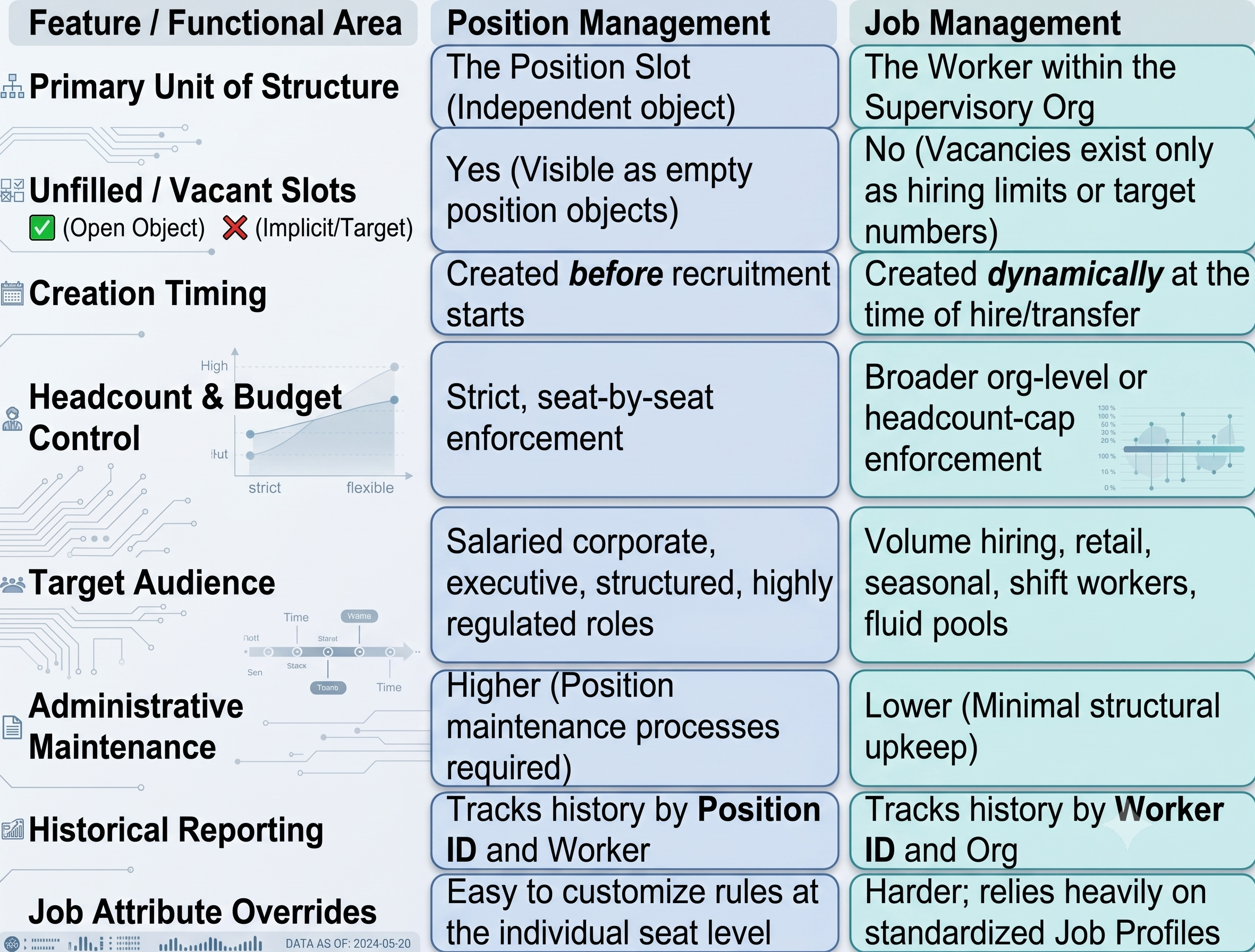
Job Management and Position Management: A Structural Overview
In order to understand how these two models of staff management function in key operational processes see the table below.
Real-World Uses of Case Studies: Choosing Between Options
Workday gives you the option of various staffing models that can be enacted across multiple entities belonging to the organization heirarchy. A single staffing model does not have to be used at all times in the international realm.
Let’s explore three enterprise cases to see how this works in practice.
Scenario A: Head Office vs Retail Shops (Retail Giant)
1. Head Office (Finance, Legal, Human Resources and Engineering):
Model Used: Position Management
Reason: At head office, roles in each category come with predetermined salary ranges, clearance for budgetary approvals and pre-set number of employees working at.
2. Store Chain:
Model Used: Job Management
Reason: With a turnover of over 40 percent yearly and peak seasons of hiring, managing positions of 50000 cashiers across 500 stores would create a paralysis in HR. All that is needed at the store level is an approval for hiring the required number of people in given “customer service jobs” with further logging of new staff as per customer traffic.
Scenario B: Hospital Systems (Clinical vs. Administrative)
3. Nurse Services:
Model Selected: Position Management
Reason: The nursing staff is governed by nurse-patient ratios as required by state safety regulations and shift budget philosophy. Positions are assigned to shifts, units (ICU vs. emergency), and specialties.
4. Per Diem Capers:
Model Selected: Job Management
Reason: The pool of healthcare workers, temporary locum tenens, or floats is highly volatile and requires speed and flexibility. Making and unmaking position objects for temporary assignments can create unnecessary problems.
Scenario C: Professional Services and Tech Startups
5. Start-Up Technology Company:
Model Selected: Position Management
Reason: Speed is important to start-ups, but fast-growing tech companies are still accountable for solid and convincing hiring plans. Position Management makes sure managers can only hire until sufficient funds are available.
Considerations for Technical Configuration and Implementation
For all HRIS Analysts, Workday consultants, and architects engaged in implementation or changes of the staffing model, it is highly important to achieve hands-on configuration experience. Have you been trying to crack this concept practically? You may attend a well-focused workday online course offered by OnlineITGuru to gain first-hand experience with Supervisory Orgs, Business Processes, and Security Domains.
1. Supervisory Organization Configuration
Staffing models are assigned at the point when a Supervisory Organization is created.
This configuration is done in the Edit Supervisory Organization task in the Staffing tab.
Inheritance rule: A child Supervisory Organization will use the staffing model of its parent only when configured to do so, which allows for various combinations of models within the organization.
Important Rule: Once active employees or completed business processes are associated with the Supervisory Organization, it becomes very difficult to make any changes to the staffing model.
This process might require dismissing employees, modifying organizational structures, or conducting complex data conversion operations. It is very important to carry out the design correctly at the beginning!
2. The Application of Business Process Rules is Influenced by the Model
The BP engine for Workday sends transactions according to the particular staffing model in place:
1. Position Management Model Workflow:
Creating a position
Amending a position restriction
Closing / freezing a position
Adding a new employee (provided an existing open position ID is linked)
2. Job Management Model Workflow:
Establishing hiring restrictions (i.e., defining which job profiles can be associated with this organization)
Adding a new employee (the job record is created in real time)
When developing BP rules, definitions, and approval paths in Workday it is necessary to check if Position Management or Job management is applicable. For instance, the rule that considers p.
Position_Is_Budgeted may not operate or be assigned a null state in the organization using Job Management.
3. Effect of the Staffing Model on Workday Recruiting
Workday Recruiting is reliant on the underlying staffing model:
In Position Management the Job requisition has to be tied to one definite Open Position. The requisition cannot be issued without an approved vacancy.
In Job Management, the Job requisition is connected directly to the Supervisory Organization, thus being subject to its total hiring restrictions and hiring limits.
4. Reporting and Security Considerations
Domain Security Strategies: It's important to ensure that your security groups (for example, HR Partner, Recruiter, Finance Partner) hold the right domain permissions for Position Administration (for Position Management) and Organization Staffing (for Job Management).
Matrix Reporting: Traditional Workday reports such as Headcount Analysis, Vacant Positions, and Position Summary hinge on the consistency of staffing model in your organization. Mixing different models across similar business divisions could drastically distort the executive dashboards based on the calculations of indicators like “Vacancy Rate,” which heavily relies on open position objects.
Decision Matrix: How to Pick the Right Model
In case one is going to conduct a Workday discovery session with business stakeholders, one can follow the given decision framework step by step to find the right staffing model for each department.
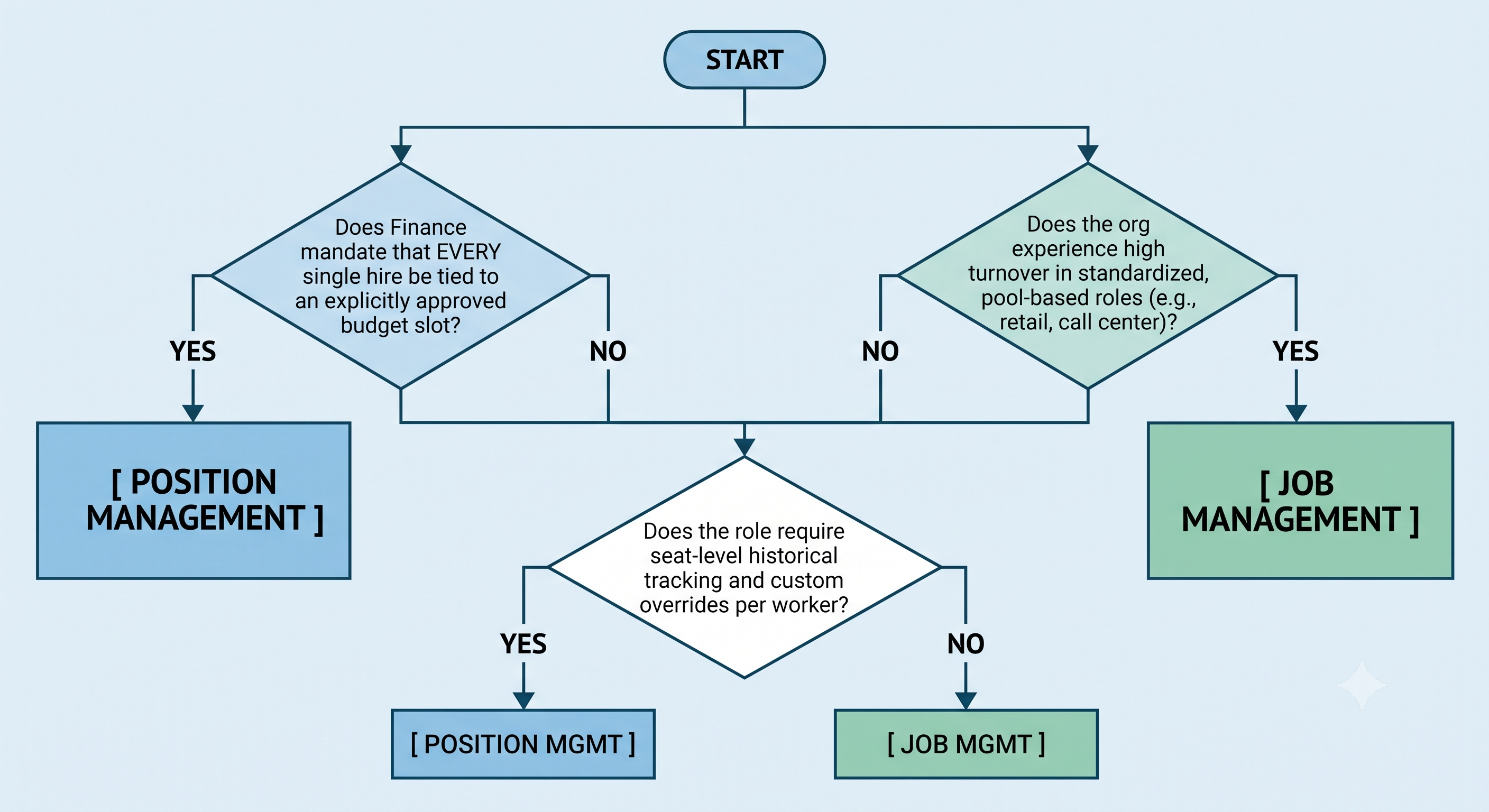
Here are 4 questions you should ask in your discovery sessions:
1. How does the Finance department have control over the payroll budget?
If Finance approves every dime spent for headcount at the seat level, then go with Position Management.
If Finance only approves departmental budgets or FTE counts in total, go with Job Management.
2. How high is the volume and velocity of hiring?
For low volume, specialized hiring, choose Position Management.
For high-volume seasonal hiring, use job management.
3. Is there a need to track vacant seats and the time of vacancy?
If yes (we check hours taken to fill against the vacant positions), choose Position Management.
If no (we only monitor if headcount is less than required), choose Job Management.
4. Do workers with the same job title need anything different regarding seat rules?
If yes (for instance, worker A speaks two languages and requires different pay, but worker B does not), select Position Management.
If no (all people with a title are subject to the same regulations), use Job Management.
The staffing model you choose determines how you monitor headcount, apply budgets, enable recruitment processes, and keep an organization’s history. Since Workday has staffing systems at the Supervisory Organization level, organizations do not have to use the same approach in every division. The real strength of Workday is the ability to create a staffing plan that fits various employees’ needs.
Position Management: Designed for Great Accuracy and Control
Position Management is based on the “seat on the bus” principle. When a position is created, it becomes an independent Workday entity well before recruiting a person for it.
Unmatched Budget Control: The finance teams can strictly control headcount and payroll expenses, as no recruitment is allowed without a predefined position.
Tailored Settings: The parameters of the position, such as the place and the pay grade, are assigned directly to it so that changes in some of the parameters do not affect the job listing.
Complete Historical Tracking: Workday collects and keeps the data about a particular position ID, including the history of all post-holders, salary changes, and reclassifications made.
Although Position Management is the best option for businesses, executive roles, and highly-regulated positions, it requires heavier administrative support to operate. Every change is difficult when you work with position data, and it’s true in fast-paced conditions.
Job Management: Built for Speed
Job Management is based on the “room in the hall” principle. We create job records when someone is hired or transferred, and don’t pre-allocate positions. This allows us to follow the organization’s headcount policies.
Speed of Operations: managers can respond quickly to staffing needs and do not have to wait for position approval.
No Administrative Maintenance: HR doesn't have to do a bunch of boring tasks to track position IDs.
Flexibility: no overheads in places where the same functions are performed by the same people.
The main drawback is that there is not enough detail to do seat level operations. When an employee leaves a company, job records are deleted, which has made it much more complex to track job-specific history and apply seat-to-seat financial variances. It is created specifically for mass hiring, retail businesses, shift employees, and seasonal workers.
A winning strategy is to use a balanced hybrid method! Workday HCM enables organizations to combine various employment models around the branches of their hierarchy.
If you want to gain a comprehensive knowledge about the configuration of these hybrid structures, an in-depth workday course online at OnlineITGuru will provide you with an understanding of the entire Workday implementation process.