
Unlock the True Value of Workday: Go Beyond Out-of-the-Box
Last updated on Oct 3, 2026
If you have ever been a part of the large-scale enterprise software implementation, you know that the tension is palpable as you cross that go-live date. The spreadsheet tracking work progress is thrown away and your project managers only half-heartedly check off the final data-cutover tasks before the main system is launched into production. For executive sponsors and leadership, the go-live date represents something of a culmination of effort. A significant milestone that perhaps is celebrated with some degree of fanfare.
For most of us, however, go-live day is just the beginning. When you take the standard out-of-the-box Workday configuration, you get a secure, compliant and centralized database that serves as the single source of truth for both HR and financial data across your enterprise. But if you stick to the defaults, you will find that your business processes are locked into a rigid framework that all too often results in multi-step, multi-approval workflows that cause excessive administrative burden and overhead. To truly unlock the value of Workday you have to think beyond the box and configure your Workday tenant into a truly optimized business process that reflects the way your business actually operates.
The Out-of-the-Box Trap
Why do many enterprise teams choose the standard set-up even after the rollout is complete? The answer often lies in the high‑pressure atmosphere that exists during the launch. During an enterprise rollout project managers are under watch to meet go‑live dates and to keep spending within strict capital budgets. To cut delivery risk, system integrators and consulting partners often tell clients to follow the standard, out‑of‑the‑box Workday Business Processes (BPs) closely as possible.
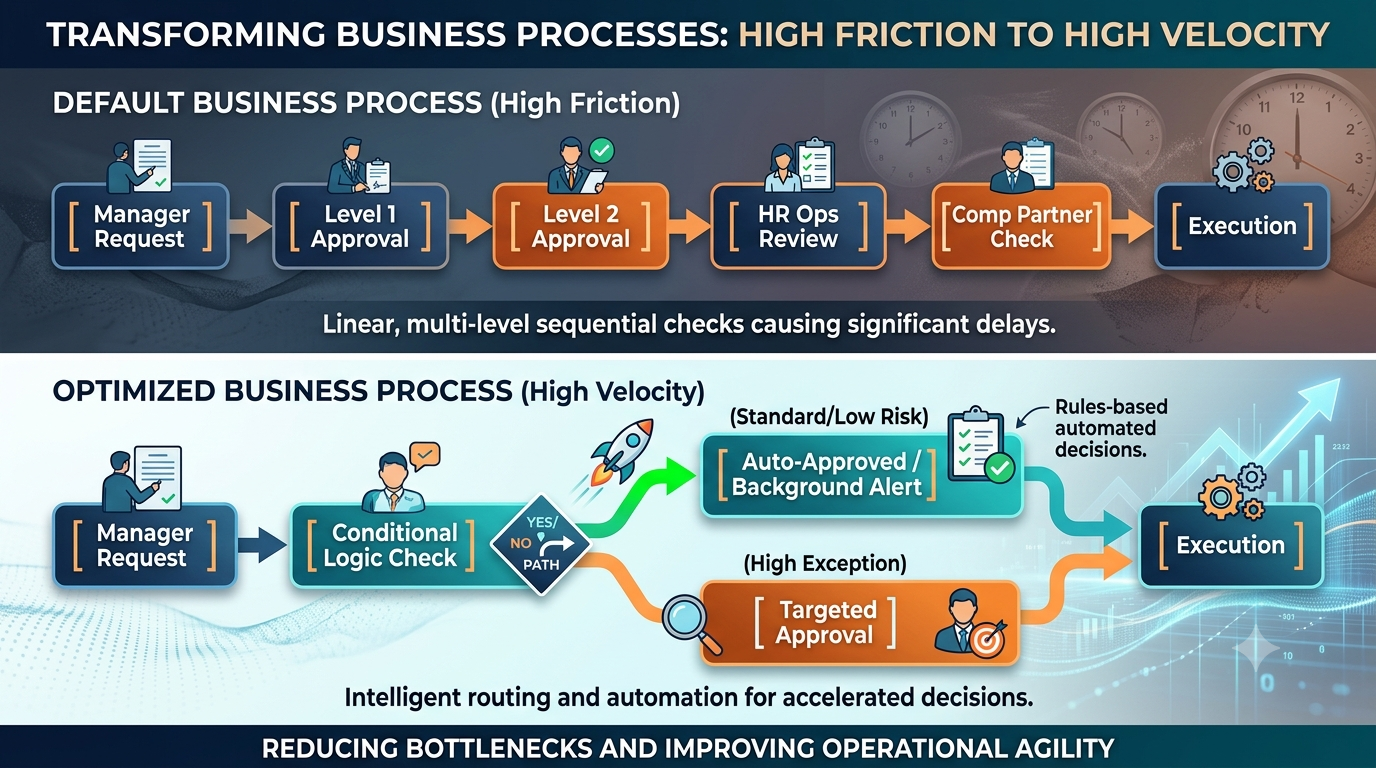
While this "vanilla" way of implementing guarantees a cutover it usually does not fit how your departments actually work together. A default business process might send a job profile change or a department move through three levels of management approval an HR operations review and a compensation partner check. In a global conglomerate with strict division of labor those multi‑tier checkpoints make sense. In a small fast‑growing mid‑market company the same workflow creates bottlenecks slows hiring and makes line managers feel stuck, in paperwork.
Default setups also work on an idea: that every person in the company uses the system the same way. In life line managers want quick easy self-service tools while HR teams need detailed data checks, records of changes and rules that follow the law. When default settings try to fit all these needs at without special rules they end up creating a system that doesn’t really work for anyone.
Making Business Processes Better
Getting real value from the platform means looking closely at the important everyday tasks your company does. Focus on the actions that happen every day: changing jobs, asking for time off, adjusting pay, giving manager reviews, and bringing new people into the company.
Looking at Approval Steps
Go through each part of your used five workflows. For each part ask a question: Does this step really help control the work or is it just a way to see what’s happening? If a manager or team leader only needs to know about something. Doesn’t need to stop it—like a move inside the same budget—change that step into a simple message in the background. Removing approval steps stops work from getting stuck in inboxes for days.
Using Smart Rules
Default processes handle every task the way no matter how big or small the risk is. By adding rules to your workflow you make the system smarter. For example simple changes like moving a worker’s location or changing their job within the team can happen automatically.. Big changes, like a pay raise that’s not planned or a new worker, without a budget go straight to top managers.
Making Screens Clearer
When a line manager opens a task to do something don’t fill the screen with fields. Keep only what’s needed. Hiding fields or using smart rules to show only what’s needed reduces mistakes lessens help requests and keeps work moving smoothly.
Building Internal Competency Beyond the Basics
To keep data safe and use rules, operators must understand how business process frameworks, security groups and tenant architecture work together. If teams set up these objects by guessing, they can create data access rules or custom reports that leave out important information. Good Workday HCM training gives platform administrators, HR business partners, and HRIS analysts a base to change settings using best practices instead of guessing. This lets internal operators adjust and test process flows without having to ask managed service partners for help.
When the internal team knows how to set custom business process security policies, conditional rule sets and calculated field mapping the organization becomes more agile. Rather than waiting weeks for a third‑party Workday partner to tweak an onboarding process or a compensation review form an up‑skilled administrator can fix forms, approval paths, and configuration logic on his own in a test environment.
Moving from Raw Data Dumps to Role-Based Analytics
A team said their new software was "data rich but insight poor" after putting a new human capital management system in place. Default reporting tools show list‑style reports that just dump data into spreadsheet‑like charts. This makes analysis hard because managers and HR directors must spend hours each month sorting and matching exported data in spreadsheet programs before giving reports to executives. Moving from list‑style reports to an approach turns data points into useful actions for people, at every level of the organization.
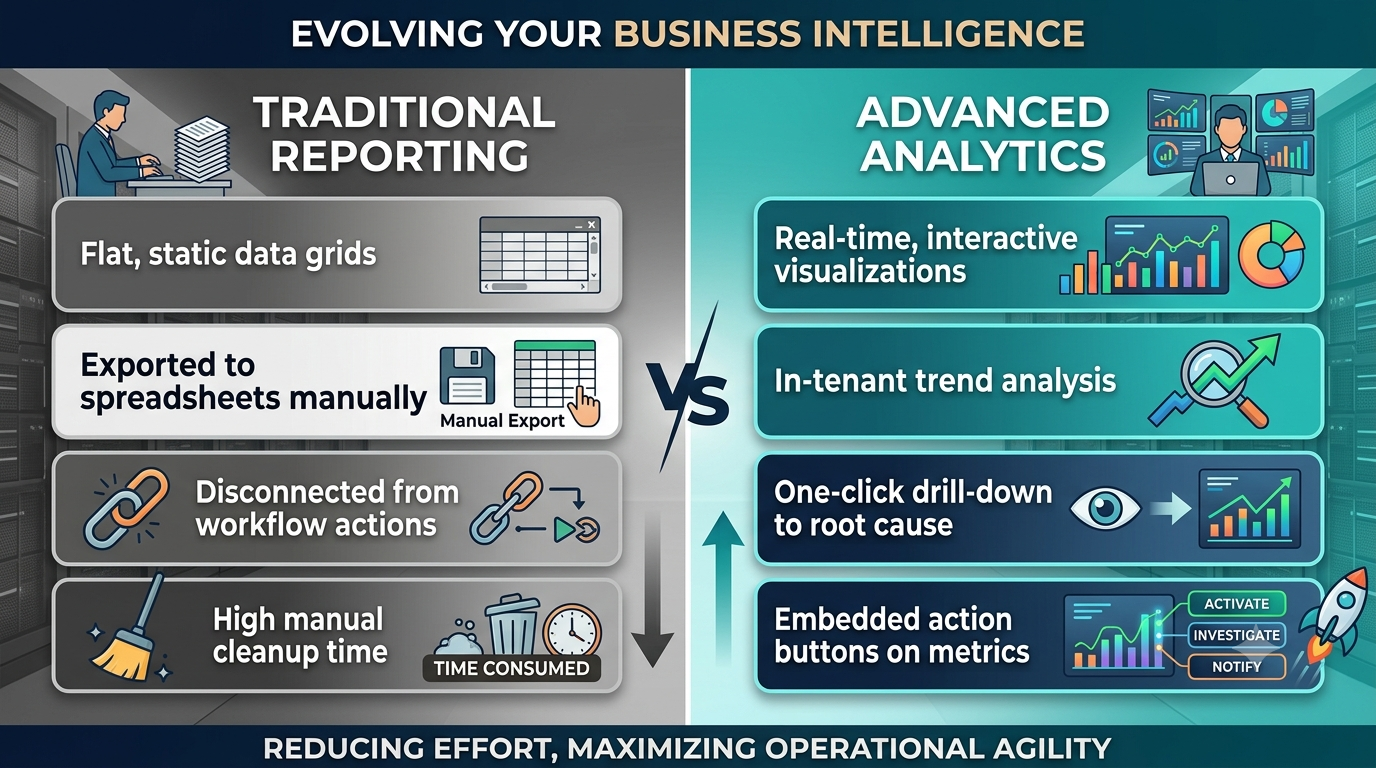
Tailored Role-Based Dashboards: Don’t use the landing page for everyone in the company. Build dashboards that are built around the real work people do every day. Each group gets a view that fits their job.
Executive Dashboard: This shows big-picture views like turnover trends total workforce cost how headcount is growing compared to plans and the span of control across the organization.
Line Manager Dashboard: This focuses on day-to-day tasks. Pending approvals team leave plans, performance reviews that need to be finished and open job requests. It keeps managers on top of what’s happening with their teams.
HR Business Partner Dashboard: This brings together live data on things like retention risks pay equity, how many new hires finish onboarding and exit survey results. It helps identify what’s working. What’s not in talent management.
Capitalizing on Calculated Fields
Use custom calculated fields to bring your organization’s rules into the application. When you automate things like tenure groups weighted pay ratios or turnover costs in reports you don’t need to move data out to spreadsheets or other tools. This keeps everything up to date in one place.
Deploying Dynamic Matrix Reports
Stop using tables. Switch to matrix reports. These let leaders explore data across layers. No need to write new queries each time. For example an executive sees an attrition number then clicks into a region then dives into a division and instantly sees department-level details. They can see the reasons behind the trends. Fast and, without extra steps.
Upskilling Your Team for Continuous Tenant Agility
Enterprise software optimization is not a onetime effort completed after launch – it is an ongoing process requiring continuous improvement. When the enterprise grows and operates in new geographies or buys and sells subsidiaries, the software tenant needs to be adapted to reflect the new business reality. To stay fully functional and efficient, the platform needs to evolve in lockstep with the enterprise’s development.
Therefore, enrolling the core functional leaders in the comprehensive workday hcm course ensures that the internal stakeholders are always prepared to adapt the system, take advantage of the biannual innovations, and design the software’s development strategy. A workforce that has received proper education can shift the relationship with the platform from responsive to proactive. Biannual Release Management: instead of being surprised by new functions and waiting for the vendor to instruct the enterprise what to do, an educated team can research the updates, test them in the sandboxes, and document the changes that will improve the business processes.
Tenant Governance: continuous learning allows the admins to keep audit trails of security group modifications, perform regular security assessments, retire obsolete business processes, delete unnecessary reports, and maintain the data governance quality across all modules. Cross‑module Configuration Strategy: understanding the fundamentals of data management enables the team to implement new modules such as Advanced Compensation, Talent Optimization, or Workforce Planning with the confidence that all data will be properly integrated and processed.
Driving True User Adoption Across the Enterprise
A properly configured system is only as good as the users who interact with it – and if the workers cannot intuitively understand how to use the application, they tend to avoid using it or make critical mistakes. When end-users report that a particular functionality is too difficult to use or underutilized, it indicates that the adoption framework was insufficient. To maximize user adoption while minimizing the support overhead, the enterprise should develop and implement the comprehensive adoption framework across the organization.
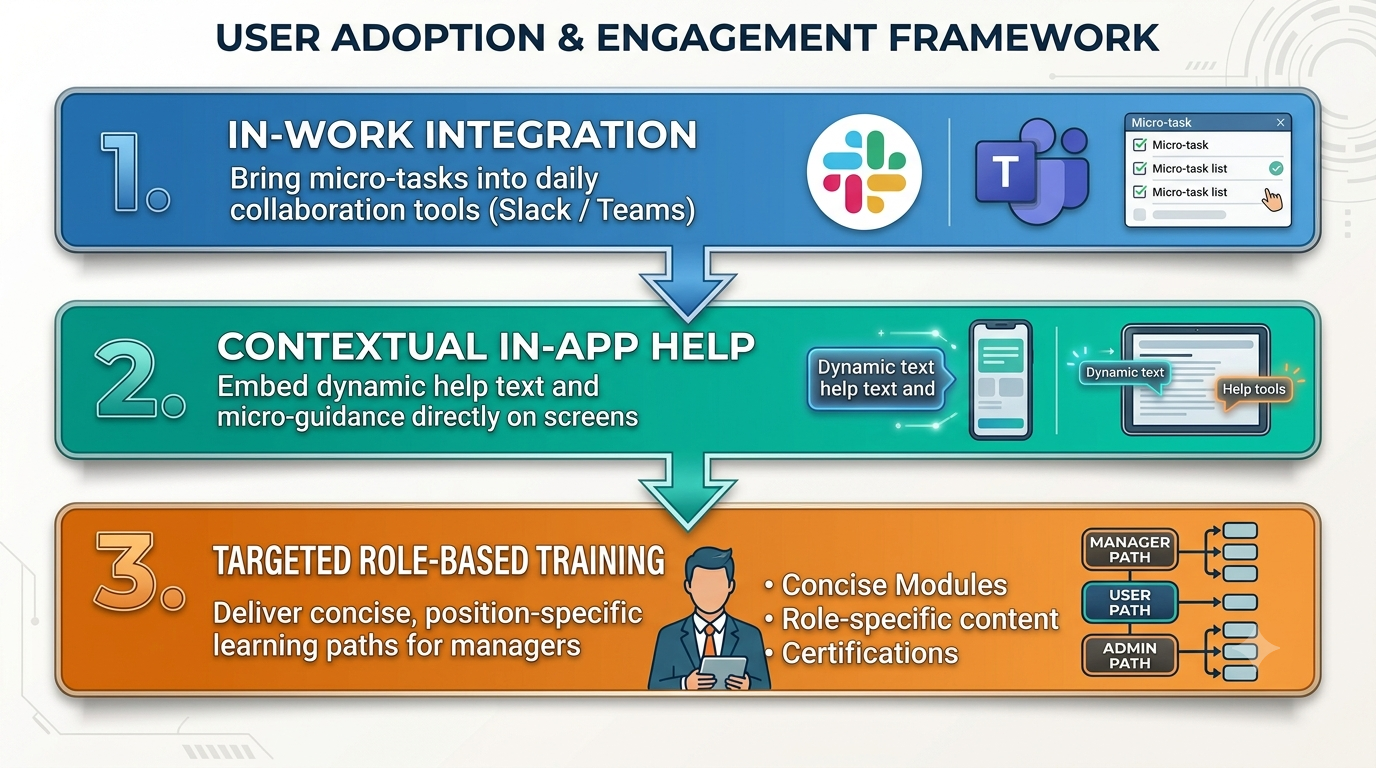
Proposing to Bring Micro Tasks Into Everyday Collaboration Tools
Nowadays, most of a manager’s time is spent working within tools such as Slack or Microsoft Teams. Opening an external platform, logging in, and searching for the relevant module in order to approve a two-day leave request is a resource-intensive endeavor for a manager to make. By providing the possibility to perform daily work-related tasks within the same collaborative space as one’s colleagues, one ensures swift and convenient approvals and uninterrupted work. This alleviates potential issues stemming from the inability to use a familiar interface when one is attempting to complete a task.
Contextual Information and Guidance
While theoretical documents and PDF guides are useful references, they often remain unopened and unread. By embedding the possibility to receive the necessary information and guidance within the application, one provides the user with a convenient option to complete their task. For instance, when a manager needs to fill out or edit a particular section, embedded notes and guidelines will assist them in the process and reduce the possibility of errors greatly.
Manager-Centric Learning Resources
When developing learning and training resources, the developers should keep the target audience in mind. In other words, the resources should be designed primarily for line managers rather than executives or administrative personnel.
It is vitally important to structure the information in accordance with the tasks which the managers are expected to perform. For example, when introducing the concept of the requisition life-cycle to the target audience, the managerial staff should be able to understand how to use requisitions, edit or view the pipeline, and utilize the fastest method for making headcount requests. Similarly, the managers need to be informed of the intricacies of team compensation reviews. The managers should be certain of the fundamentals of bonuses, compensation methods, and the simplest way to request a review of compensation. When learning performance enablement techniques, the managers need to know how to have performance conversations, set goals, and complete an appraisal. Finally, when learning to use operational absence tracking, the managers need to be informed of the simplest ways to review time off requests and the means of keeping track of the staff’s time off within the tool to avoid overspending the allocated quotas.
Strategic Action Plan: From Default Tenant to Optimized Asset
Transitioning an enterprise tenant from a standard, high-friction setup to a streamlined operational tool requires an organized execution plan. Rather than attempting a massive overhaul all at once, follow a phased implementation schedule.
Phase 1: Discovery & Audit (Objective: Identify the Greatest Number of Underperforming Processes)
Look at the 10 business processes in terms of how many transactions they handle. The goal is to find where the delays are happening. Check how long it takes for each department to approve things. The goal is to find where the hold points are often. Also look at the support tickets to see what problems happen again and again and what forms are involved. After this step the person should have a list of the processes that have the hold points or delays.
Phase 2: Workflow Refinement (Objective: Reduce the Number of Necessary Approvals)
Try to reduce how many approvals are needed for low-risk transactions. Use automated tools where it makes sense and get rid of approval steps that only tell a manager about a transaction that is coming up. Also make it so that managers do not see fields that do not need their input. The expected result is transactions and fewer support tickets from managers.
Phase 3: Analytics Evolution (Objective: Transition from Simple Data Exports to Building Customized Dashboards)
Stop exporting data for analysis. Instead build dashboards for executives and the managers who need the information. Make these into reports with tools for analyzing workforce data. Add metrics and use the software’s own calculations to do the analysis inside the software. The result should be analysis without having to do long tasks in Excel.
Phase 4: Enablement & Adoption (Objective: Ensure Internal End-User Agility)
Help internal users be more flexible by training the people who manage the software so they understand how it works. Help regular users get used to the platform by putting parts of it into the tools they already use every day. Create learning tracks, for managers so they can use their understanding of the software. The result should be people using the software to its full ability and more work getting done faster.
Moving From Maintenance to Strategic Advantage
Thinking of enterprise management software, as a one-time project that ends on the go- day is a mistake. That kind of thinking leads to frustration, endless workarounds and unhappy users. The companies that get the most out of their enterprise software understand that the application tenant is not a tool. It is a living system that needs attention. It needs improvement, streamlining and strategic upgrades to support real business results.
By conducting process audits, cutting out redundant approval steps, turning dull Excel reports into clear and useful dashboards, and investing in targeted workday hr training to help internal teams build stronger skills, you can turn a basic corporate system into a dynamic and responsive ecosystem. This transformation allows your managers to act faster and smarter, directly improving overall business performance.