
What is Red Hat OpenShift? From Core Architecture to Production Deployment
Last updated on Jun 30, 2026
There is a paradigm shift that is occurring within the contemporary world of enterprise software. Monolithic architecture and the conventional provisioning methods involving virtual machines are increasingly giving way to microservices and containerization. This change is a result of the coming up of Kubernetes. The fact is that Kubernetes is known to be the de facto industry standard for container orchestration. However, although Kubernetes provides highly flexible building blocks for infrastructure management, running Kubernetes clusters within enterprise security environments is no small feat.
For this reason, Red Hat has come up with a comprehensive Kubernetes platform known as OpenShift that caters to all application lifecycle management needs. OpenShift deals with everything from cluster management, implementation of security policies and integration of development environments to CI/CD and dynamic scaling.
The objective of the current article is to provide a thorough review of Red Hat OpenShift and will be beneficial to everyone that has enterprise skills like the openshift training online or DO280 Red Hat OpenShift Administration course.
1. Introduction to Enterprise Containers and Orchestration
Before considering all the nuances of Red Hat OpenShift, it will be useful to get acquainted with the technological stack of OpenShift: containers, container images, and Kubernetes.
The Container Revolution
Historically, the isolation of applications was performed by means of hypervisor hardware virtualization (Virtual Machines). The drawback of Virtual Machines is that each of them requires full installation of guest operating systems with full virtual memory management and device drivers, which results in a significant overhead.
In order to overcome the problem of large overhead, containers provide virtualization on the OS (not hardware) level. Several container runtimes are isolated and use the same host operating system kernel. Utilizing various Linux kernel facilities such as cgroups (Control Groups) for setting up resource restrictions and Namespaces for process isolation allows running applications in isolated processes.
The Role of Kubernetes
While container runtimes independently (for example, Docker or Podman) are good for local or single application deployments, coordinating hundreds or even thousands of interactions of different containers deployed on the distributed bare-metal or cloud servers would be impossible manually. That’s why Kubernetes (or K8s) has been developed.
Kubernetes performs the following functions:
Service Discovery and Load Balancing: connecting containers to the network and balancing traffic among several copies.
Storage Orchestration: mounting various storage solutions (local, cloud, network-attached).
Rollout and Rollbacks: deploying new versions of the app with zero-downtime by gradually introducing changes and monitoring their effects on the system's work.
Self-Healing: finding and restarting failed containers in the cluster.
Why Red Hat OpenShift?
While Kubernetes is a very capable and highly flexible engine, Red Hat OpenShift is the fully-fledged and luxurious car built on top of it. The upstream Kubernetes is purposefully designed as minimalistic software; it is expected from its users to obtain and integrate third-party services like plugins for networking and ingress control, identity provider systems, image registry solutions, security contexts, and logging frameworks.
The integration challenges are solved by Red Hat OpenShift with its pre-integrated solution. It brings together the upstream Kubernetes with enterprise-oriented configurations, convenient web UI, improved command line utility (oc), security baselines, and container registry services.
2. Red Hat OpenShift Architectural Framework and Cluster Administration
In order to effectively manage the OpenShift platform, one needs to understand the architecture, components, and management interfaces of OpenShift.
Centralized Control Plane and Worker Nodes
The OpenShift cluster can generally be divided into two main components: Centralized Control Plane (previously master nodes) and Worker Nodes.
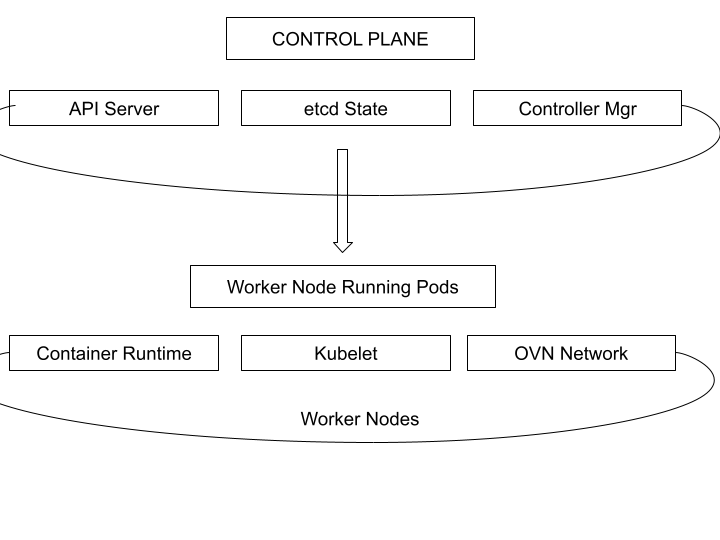
Control Plane: Brain of the cluster that is responsible for maintaining desired state, scheduling of workloads, and management of cluster wide configuration.
API Server: It is the most critical component of OpenShift Architecture where all the administrative, user activities, and internal node communications occur.
Etcd: It is a high-available and distributed key-value store that holds the configuration and status of the whole cluster.
Controller Manager & Scheduler: This acts as a brain and logic that takes into account the cluster's status, matches workload resource request to available resources in the cluster worker nodes and replicates the same.
Worker nodes: These host all the application containers.
Kubelet: This is an agent that runs on every node and ensures that containers are according to the configuration files.
CRI-O (Container Runtime): It is light and secure application which contain open-source runtime that fly on openshift.
Cluster observability: Logs, Events, Metrics, Cluster Health.
To verify the status of your OpenShift cluster, you will have to verify the three main elements of telemetry.
Logs: It is a kind of logging that involves the collection of standard output and errors from containers and OS logs from nodes running the containers. Logs can be viewed via direct examination using oc logs or Dashboard.
Events & Alerts: The Kubernetes framework sends state changes in the form of Events (node restarts, container pull failures, etc.). OpenShift provides an out-of-the-box solution for alerts using the powerful Prometheus + Alertmanager setup for specific alerts if memory quotas, storage limits, or control planes become critical to performance.
Metrics: Usage statistics on the amount of CPU cores used, memory usage limits, network throughput, and storage IOPS are collected live.
3. Basic Objects and Applications Deployment Procedures
Deployment of enterprise software onto OpenShift requires orchestration of architectural entities that govern container demarcations, networking routes, and continuous integration.
Basic Primitives of Resources: Pods, ReplicaSets, and Deployments
Basic primitives used in workload orchestration consist of three tightly coupled resources:
Pods: The most basic unit for deploying applications in Kubernetes. A Pod holds one or several containers that operate in the same network namespace, have the same IP address and loopback interface, and can share storage volumes.
ReplicaSets: Invisible controllers responsible for maintaining a certain number of copies of identical Pods on the cluster's worker nodes.
Deployments/DeploymentConfigs: High-level objects responsible for managing the declarative declarations of software changes. Deployments control the scaling policies of ReplicaSets, define the strategy of rollouts (e.g., rolling or recreating), and maintain the complete history of deployments to be used for rollback procedures.
Namespaces and OpenShift Projects
Kubernetes uses namespaces as means to segregate clusters into multi-tenancy environments in a logical way. OpenShift employs a mechanism that builds on namespaces known as Projects.
Projects provide self-service request capabilities, metadata attributes, templates, and robust access control capabilities. Projects may be created independently by developers if they satisfy cluster quotas and thereby isolate their microservices, secrets, and routing attributes from other developers on the same hardware infrastructure.
Multi-Channel Application Deployment
OpenShift provides several means of application deployment, meeting different engineering requirements:
Resource manifests: Straightforward use of YAML/JSON documents describing the Pod configuration, environment configuration, and volume claims.
Container images: Direct mention of an already built image in some external registry (for example, Quay.io Docker Hub) or in the internal OpenShift registry.
OpenShift templates: JSON/YAML configuration templates which combine several different resources (like frontend deployment, database backend deployment, and corresponding network configurations) into one reusable entity.
Helm charts: Use of the CNCF-standard Kubernetes packaging system Helm to deploy catalogs of applications.
Being able to effectively navigate through these channels of deployments is an important practical aspect taught during professional openshift training online, allowing teams to choose a proper strategy for their particular deployment environment.
Uncovering Applications: Services and Routes
Containers, by their very design, are temporary, being brought up and destroyed repeatedly with totally new IP addresses. To ensure reliable connection paths, OpenShift uses a layered network routing structure:
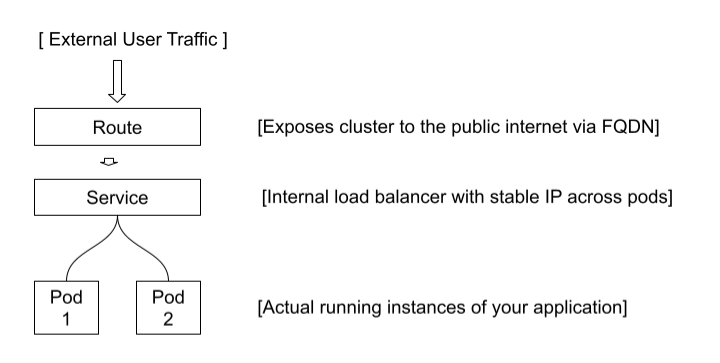
Services: An internal cluster concept which serves as a load-balanced network endpoint for some Pods, defined via labels and selectors.
Routes: A cluster resource specific to OpenShift, which exposes a service available internally by giving it a global Fully Qualified Domain Name (FQDN). This resource provides both standard HTTP functionality as well as advanced cryptographic configuration of TLS termination such as Edge, Passthrough, and Re-encrypt options.
4. Complex Networks and Security in Clusters
With increasing sizes of enterprises' container infrastructures, the need for workload isolation and secure communication between edge-traffic becomes crucial.
Software-Defined Networking (SDN) and OVN-Kubernetes
In OpenShift, software-defined networking (SDN) is implemented using OVN-Kubernetes (open virtual network). The SDN creates a secure virtual mesh in the overlay network between all nodes within the cluster. It assigns each node its own non-routable private subnet, allowing pods to communicate from one physical machine to another with reduced latency and without external interference.
TLS routing for securing the connections in and out
All connections which make sure the accessibility to sensitive applications inside the organization need to be secured using encryption. There are following TLS routing profiles in OpenShift:
Edge termination: Here, the TLS certificates are terminated at the routers of the OpenShift cluster. The router decrypts the TLS packets first and then forwards the messages to the service pod using regular HTTP communication on the secure internal SDN network.
Passthrough termination: In this case, router does not decrypt the TLS packets but sends the encrypted messages directly to the application pod where they are decrypted using certificates provided by them.
Re-Encrypt Termination: A combination approach in which the external router terminates the public TLS certificate and inspects the content and then encrypts it again using an internal TLS certificate.
5. Storage architecture & stateful applications
Even though microservices are normally developed to be stateless, there is a need for reliable frameworks to manage stateful applications such as transactional databases, distributed caches, and durable file systems.
The Ecosystem of Kubernetes Storage Primitive Layer
OpenShift abstracts the lower level hardware storage layers into a standardized primitive layer which comprises three layers: Persistent Volumes (PV), Persistent Volume Claims (PVC), and Storage Classes. Since dynamic storage provisioning always poses a challenge for new engineers, an effective openshift training course that focuses on cloud and lifecycle of PV/PVC would be extremely useful:
Persistent Volumes (PV): Cluster-wide low-level resources that are provisioned by infrastructure personnel and map to underlying physical storage backends (for instance, AWS EBS, Azure Disk, VMware vSphere volumes, or local NVMe storage).
Persistent Volume Claims (PVC): Developer's claim for the storage. It defines storage size needs (for example, 50Gi) and access modes without being aware about the underlying hardware.
Storage Classes: Profiles defined by administrators that provide Dynamic Provisioning. Whenever the developer sends a PVC against a Storage Class, the underlying volume is provisioned on the fly.
Volume Access Modes Description
The Red Hat OpenShift approach for allocating storage volumes has been built with the use of three different volume access modes designed for particular application read-write patterns:
ReadWriteOnce (RWO): This access mode lets a persistent volume to be attached and read-written by a single cluster node at once. It is the default mode for relational databases like PostgreSQL and MySQL due to the data consistency issues which do not allow several write paths from different hosts.
ReadOnlyMany (ROX): This type of volume access lets several distributed nodes mount a volume simultaneously, but only in read-only mode. This mode of volume allocation is perfect for deploying static website content, application packages or common configuration files that will be used by several pods simultaneously without changes.
ReadWriteMany (RWX): This access mode allows concurrent read-write access to a volume from several cluster nodes simultaneously. The RWX mode is often used to deploy stateful distributed cluster architectures like CMS or network file servers.
Config Map: Secrets and ConfigMaps
In order to be portable between different development, testing, and production environments, applications need externalized configuration files, connection strings, and licenses. OpenShift splits these into two kinds of resources:
ConfigMaps: Holds non-sensitive operational data such as environment variables, properties files, or feature flags in clear text format.
Secrets: Securely holds extremely sensitive data such as API tokens, database passwords, and even private SSH keys. The OpenShift cluster will automatically encrypt the Secret in the etcd store and mount it in memory within pods that are granted permission, ensuring no sensitive data is written on physical storage media or stored in container image logs.
6. Application Reliability, Resilience, and Lifecycle Management
Ensuring high availability of enterprise services demands automatic health monitoring and intelligent image tracking.
Resilience Through Probes and Health Verification
OpenShift constantly tests the health status of applications through three specific types of automation probes:
Startup Probe: Tests the legacy application that takes a long time to launch and determines whether it has completed the initialization process. No other health checks are performed until this particular probe succeeds.
Liveness Probe: Constantly tests the health state of the application container. If the liveness probe fails because of a deadlock or exception, the container is terminated by Kubelet, and the automatic restart process begins.
Readiness Probe: Checks if the pod is ready to receive network requests. The failure of the readiness probe results in removing the pod from the load balancer pool of its related service to prevent users from having broken links and server errors.
Dynamic Resource Management: Quotas & LimitRanges
When an application is not optimized, it will create a memory leak and utilize all resources on a host node, thus starvating other processes on the same node. OpenShift ensures stability of the cluster through resource management constraints:
Resource Quotas: Limitations for clusters in particular projects, setting a maximum amount of pods, services, CPU and memory usage of a certain project.
LimitRanges: Limitations of resource requests and limits for containers in particular projects.
Horizontal Scaling Automated
In OpenShift, Horizontal Scaling can be automated through a mechanism referred to as Horizontal Pod Autoscaler (HPA). The HPA achieves automated horizontal scaling using the telemetry data generated in real-time by the metrics engine. It automatically scales pods to increase or reduce replicas depending on the threshold settings. For instance, the HPA scales pods to ensure that the average CPU usage remains at 70%.
Image Management: Making Image Updates Easy Using ImageStreams
OpenShift has introduced an abstraction layer called ImageStream that sits on top of the conventional container registry. An ImageStream does not host the binary of the images but rather tracks image tags, digest, and other metadata references.
Whenever there is an update of any container image tag hosted in the registry, the ImageStream identifies the change and creates internal events. This helps to automatically deploy the applications in different environments.
Authentication, Authorization, and Identity Management
Running a multi-tenant enterprise cluster involves strong security, proper authentication, and permission management.
Using OpenShift's Identity Providers
The OpenShift system comes with its own OAuth server, which works with numerous proprietary and open-source identity providers. One can easily connect a cluster login process to their existing identity providers, such as:
HTPasswd: The basic file-based flat authentication systems used mainly for testing and initial setup.
LDAP/Active Directory: Direct integration of account registration/user’s data with corporate directories.
OAuth2/OpenID Connect (OIDC): Using existing web authentication schemes like Keycloak, Okta, or Google Workspace in order to provide Single Sign-On (SSO) across the whole organization.
RBAC systems
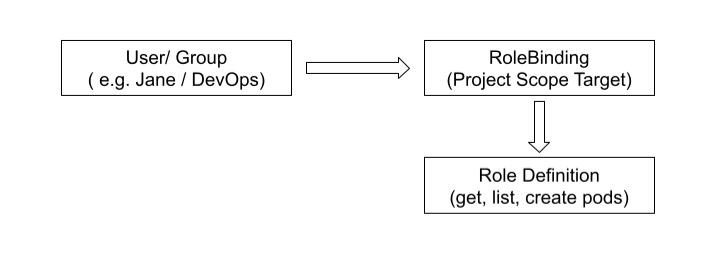
After authentication of the user, the OpenShift system determines whether the user has the appropriate permissions within the system following the principle of Role Based Access Control (RBAC) which relates to three major entities:
Roles / Cluster Roles: Rules, which comprise a set of actions (verbs like get, list, create, delete) that are allowed for specific cluster resources (nouns like pods, services, routes). The roles are created only for specific projects but Cluster Roles can be applied to the whole cluster.
Role Binding / Cluster Binding: Objects that bind some Role or Cluster Role with the authenticated User or ServiceAccount
Container level Authorization: Security Context Constraints (SCC)
Although RBAC controls actions of the user in relation to OpenShift API, Security Context Constraints (SCC) control real capabilities of containers. SCCs are security policies that determine whether the container should:
Run with the privileged root user or run in isolation using a random UID range.
Gain access to the network ports, filesystem directories, or PID spaces of the host node.
Use dangerous host volumes inside the container runtime environment.
OpenShift adopts a secure by default approach by using the restricted SCC so that the containers run with least privilege and do not harm the infrastructure when a vulnerability in the software is discovered.
8. Extensibility through OpenShift Operators
Infrastructure states like distributed stateful database systems, monitoring pipelines, or network plugins are a hard-to-manage task. OpenShift makes this entire process easier by using Operators.
Understanding the Operator Pattern
The Operator Pattern uses custom resource definitions and control loops to implement it. The operator uses human knowledge like backup, patching, and upgrading processes to write it into the software code running on the cluster.
This operator constantly compares the actual state of the system to the desired one and performs actions required to correct any mismatched states. The process of learning how to design, implement, and manage customized operators is normally taught in open shift training courses intended for more experienced DevOps architects.
Operator Lifecycle Manager (OLM)
The OpenShift distribution offers the Operator Lifecycle Manager (OLM) component which acts as the enterprise application store for adding functionalities to the clusters. Using the OperatorHub interface, system administrators can easily view, deploy, and manage the ecosystem of Red Hat, certified third party, and community operators like MetalLB or Multus using just one click.
9. Conclusion: Adopting the Future of Enterprise Hybrid Cloud
Red Hat OpenShift offers an enterprise-grade orchestration platform which hides the inherent complexity of Kubernetes. With the help of integrated CI/CD pipelines, automated scaling, robust security architecture and management interface, OpenShift helps businesses to reduce software delivery time while ensuring resilience and solid security posture.
As businesses today move toward hybrid cloud strategies, OpenShift emerges as a common plane of operations for their IT infrastructure regardless of the platform used – be it bare-metal enterprise servers, virtualized private data centers, or large-scale public clouds. To be able to master the openshift online training technologies is to be able to spearhead the digital transformation initiatives within an enterprise. If you wish to gain practical industry experience, there is nothing better than joining a structured openshift training course.